



What small law firms should evaluate before choosing a tool
Before comparing products, it helps to get clear on what “affordable” actually means for your firm. A lower monthly subscription can still become expensive if core databases, stronger citation tools, or workflow features are locked behind another tier.
A few questions matter more than the marketing copy:
- Does the tool cover the federal and state case law your practice relies on?
- Are statutes included, and if so, at what depth?
- Is citation treatment built in, or only available on higher plans?
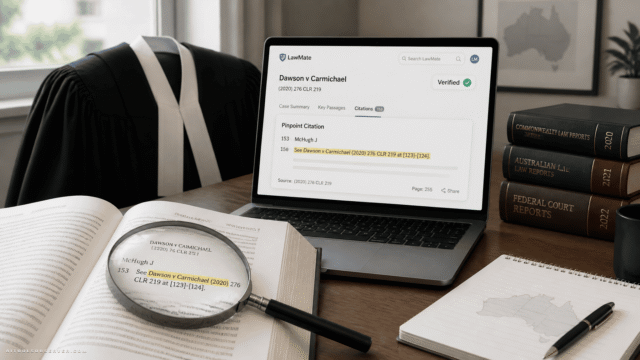
- Can you trace AI output back to source material quickly?
- Will lawyers spend more time verifying than they save researching?
- How does the vendor handle confidential firm and client information?
This is especially important if your firm already has some level of research access through a bar association. In some cases, a complimentary legal research benefit may cover enough of your day-to-day work that adding a separate AI subscription only makes sense for speed, summaries, or specific citation workflows.
The 4 affordable AI legal research tools worth comparing
Based on the available context, these four products stand out because they are positioned as stand-alone legal research options for solo and small-firm lawyers with published pricing at $100 or less per user per month:
- Descrybe
- Midpage
- Cases
- CaseSearch
They all focus on AI-assisted legal research, but they differ in pricing, research depth, and how they approach citation review.
Descrybe
Descrybe is positioned as an AI legal research platform for U.S. case law and other primary legal authorities using natural-language search. Its feature set includes case summaries, legal issue analysis, and an AI citator called Cytator, which looks at how courts have treated legal authorities.
The pricing structure is one of its biggest strengths. At $50 per user per month for the full research platform, and $25 per user per month for the Legal Engine alone, it gives smaller firms a relatively low-cost way to test AI-assisted research without stepping into triple-digit subscriptions.
Where Descrybe looks strongest
Descrybe appears especially interesting for firms that want affordability first and are comfortable building a lightweight stack. The lower-cost Legal Engine option may appeal to lawyers already using assistants like ChatGPT or Claude and wanting legal research support alongside them.
That said, this setup also creates a practical tradeoff. If you need separate subscriptions to those assistants, your total monthly cost may be higher than the entry-level legal research price suggests.
Best fit
Descrybe is likely a fit for:
- Solo lawyers watching spend closely
- Small firms that want a lower-cost AI research layer
- Teams that value summaries and issue analysis
- Lawyers already working with external AI assistants
Midpage
Midpage is priced at the top of this affordable category, with monthly pricing at $100 per user or $80 per user with annual billing. In exchange, it appears to offer a broader AI research experience, including federal and state case law, statutes, agentic research capabilities, and an AI citator.
The agentic angle matters. Instead of just returning search results from plain-language prompts, the platform is described as investigating legal questions across multiple sources, which may be appealing for lawyers handling more layered research tasks.
Where Midpage looks strongest
Midpage seems better suited to firms that want a more active AI research assistant rather than a simpler search-and-summary tool. It is also available as a plugin for Claude, ChatGPT, and Perplexity, which may fit firms already experimenting with AI-first workflows.
The tradeoff is obvious: price. Even though it still falls into the “affordable” bucket compared with large-firm tools, it is meaningfully more expensive than the lowest-cost options in this group.
Best fit
Midpage may be a strong option for:
- Firms that want agentic legal research
- Practices handling more complex research questions
- Lawyers who want statute and case law coverage in one place
- Teams already using Claude, ChatGPT, or Perplexity in daily work
Cases
Cases is one of the most budget-friendly products in this comparison, starting at $24 per user per month or $288 annually. It is designed for solo practitioners and small firms and focuses on federal and state case law search using plain-English questions.
Search results include relevant judicial decisions, summaries of holdings, and citations to underlying opinions. Higher-tier plans add research history and good-law flags, which help identify decisions that should be reverified.
Where Cases looks strongest
Cases stands out on price and simplicity. For firms that mainly want an easier way to search case law and get quick summaries without paying for a larger research environment, it may be a practical entry point.
But there is an important limitation to keep in mind. Some of the stronger verification features appear to sit on higher-tier plans, so firms should confirm what is actually included at the advertised starting price before treating it as a true apples-to-apples comparison.
Best fit
Cases may work well for:
- Solo lawyers with narrow budgets
- Small firms focused mainly on case law research
- Lawyers who want plain-English search without a lot of extra layers
- Firms testing AI legal research for the first time
CaseSearch
CaseSearch sits in the middle of this group on monthly pricing at $49 per user, with a lower annual-billing price of $24 per user per month. It supports natural-language search across federal and state case law and helps users locate relevant statutory authorities.
It also includes case summaries, citations, and treatment checks to help evaluate whether a decision remains good law. That combination makes it look like a balanced option for firms that want more than basic search but do not want to jump immediately to the highest-priced tool here.
Where CaseSearch looks strongest
CaseSearch appears to offer a practical middle ground. It combines relatively accessible pricing with treatment checks and statute-related support, which may matter for firms that need more than case retrieval.
The annual price is also notable. If a firm is comfortable committing upfront, it may narrow the gap between a lightweight entry-level tool and a more full-featured research product.
Best fit
CaseSearch may be a fit for:
- Small firms that want balanced pricing and functionality
- Lawyers who need both case law and statutory authority support
- Practices that care about treatment checks but want to stay under stricter budget limits
- Firms willing to use annual billing to reduce cost
Which tool is the cheapest?
If you are looking only at entry pricing, Cases and Descrybe sit at the low end.
But cheap and affordable are not always the same thing. A tool with a lower sticker price can become less affordable if you need to upgrade for citation features, add external AI subscriptions, or work around coverage gaps with another research platform.
That is why small firms should compare total working cost, not just advertised monthly price.
Citation checks matter more than AI summaries
One of the easiest mistakes in this category is overvaluing fast summaries and undervaluing verification. AI can make research feel faster very quickly. The harder question is whether the tool helps you confirm the answer just as quickly.
For most firms, these features deserve extra weight:
- Citators or treatment analysis
- Good-law indicators or reverification flags
- Clear links to source opinions
- Easy access to the underlying authority
- Visibility into where the answer came from
If the platform gives you polished text but makes source checking awkward, the time savings may disappear.
Choose Descrybe if cost flexibility is your top priority
Descrybe makes the most sense if you want a lower-cost path into AI legal research and like the idea of pairing a legal engine with existing AI assistants. It is a practical option for firms that want to experiment without committing to the highest subscription cost in this category.
Choose Midpage if you want the most ambitious AI workflow
Midpage is likely the better fit if your firm wants a more advanced AI research experience, especially if agentic research is appealing. It may justify the higher cost for firms that do heavier legal research and want broader assistance across sources.
Choose Cases if you want the simplest low-cost entry point
Cases is attractive for solo lawyers and smaller firms that need affordable plain-English case law search first and foremost. Just confirm whether the specific verification features you need are included in the plan you are actually considering.
Choose CaseSearch if you want a balanced middle option
CaseSearch looks well positioned for firms that want useful legal research features without stretching to the top of the affordable range. It may be the easiest compromise between monthly cost and day-to-day usefulness.
Security and confidentiality should be part of the buying decision
Price and features are only half the evaluation. Law firms also need to understand how a provider handles confidential information.
When reviewing any AI legal research product, ask about:
- Data storage practices
- Access controls
- Security measures
- Backup frequency
- Whether uploaded data is used to train models
- What protections exist for confidential client information
This is not an optional checklist. It is part of choosing technology responsibly in a law practice.
A practical shortlisting framework
If you want to narrow this category quickly, use a simple scoring approach. Rank each tool from 1 to 5 on these factors:
- Coverage for your jurisdictions
- Statutes included
- Citation or treatment reliability
- Source transparency
- Ease of verification
- Monthly cost
- Annual cost
- Workflow fit for your team
- Data handling comfort level
That exercise usually makes the decision clearer than a feature-by-feature spec sheet.
The bottom line
For small law firms in 2026, the good news is simple: affordable AI legal research is no longer a one-option category. Descrybe, Midpage, Cases, and CaseSearch each offer a different balance of price, research depth, and verification support.
The smartest move is not to chase the tool with the flashiest AI layer. It is to choose the one that covers your jurisdictions, makes citation checking easy, fits your existing workflow, and keeps your total cost low enough that the time savings are actually real.






Comments (0) No comments yet
Want to join this discussion? Login or Register.
No comments yet. Be the first to share your thoughts!