What Is Code Converter?
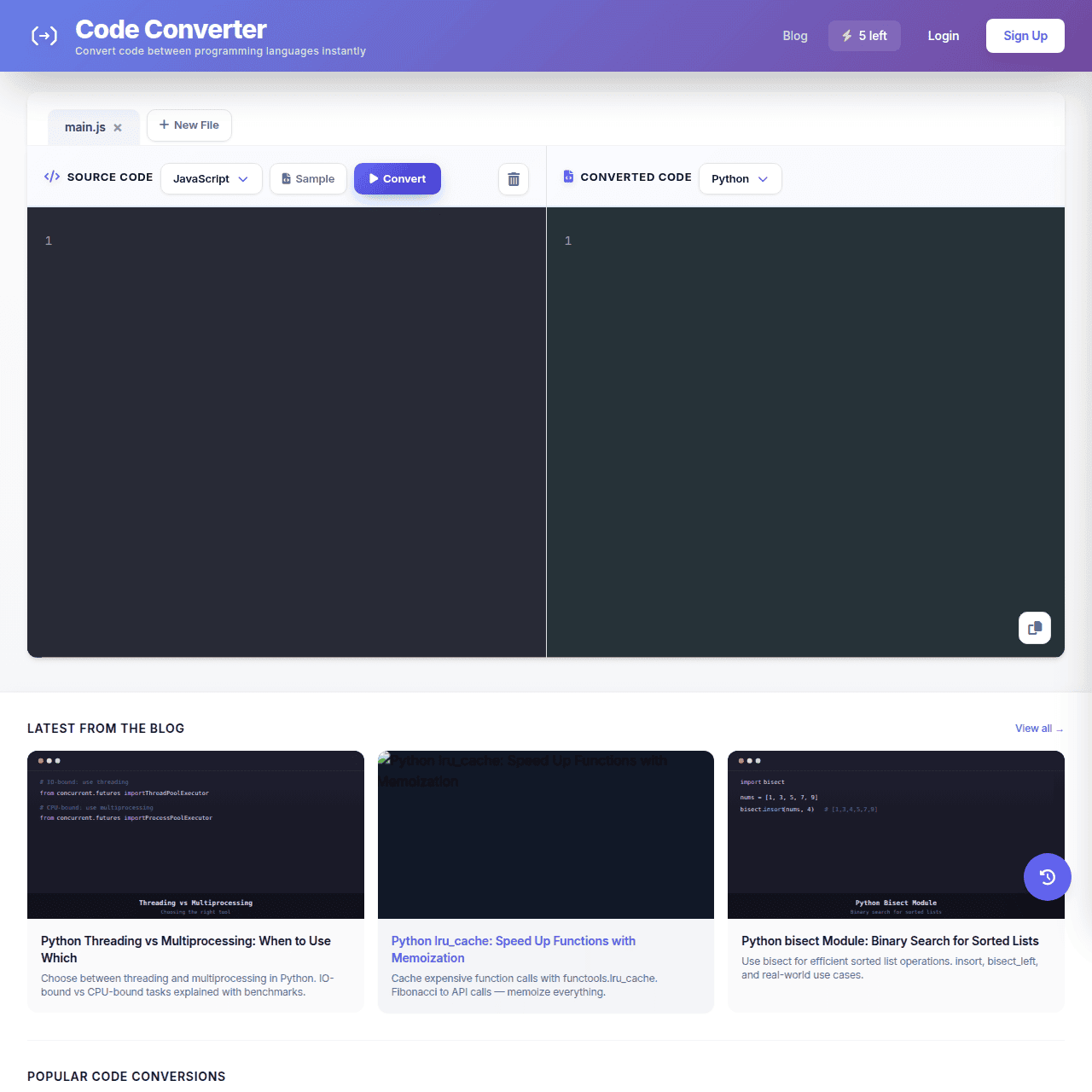
Code Converter is a web-based AI code translation platform that converts source code between 20+ programming languages in seconds. Developers simply paste or write code, select the source and target languages, and generate translated code in a side-by-side editor with syntax highlighting. It supports popular language pairs such as JavaScript to Python, Java to Kotlin, and C++ to C, helping teams work across stacks more easily.
Features like conversion history and copy-to-clipboard streamline everyday workflows for both learning and production tasks. A built-in blog and guides offer best practices for code conversion, algorithms, concurrency, and language-specific topics. With a generous free tier and a low-cost Pro plan, Code Converter makes multi-language development and project migration more accessible.
Quick Snapshot
Code Converter removes the manual effort of rewriting code when switching languages, helping developers move faster with fewer bugs. Its AI-powered translations, history, and multi-language support make it ideal for learning, migrations, and rapid cross-language prototyping.
- Works on
-
- Web
- Pricing Model
- Freemium
Starting at $4.99/month — Code Converter uses a freemium model, with a Free plan offering up to 5 conversions per day and 20+ supported languages. The Pro plan starts at $4.99/month and unlocks unlimited conversions, advanced model selection, and a larger context window, with a 7-day free trial. - Fits on
- Affiliate Program
- We could not identify an affiliate program.
- API Availability
- We could not identify whether an API is available.
- Key Features
-
- Translate code across 20+ programming languages
- Side-by-side AI conversion with syntax highlighting
- Freemium plans with unlimited Pro conversions
- Audience
-
- developers
- software engineers
- students
- bootcamp learners
- startups
- engineering teams
- data scientists
Screenshot

Key Features of Code Converter
AI code translation
Automatically converts source code between 20+ programming languages while aiming to preserve the original logic and structure.
Side-by-side editor
Displays source and translated code next to each other so developers can easily compare, review, and adjust the output.
Syntax highlighting
Highlights syntax for both source and target languages to improve readability and reduce mistakes during review.
Conversion history
Stores previous conversions so you can revisit and reuse translated snippets without repeating the same steps.
Copy to clipboard
Lets you copy converted code with a single click, streamlining integration into your editor or codebase.
Educational content
Includes a blog and guides covering best practices for code conversion, concurrency, algorithms, and language-specific topics.
Freemium access
Offers a free tier with daily conversions and a low-cost Pro plan with unlimited conversions, advanced models, and a larger context window.
Use Cases for Code Converter
Cross-language migration
Quickly translate existing codebases from one language to another, reducing manual rewriting effort and lowering the risk of introducing bugs during migrations.
Learning new languages
Compare familiar source code against AI-generated translations side by side to understand syntax and idioms in a new programming language faster.
Rapid prototyping
Draft logic once and convert it into multiple languages to test ideas across different stacks or frameworks without starting from scratch each time.
Polyglot team support
Help teams working across JavaScript, Python, Java, C++, and more quickly share logic in their preferred languages, improving collaboration and code reuse.
Code refactoring assistance
Use AI-powered translation between closely related languages like Java and Kotlin to modernize or refactor code while preserving core logic and structure.
Frequently Asked Questions
What is Code Converter and how does it work?
Code Converter is an AI-powered web tool that translates source code between 20+ programming languages. You paste your code, select source and target languages, and the platform generates an equivalent version in the target language while preserving logic and structure.
Which programming languages does Code Converter support?
Code Converter supports 20+ languages, including popular pairs like JavaScript to Python, Java to Kotlin, and C++ to C. The full list is available directly on the platform.
Is Code Converter free to use?
Yes, Code Converter has a Free plan that includes up to 5 conversions per day, support for 20+ languages, conversion history, syntax highlighting, and copy to clipboard.
What do I get with the Pro plan?
The Pro plan, starting at $4.99/month, offers unlimited conversions per day, advanced model selection, and a larger context window, plus a 7-day free trial to test the full experience.
Does Code Converter have an API?
No, Code Converter does not currently offer an API and is designed primarily as a web-based code translation tool.
Is Code Converter suitable for production code?
Code Converter can significantly speed up translation for production code, but as with any AI-generated output, developers should review, test, and adjust the converted code before deploying.
Can Code Converter help me learn a new programming language?
Yes, by viewing original and translated code side by side with syntax highlighting, you can see how familiar patterns map to a new language, making it a helpful learning aid.
Code Converter · Our Verdict
Code Converter delivers a focused, practical solution for developers who frequently move between languages or support polyglot codebases. Its side-by-side editor, syntax highlighting, and history make AI-powered translation feel approachable for both learning and production use, especially given the low-cost Pro plan and accessible free tier.
Code Converter ·
-
 Freemium
 Base44
AI-powered base for building apps, fast
No-Code AI App Builders - Subscription
Bemi
Automatic, secure audit trails for PostgreSQL.
Regulatory Compliance Monitoring - Subscription
Aikido Security
Continuous, developer-first security for everything you build
Risk Assessment - Subscription
Nativeline
Describe your app once, launch native Swift everywhere.
No-Code AI App Builders - Subscription
Bezi
AI copilot built for real Unity games.
AI Developer Tools - Your Ad Here
- Subscription
Workbench
Remote desktop for AI agents and headless Macs
AI Developer Tools - Freemium
Carepatron
Beautiful, AI-powered practice management for clinicians
Healthcare AI