
What Is Lensa AI: Photo Editor?
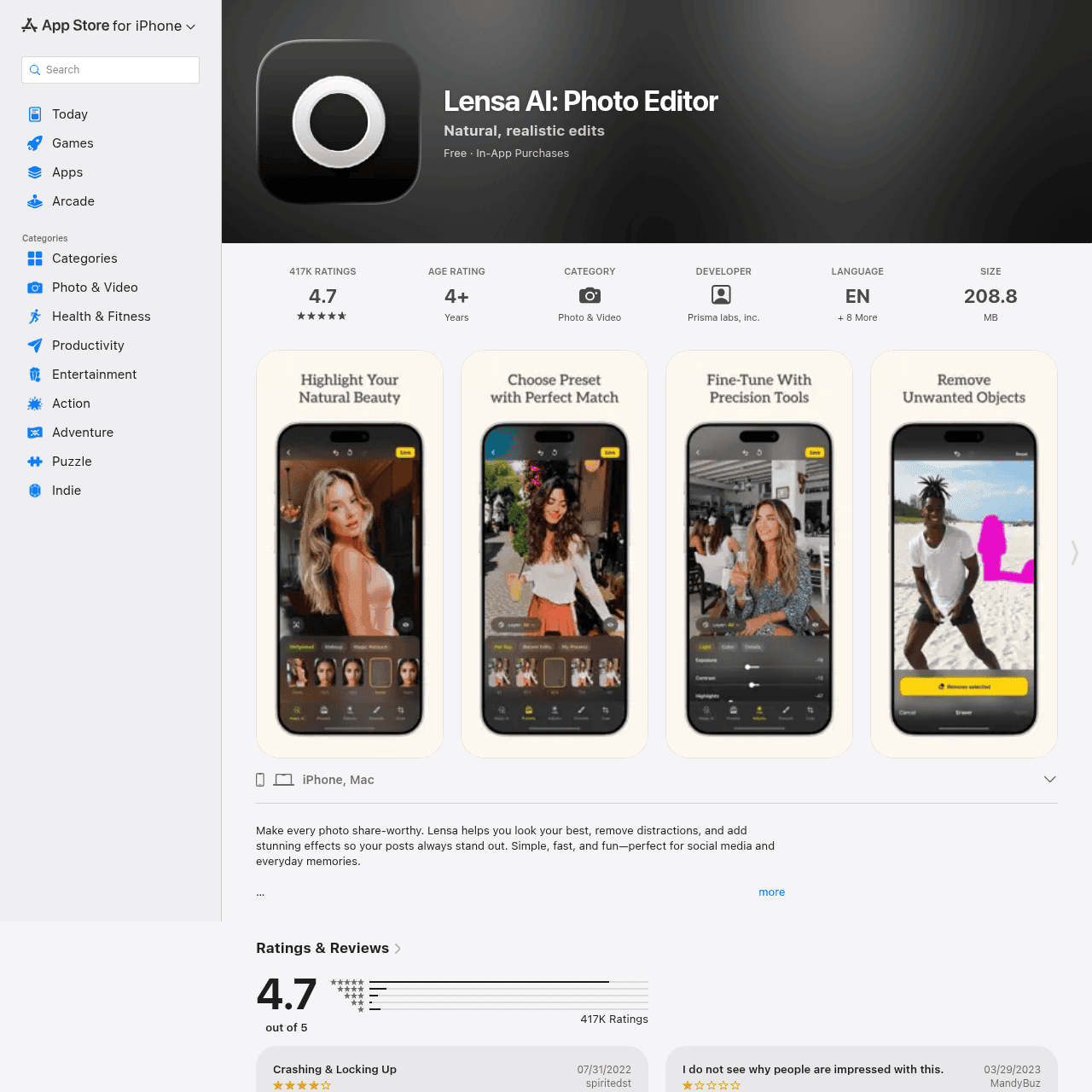
Lensa AI: Photo Editor is a mobile photo and video editing app that uses AI to make everyday shots look polished and share‑worthy. It focuses on highlighting natural beauty with well-matched presets and intuitive portrait enhancement tools. Users can fine‑tune details or let the app handle adjustments automatically, from lighting and color to subtle retouching. Lensa also removes unwanted objects and distractions from the background so the main subject stands out.
Designed for both casual users and content creators, it delivers quick, professional‑style results for selfies, social posts, and everyday memories. The app is available on iPhone and Mac with a freemium model and optional in‑app purchases.
Quick Snapshot
Lensa AI lets you create professional-looking portraits in seconds with smart presets, precise retouching tools, and powerful object removal on mobile. You get natural, share‑ready images without needing advanced editing skills.
- Works on
-
- iOS
- Mac
- Pricing Model
- Freemium — Lensa AI follows a freemium model: the app is free to download and use with optional in‑app purchases for additional features or content. Exact pricing details are not specified.
- Affiliate Program
- We could not identify an affiliate program.
- API Availability
- We could not identify whether an API is available.
- Key Features
-
- Enhance portraits with AI-powered adjustments
- Remove background distractions in one app
- Create share‑ready photos in seconds
- Audience
-
- content creators
- social media users
- influencers
- photography enthusiasts
- casual smartphone photographers
- small business owners
Screenshot

Key Features of Lensa AI: Photo Editor
AI portrait enhancement
Automatically improves portraits by highlighting natural beauty with smart adjustments to skin, lighting, and overall look.
Smart presets
Offers well-matched, ready-made presets so users can apply a complete, polished look to photos in a single tap.
Object and distraction removal
Removes unwanted objects and background distractions so the main subject stands out clearly in the frame.
Precision editing tools
Provides fine‑tuning controls for details like color, contrast, and other adjustments for users who want more control.
Photo and video support
Works with both photos and videos, enabling consistent visual style across static posts and short-form clips.
Mobile and Mac availability
Available on iPhone and Mac, giving users flexibility to edit on the go or from their desktop environment.
Use Cases for Lensa AI: Photo Editor
Social media portraits
Quickly enhance selfies and portraits with natural-looking presets and retouching so your profile photos and feeds look consistently polished.
Creator content
Streamline editing for Reels, Stories, and thumbnails with AI-driven enhancements and distraction removal, saving time on every post.
Brand and product shots
Small businesses can clean up backgrounds and highlight subjects for more professional-looking marketing images without hiring a retoucher.
Everyday photo cleanup
Improve lighting, color, and composition of everyday memories, removing unwanted objects so your best moments stay in focus.
Frequently Asked Questions
What is Lensa AI: Photo Editor used for?
Lensa AI is used for enhancing portraits, retouching selfies, improving lighting and color, and removing background distractions in photos and videos on mobile devices.
Is Lensa AI free to use?
Lensa AI is free to download and use with a basic feature set, and it offers in‑app purchases for additional features or content.
Does Lensa AI work on both photos and videos?
Yes, Lensa AI can edit both photos and videos, helping you maintain a consistent, polished look across different types of content.
Do I need editing experience to use Lensa AI?
No, Lensa AI is designed for users of all skill levels, with AI-powered presets and simple controls that make professional‑style edits accessible without advanced experience.
Can Lensa AI remove unwanted objects from photos?
Yes, Lensa AI includes tools to remove unwanted objects and distractions from the background so your main subject remains the focus.
On which platforms is Lensa AI available?
Lensa AI is available on iPhone and Mac, allowing you to edit content on mobile or desktop within the Apple ecosystem.
Lensa AI: Photo Editor · Our Verdict
Lensa AI stands out as a focused, portrait-first editor that trims away the usual complexity of photo tools. By combining smart presets, background cleanup, and precise retouching in a simple mobile interface, it makes professional‑style results realistic for everyday users and busy creators.
Lensa AI: Photo Editor ·
-
 Freemium
 Adobe Express
Create standout content fast with AI
Image & Design AI - Credit-Based Premium
ImageTranslate.AI
Translate any image, keep the design intact
Image & Design AI -
AI Avatar
Turn one selfie into hundreds of avatars
AI Photo Editors -
Perfectly Clear by EyeQ
AI photo correction built to scale for business
AI Photo Editors - Credit-Based
AIShowX
All-in-one AI studio for visual and audio content
Video & Animation AI - Your Ad Here
- Credit-Based
CrayonAI
All‑in‑one AI photo editor and generator
Image & Design AI - Free
Redesign by Nodewave
Turn your codebase into on‑brand social posts
Social Media Content Creation