
What Is Dynaboard?
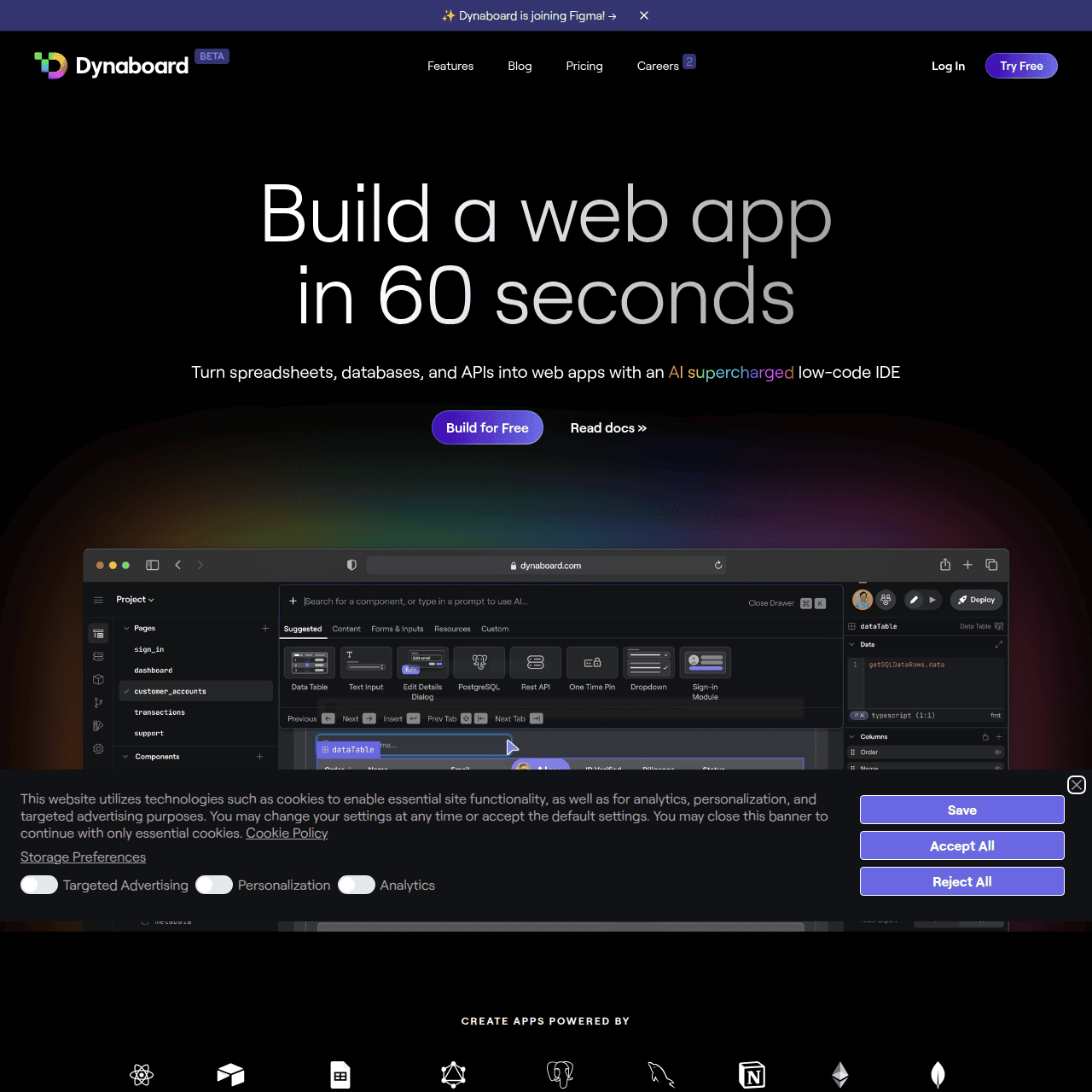
Dynaboard is a low-code web application development platform designed for developers and product teams who need to ship production-grade apps fast. It combines a visual builder with opinionated UI components and full support for client-side and server-side code, allowing you to go from idea to deployed app in a single tool.
Teams can connect to APIs and databases, define authentication and permissions, create custom components, and configure cron jobs without dealing with complex infrastructure. Real-time collaboration makes building apps feel like a multiplayer experience, while instant deployments and Git Sync fit smoothly into modern development workflows.
Dynaboard supports both internal tools and customer-facing apps, with secure authentication and scaling options suitable for growing teams and enterprises.
Quick Snapshot
Dynaboard unifies visual UI building, backend logic, and collaboration in one low-code IDE so teams can ship secure, production-grade apps in hours instead of weeks. It keeps the flexibility of real code while removing much of the infrastructure and boilerplate work.
- Works on
-
- Web
- API
- Pricing Model
- Freemium
Starting at $19/month — Dynaboard offers a free plan for developers with unlimited collaborators and up to 10,000 server function calls. Paid plans start at $19/month, with higher tiers adding more usage, environments, security features, and support. - Fits on
- Affiliate Program
- We could not identify an affiliate program.
- API Availability
- Dynaboard has an API available.
- Key Features
-
- Build full-stack apps in a single IDE
- Combine visual low-code with real code
- Collaborate and deploy in real time
- Audience
-
- developers
- product teams
- startups
- engineering managers
- internal tools teams
- SaaS companies
Screenshot

Key Features of Dynaboard
Low-code visual builder
Design full-stack web applications using a visual UI builder with opinionated components, while retaining the ability to drop into real code when needed.
Client and server code
Write client-side and server-side logic in the same environment, including server functions and cron jobs, without managing complex infrastructure.
API and database integration
Query APIs and databases directly from Dynaboard to power dynamic, data-driven interfaces and workflows.
Auth and permissions
Define authentication, authorization, and granular permissions for both internal tools and customer-facing applications.
Real-time collaboration
Work with teammates simultaneously in a multiplayer-like environment, seeing changes and edits as they happen.
Instant deploys and Git Sync
Deploy applications instantly from the IDE and sync projects with Git to fit into existing development and review workflows.
Use Cases for Dynaboard
Internal tools
Quickly build secure internal dashboards, admin panels, and workflow tools without standing up separate frontend and backend stacks.
Customer-facing apps
Ship production-ready SaaS or portal-style applications with visual UI building, authentication, and scaling options built in.
Prototyping and MVPs
Go from idea to working MVP in hours using low-code components and server functions, then refine with custom code as you validate the product.
Data-driven interfaces
Connect to APIs and databases to create rich, interactive data views and CRUD interfaces with built-in permissions and auth.
Collaborative app development
Enable engineers and product stakeholders to design and iterate on app flows together in real time, reducing back-and-forth and handoffs.
Frequently Asked Questions
What is Dynaboard used for?
Dynaboard is used to design, build, and deploy full-stack web applications—such as internal tools, dashboards, and customer-facing SaaS apps—using a collaborative low-code IDE.
Is Dynaboard only for internal tools?
No. Dynaboard supports both internal tools and external, customer-facing applications, with authentication, permissions, and scaling options suitable for production use.
Do I need to know how to code to use Dynaboard?
Dynaboard is low-code and provides a visual builder, but it is built with developers in mind and fully supports writing client-side and server-side code for custom logic.
Does Dynaboard support APIs and databases?
Yes. Developers can query APIs and databases directly in Dynaboard to power dynamic UIs and workflows.
Can teams collaborate in real time in Dynaboard?
Yes. Dynaboard offers real-time collaboration so multiple team members can design and develop applications together like a multiplayer experience.
How is Dynaboard priced?
Dynaboard has a free plan for developers with limited server function calls, and paid plans starting at $19/month with higher tiers for additional usage, environments, security, and support.
Dynaboard · Our Verdict
Dynaboard stands out among low-code platforms by focusing squarely on developer workflows rather than hiding code. The combination of visual UI building, real-time collaboration, and first-class support for both client and server logic makes it well-suited for teams who want speed without sacrificing control.
For internal tools and production SaaS apps alike, it offers a pragmatic middle ground between no-code builders and fully custom stacks.
Dynaboard ·
-
 Freemium
 Replit
AI platform to build, launch, and scale apps fast
No-Code AI App Builders - One-Time
AI Website Redesign by Shuffle
Redesign your website in minutes with multi‑AI power.
UI/UX & Web Design Tools - Freemium Featured
HTML Pub
Publish AI-generated HTML pages in seconds
No-Code AI App Builders - Freemium
Base44
AI-powered base for building apps, fast
No-Code AI App Builders - Subscription
Nativeline
Describe your app once, launch native Swift everywhere.
No-Code AI App Builders - Your Ad Here
-
AI CSS Animations
Generate beautiful CSS animations in seconds with AI
UI/UX & Web Design Tools -
OnRanko
AI-powered agents for SEO, marketing, and data
Marketing & Sales AI