
What Is Menu Explain?
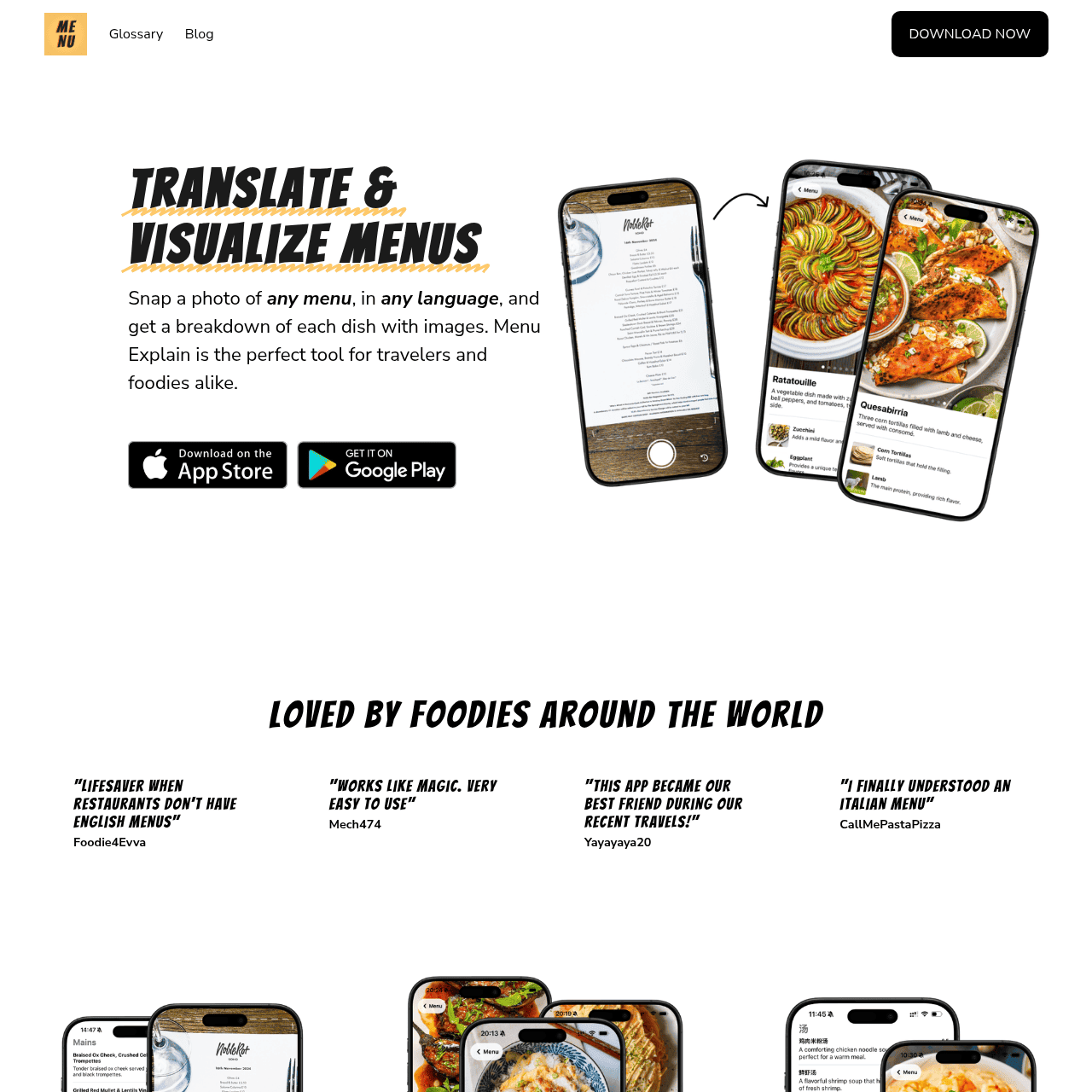
Menu Explain is a mobile app designed to make foreign restaurant menus easy to understand. Users simply snap a photo of a menu in almost any language and receive instant translations, along with visual cards for each dish. The app focuses on food-specific terms and nuances, pairing translated dish names with images and ingredient descriptions. This reduces ordering anxiety, prevents unwelcome surprises, and encourages users to try new dishes. It is especially useful for travelers, expats, and food enthusiasts who frequently dine abroad or in unfamiliar cuisines.
Quick Snapshot
Menu Explain removes the confusion of foreign-language menus by combining accurate translations with vivid dish images and clear explanations. Travelers and food lovers can explore new cuisines confidently without guessing what they’re ordering.
- Works on
-
- iOS
- Android
- Pricing Model
- Cannot determine the price.
- Fits on
- Affiliate Program
- We could not identify an affiliate program.
- API Availability
- We could not identify whether an API is available.
- Key Features
-
- Translate menus from photos in seconds
- See dish images and ingredient explanations clearly
- Explore foreign cuisines with confidence abroad
- Audience
-
- travelers
- tourists
- foodies
- expats
- study abroad students
- frequent business travelers
Screenshot

Key Features of Menu Explain
Photo menu translation
Snap a photo of any restaurant menu and get instant translations, so you no longer need to type or copy text manually.
30+ language support
Works across more than 30 languages, helping users handle menus in a wide range of international destinations.
Dish image visualization
Pairs translated dishes with images, giving users a visual sense of what each item looks like before they order.
Ingredient explanations
Provides ingredient descriptions and context for each dish, focusing on food-specific nuances that generic translators often miss.
Visual menu cards
Transforms confusing text-based menus into visual, easy-to-read cards for each dish that are simple to scan and compare.
Use Cases for Menu Explain
Tourist dining abroad
Travelers can quickly translate unfamiliar menus and see visual dish explanations, reducing the risk of ordering something they did not intend to eat.
Business travel meals
Frequent business travelers can confidently navigate restaurant menus in different countries, ensuring smoother client dinners and solo meals without language barriers.
Study abroad students
Students living overseas can use the app to understand local dishes and ingredients, helping them adapt to new cuisines while avoiding unwanted surprises.
Foodie restaurant exploration
Food lovers can explore authentic local restaurants and try new specialties with clarity, using dish images and explanations to choose items that match their tastes.
Expats in new countries
Expats can rely on Menu Explain to bridge daily dining language gaps, making routine restaurant visits and takeout orders easier to manage.
Frequently Asked Questions
What is Menu Explain and how does it work?
Menu Explain is a mobile app that translates restaurant menus from photos in over 30 languages. You take a picture of a menu, and the app returns translations with dish images and ingredient explanations so you understand what each item is.
Which languages does Menu Explain support?
Menu Explain supports more than 30 languages for menu translation. While specific languages are not listed in the provided information, it is designed to cover a wide range of common travel destinations.
Is Menu Explain only for travelers?
No. While it is especially helpful for travelers, tourists, and study abroad students, Menu Explain is also useful for expats, frequent business travelers, and local foodies exploring unfamiliar cuisines.
Does Menu Explain show images of the dishes?
Yes. Menu Explain pairs translated dish names with images and ingredient explanations, giving you a clearer idea of what the food will look like and contain before ordering.
Is Menu Explain free to use?
The exact pricing structure is not specified in the available information. For current pricing and any free or paid plans, check the Menu Explain listing in the App Store or Google Play.
Can I use Menu Explain without knowing the local language?
Yes. Menu Explain is designed for users who do not speak the local language, letting you translate menus from photos and understand each dish through clear translations and visuals.
Menu Explain · Our Verdict
Menu Explain focuses on a very specific travel pain point: not understanding what’s on the menu. By combining photo-based translation with dish images and explanations, it goes beyond generic translation apps and provides context that actually helps you decide what to order. For frequent travelers and food lovers, this specificity makes it a practical companion at restaurants worldwide.
Menu Explain ·
-
 Free
Free SciMatch
AI dating app that sees what others miss
Industry-Specific Advisors -
Travelities
Plan smarter trips with your AI travel assistant
Industry-Specific Advisors - Freemium
BnBuddy
Your Airbnb and guest communication on autopilot
Industry-Specific Advisors - Free
HueBuddy
AI-powered paint mixing and colour matching for artists
Image & Design AI -
Z.ai Chat
Multi-role AI chat assistant powered by GLM-5.3
AI Assistants & Chatbots - Your Ad Here
-
AirFryBot
Turn any ingredients into perfect air fryer meals
Industry-Specific Advisors - Freemium
Jinna.ai
AI assistant for proposals, invoices and follow-ups
Contract & Invoice Processing