
What Is PDFQuiz?
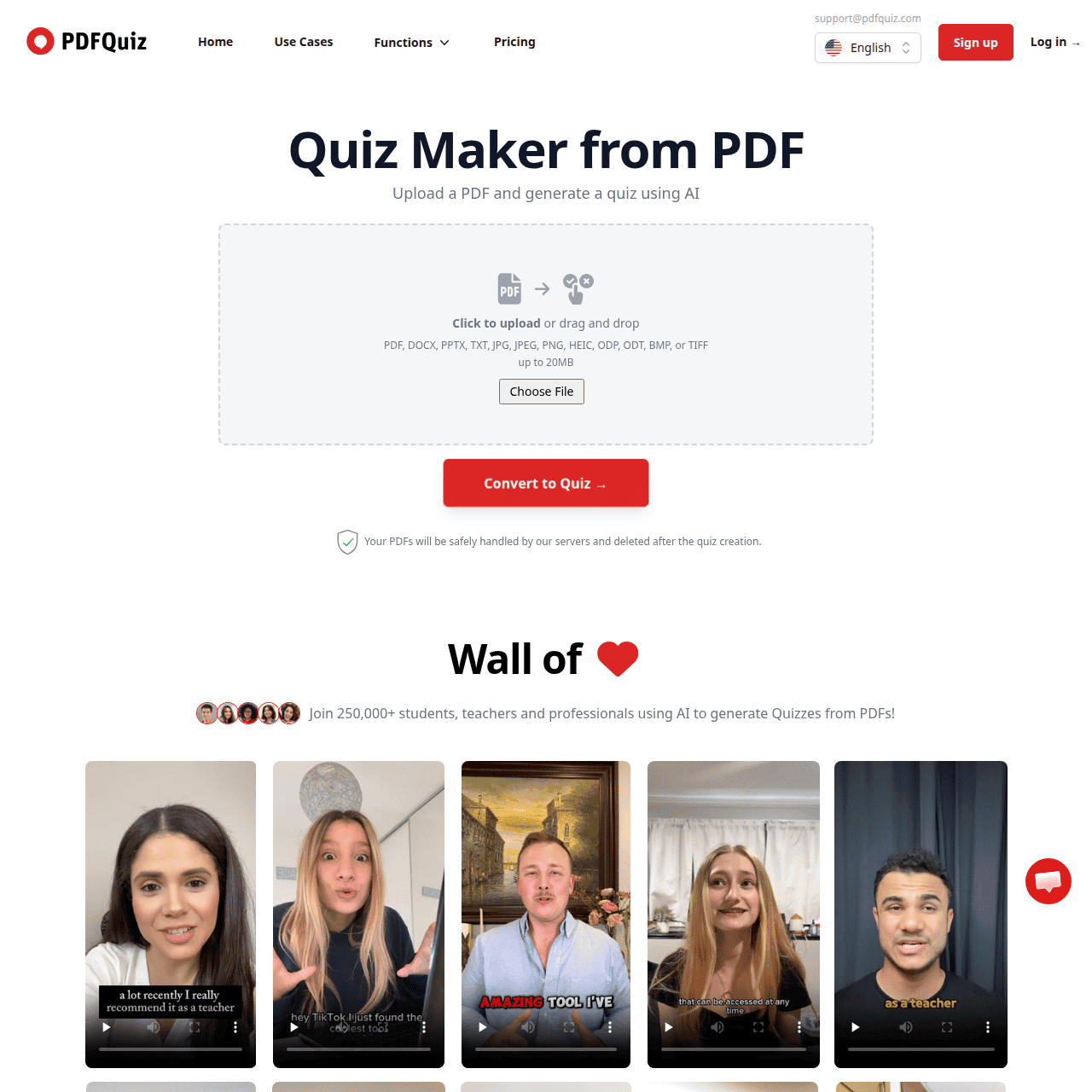
PDFQuiz is a web-based AI quiz maker that transforms PDFs, PowerPoints, Word documents, URLs, and text into interactive quizzes and tests. Using Vision AI with OCR, it scans your content, identifies key concepts, and generates multiple-choice, true/false, open-ended, and short-answer questions with correct answers and explanations.
Educators and trainers can customize quizzes by editing questions, choosing the number of questions, setting timers, and adding images. The platform supports quiz sharing via dedicated invite links, exporting results, and translating documents into quizzes in different languages.
With dashboards, analytics, and compliance-focused features, PDFQuiz is built for classrooms, corporate training, and self-study at scale, helping users replace manual test creation with fast, AI-assisted assessment workflows.
Quick Snapshot
PDFQuiz instantly converts your PDFs and documents into auto-graded quizzes, saving hours of manual test creation. It helps educators, trainers, and learners build engaging assessments that improve comprehension and streamline studying.
- Works on
-
- Web
- API
- Pricing Model
- Subscription
Starting at $7/month — PDFQuiz offers a free plan with usage limits and paid subscriptions starting at $7/month for Plus, $19/month for Pro, and $49/month for Elite billed yearly. Higher tiers unlock more AI processing, quiz invitations, open-ended questions, branding options, API access, and certificates. - Fits on
- Affiliate Program
- 30% commission on sales
- API Availability
- PDFQuiz has an API available.
- Key Features
-
- Instantly convert documents into auto-graded quizzes
- Customize AI-generated questions and timing easily
- Track learner performance with dashboards and analytics
- Audience
-
- teachers
- students
- schools and universities
- corporate trainers
- instructional designers
- edtech companies
- coaches
- tutors
Screenshot

Key Features of PDFQuiz
AI quiz generation
Automatically creates quizzes from PDFs, PowerPoints, Word files, URLs, and text, generating questions, answers, and explanations in seconds.
Vision AI with OCR
Uses optical character recognition to scan and extract content from documents, enabling question generation even from image-based PDFs.
Multiple question types
Supports multiple-choice, true/false, open-ended, and short-answer questions to match different assessment needs.
Quiz customization
Allows users to edit questions, choose the number of questions, set timers, and add images for fully tailored assessments.
Sharing and invitations
Provides dedicated quiz invite links so educators and trainers can easily distribute quizzes to learners.
Results and analytics
Offers dashboards and analytics to review quiz performance, export results, and monitor learner progress over time.
Language translation
Can translate PDFs into quizzes in different languages, supporting multilingual learning environments.
API and advanced features
Higher-tier plans add capabilities like API access, enhanced AI processing limits, custom branding, and certificates.
Use Cases for PDFQuiz
Classroom assessments
Quickly turn lecture slides and reading PDFs into auto-graded quizzes, reducing prep time for teachers while giving students immediate feedback.
Corporate training tests
Convert training manuals and policy documents into structured quizzes to verify employee understanding and document compliance.
Self-study practice
Students can upload notes or textbooks to generate practice questions that reinforce key concepts and highlight knowledge gaps.
Online course quizzes
Instructional designers can transform course content into quizzes at scale, then embed or share them to keep learners engaged.
Coaching and tutoring
Coaches and tutors can rapidly build personalized quizzes from client materials to track progress and target weak areas.
Frequently Asked Questions
What is PDFQuiz and how does it work?
PDFQuiz is an AI-powered quiz generator that turns PDFs, PowerPoints, Word files, URLs, and text into interactive quizzes. You upload a document, the AI scans it using Vision AI with OCR, and automatically generates questions, answers, and explanations that you can edit and share.
Can PDFQuiz handle image-based or scanned PDFs?
Yes. PDFQuiz uses Vision AI with OCR to extract text from image-based or scanned PDFs, allowing it to generate quizzes even from non-editable documents.
Which question types does PDFQuiz support?
PDFQuiz supports multiple-choice, true/false, open-ended, and short-answer questions, giving you flexibility to design different kinds of assessments.
Is there a free version of PDFQuiz?
Yes. PDFQuiz offers a free plan with usage limits, and you can upgrade to paid plans for higher character limits, more invitations, open-ended questions, branding, API access, and certificates.
Who is PDFQuiz designed for?
PDFQuiz is built for teachers, students, schools and universities, corporate trainers, instructional designers, edtech companies, coaches, and tutors who need to generate quizzes from existing learning materials.
Can I share quizzes created with PDFQuiz?
Yes. You can share quizzes via dedicated invite links, allowing students or trainees to access and complete them online while you track results.
Does PDFQuiz support analytics and reporting?
PDFQuiz includes dashboards and analytics that let you review quiz results, monitor learner performance, and export data for further analysis.
Does PDFQuiz offer an API or integrations?
PDFQuiz offers API access on higher-tier plans, enabling edtech companies and organizations to integrate quiz generation into their own systems.
PDFQuiz · Our Verdict
PDFQuiz stands out as a focused assessment tool that bridges traditional learning materials and modern AI-driven testing. Its ability to ingest PDFs, slides, and web content and produce auto-graded, editable quizzes makes it especially practical for educators and trainers looking to scale assessments without sacrificing control.
PDFQuiz ·
-
 Freemium
 Colorings
Create artistic AI coloring pages in seconds.
AI Art Generators - Subscription
LoveHeart (Mana)
AI educator aide for powerful early childhood documentation
Teacher Productivity Tools -
CoWriter AI
AI writing copilot for faster academic work
Academic & Research Writing - Free
Figurative Checker
Instantly detect and refine figurative language
Text & Writing AI -
LanguageMate
Unlock spoken practice, free teachers to teach
Language Learning Tools - Your Ad Here
- Freemium Featured
YouTube to Quiz with AI by MagicForm
Turn any YouTube video into a quiz in seconds
Teacher Productivity Tools -
Sanctuary AI
Production‑ready Physical AI for complex work
Productivity & Automation AI