
What Is savtocsv?
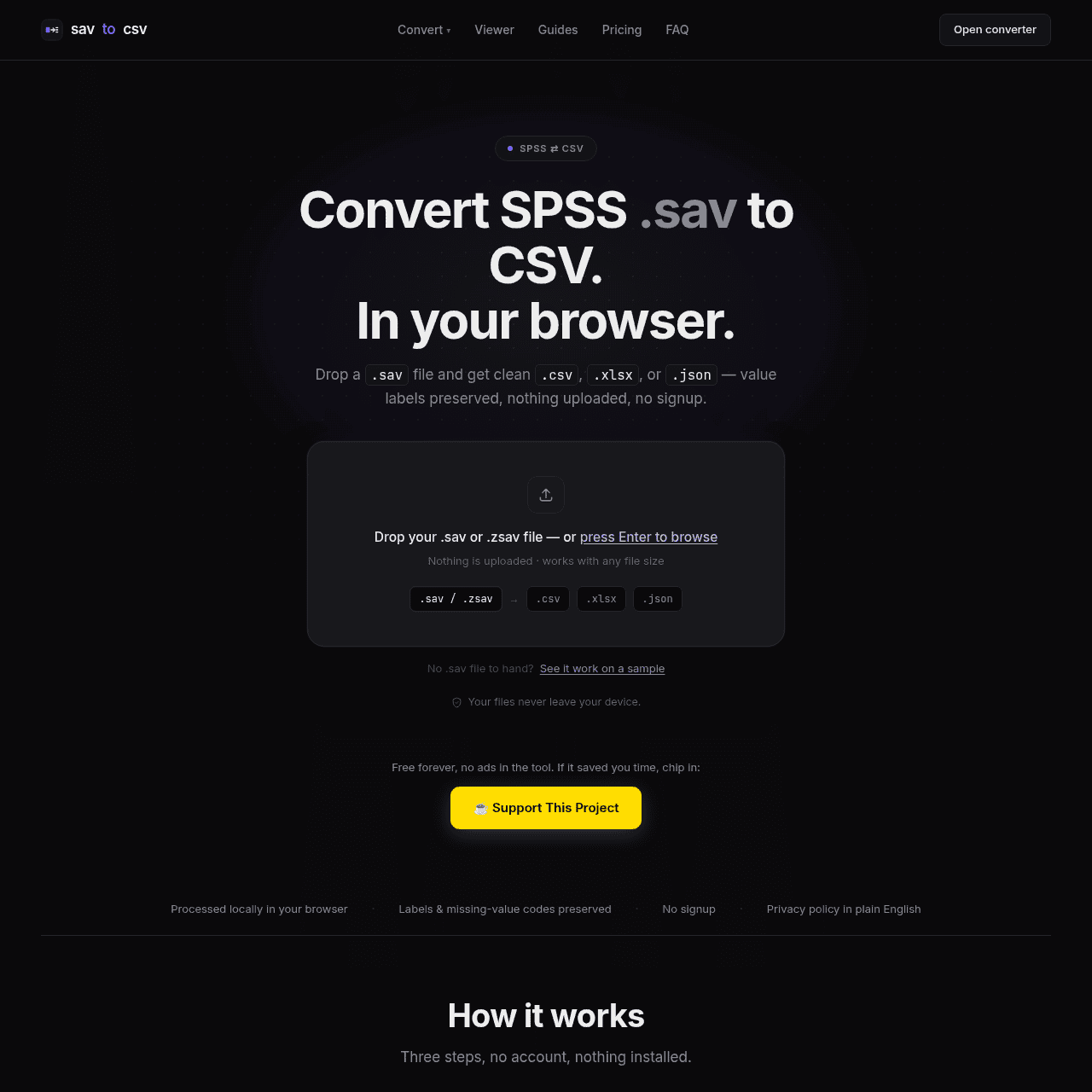
savtocsv is a browser-based converter built for anyone working with SPSS .sav files who needs analysis-ready CSV, Excel (.xlsx), or JSON. You drag and drop a .sav file, pick your export format and how you want value labels handled, then immediately download the converted dataset.
The tool preserves value labels, missing-value codes, and lets you choose between exporting labels, numeric codes, or both. Because all processing happens locally in your browser, your data never leaves your machine, making it suitable even for sensitive or confidential research.
savtocsv also includes a free .sav viewer so you can inspect variables, names, labels, and sample rows before converting, supported by guides and FAQs on working with .sav files without SPSS.
Quick Snapshot
savtocsv lets you convert SPSS .sav files to CSV, Excel, or JSON entirely in your browser, with value labels preserved and no uploads, accounts, or paywalls. It’s a fast, secure way to work with SPSS data without needing an SPSS license.
- Works on
-
- Web
- Pricing Model
- Free — savtocsv is currently completely free with no account, usage caps, or paywalled features. A Pro tier is under consideration but not available yet.
- Fits on
- Affiliate Program
- We could not identify an affiliate program.
- API Availability
- We could not identify whether an API is available.
- Key Features
-
- Convert .sav to CSV, Excel, or JSON locally
- Preserve SPSS value labels and missing codes
- Free, no signup, no uploads required
- Audience
-
- researchers
- data analysts
- social scientists
- students
- survey methodologists
- data journalists
- academics
Screenshot

Key Features of savtocsv
SPSS .sav conversion
Convert SPSS .sav files directly to CSV, Excel (.xlsx), or JSON formats for use in common analysis tools.
In-browser processing
Handle all file parsing and conversion locally in your browser, ensuring that data never leaves your machine.
Value label preservation
Retain SPSS value labels and missing-value codes, with options to export labels, numeric codes, or both.
.sav file viewer
Inspect variables, names, labels, and sample rows from your .sav file before converting to another format.
No account required
Use the full tool with no signup, usage caps, or paywalls, making quick conversions frictionless.
Guides and FAQs
Access documentation on working with .sav files without SPSS and how specific SPSS features are handled during conversion.
Use Cases for savtocsv
Academic research data export
Convert SPSS .sav files from surveys or experiments into CSV or Excel so they can be analyzed quickly in R, Python, or statistical packages without an SPSS license.
Survey data cleaning
Preserve value labels and missing-value codes when exporting survey datasets, making it easier to clean and recode responses in your preferred data analysis environment.
Data journalism workflows
Turn SPSS-based public datasets into CSV or JSON in the browser, enabling fast integration into newsroom analysis pipelines while keeping potentially sensitive data local.
Teaching and coursework
Allow students to open and convert .sav files for assignments using only a browser, removing the need for institutional SPSS licenses or complex installs.
Institutional data sharing
Standardize internal or cross-team data sharing by converting legacy SPSS files into widely compatible CSV or Excel formats without uploading data to third-party servers.
Frequently Asked Questions
What is savtocsv and what does it do?
savtocsv is a free, browser-based tool that converts SPSS .sav files into CSV, Excel (.xlsx), or JSON while preserving value labels and missing-value codes, with all processing done locally.
Does savtocsv upload my SPSS .sav files to a server?
No. All file processing happens client-side in your browser, so your .sav files and converted data never leave your machine.
Do I need an SPSS license to use savtocsv?
No. savtocsv is designed to help you work with .sav files without needing an SPSS license by converting them into common formats like CSV, Excel, or JSON.
Is savtocsv really free to use?
Yes. savtocsv is currently completely free with no account requirement, no usage caps, and no features locked behind a paywall.
Does savtocsv keep SPSS value labels and missing values?
Yes. The converter preserves value labels and missing-value codes and lets you choose whether to export labels, numeric codes, or both.
Can I preview my .sav file before converting it?
Yes. savtocsv includes a built-in .sav viewer so you can inspect variables, names, labels, and sample rows before downloading a converted file.
savtocsv · Our Verdict
savtocsv focuses on a very specific pain point—getting .sav data out of SPSS and into common analysis formats—without adding friction like signups or upload limits. The fully client-side processing and label preservation make it especially attractive for researchers handling sensitive data who still need clean, well-structured exports.
savtocsv ·
-
 Subscription
 Querri
AI data analyst for everyone, powered by your data.
Research & Data AI -
Bright Data
All-in-one web data backbone for AI
Research & Data AI -
ThatNeedle
Realtime data fusion for software-defined defence
Pattern Recognition & Forecasting -
Simple ML for Sheets
No-code machine learning directly inside Google Sheets
Spreadsheet AI Tools - Freemium
Yorph AI
Agentic AI for trusted, no-code analytics
Research & Data AI - Your Ad Here
- Freemium
Hopsworks
The AI Lakehouse for real-time production ML
AI Developer Tools -
OnRanko
AI-powered agents for SEO, marketing, and data
Marketing & Sales AI