


Start with the plan, not the logo
Most privacy debates about AI tools are really plan-tier debates wearing fake mustaches.
The same vendor can offer very different defaults across free, personal, team, API, and enterprise plans. Training settings, retention controls, admin controls, and DPA availability may all change by tier. So “we use this vendor safely” might be true for one department and false for another.
Before anything else, verify:
- Which exact plan your team would use
- Whether that plan is a personal, team, business, or enterprise offering
- Whether employees are already using a different tier on their own
- Whether the terms for that tier match your approval assumptions
If you skip this step, the rest of the review is theater.
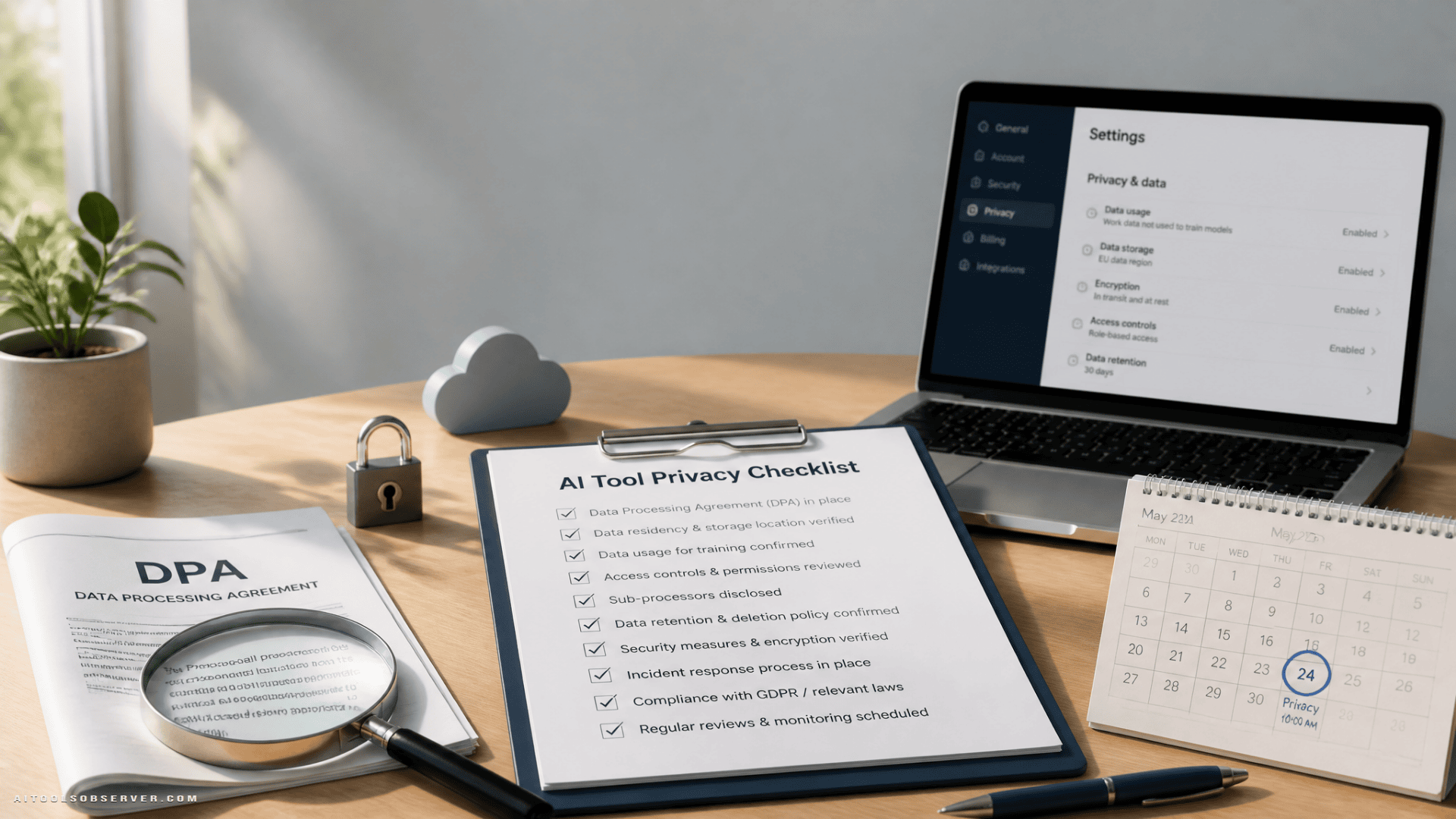
The fast privacy checklist
Use this before approving any AI tool for work data.
1. Confirm whether a DPA exists for your plan
A vendor may offer a Data Processing Addendum for some plans and not others. That matters.
Check:
- Is a DPA available on the specific plan you’re evaluating?
- Can you review it before purchase?
- Is it self-serve or gated behind sales?
- Does it cover your intended use case?
- Does it list subprocessors?
If there’s no DPA for the tier your team wants, that’s not a small footnote. It usually means the vendor is not positioning that tier for handling business data in a way many teams would want.
2. Verify training terms for inputs and outputs
This is the question everyone asks first. Fair enough. Just don’t let it be the only one.
Check:
- Are prompts, files, and outputs used to train models by default?
- Is training opt-in or opt-out?
- Can training be disabled at the workspace or admin level?
- Does the answer differ by plan?
- Does disabling training affect features or retention?
Do not rely on a homepage slogan like “your data stays yours.” You want the written terms for the specific plan, not the vibes.
Ask the uncomfortable question: what happens under non-normal conditions?
Ordinary deletion policies are about ordinary days. Lawsuits, legal holds, regulatory demands, and other third-party actions are not ordinary days.
That means your real question is not just “what is the default retention schedule?” It’s also:
- What can interrupt deletion?
- What legal or compliance events create exceptions?
- Is zero data retention available contractually?
- Is there a deployment option where sensitive data does not persist in the same way?
If your policy requires that certain data truly must not sit on someone else’s system, a settings toggle may not be enough. You’re usually looking for stronger contractual terms or an architecture choice that minimizes what leaves your side in the first place.
Read these three documents in this order
Skip the feature page. It is not where the truth lives.
1. The DPA
Read this first because it tells you whether the vendor is prepared to support business data responsibly on that plan.
Look for:
- Availability by plan
- Subprocessor list
- Transfer language
- Basic controller/processor structure
- Any obvious gaps for your compliance needs
2. Retention and training terms
Read the actual policy language, not just the summary box.
Look for:
- Written defaults
- Opt-in or opt-out model training
- Workspace-wide controls
- Human review language
- Retention windows and exceptions
3. Security documentation
The trust page is useful only if it leads somewhere real.
Look for:
- Current security documentation
- Recognized certifications or audit reports where appropriate
- Clarity on access controls
- Clarity on encryption and admin controls
- A process for reviewing more detailed material under NDA if needed
A page full of badges with no route to deeper documentation is mostly interior decoration.
Review subprocessors and data location
This part tends to get rushed because it sounds administrative. It is administrative. It also matters.
Check:
- Where data is stored
- Where data is processed
- Whether subprocessors are named
- Whether those subprocessors create jurisdiction or transfer concerns for your company
- Whether the subprocessor list can change without notice
This is especially important if your internal policy, customer contracts, or regional obligations care about where data goes and who can touch it.
Don’t forget admin controls
Privacy is partly legal paperwork and partly “can your team actually use this safely on a Tuesday?”
Verify whether the tool gives you:
- SSO or equivalent account control
- Centralized billing and seat management
- Workspace-level privacy settings
- Audit or usage visibility for admins
- The ability to disable unsafe defaults
- Export controls when you leave
A tool with decent terms and weak admin controls can still create a mess. People are creative, especially under deadline pressure.
The five-email test
Before starting a trial, send one short email. The response speed and clarity are data points.
Ask:
- Is a DPA available on the plan we’re evaluating?
- Are our inputs and outputs used for training by default on that plan?
- What is the retention period for prompts, outputs, and logs?
- Where is data stored and processed, and who are your subprocessors?
- If we leave, what can we export and in what format?
If the vendor cannot answer the retention question clearly, that’s your answer wearing a nametag.
Red flags worth noticing early
You do not need a dramatic scandal to reject a tool. Mild confusion is often enough.
Watch for:
- Different answers across FAQ, terms, and sales email
- Privacy controls available only on a higher plan than the one your team wants
- No DPA for business use on your intended tier
- Vague retention language like “for as long as necessary” with no specifics
- Security pages heavy on branding, light on documentation
- No clear explanation of subprocessors or data location
- Per-user privacy settings when you need workspace-level control
A good vendor can usually answer basic privacy questions plainly. If the answer requires interpretive dance, keep moving.
Make the safe option the easy option
Banning AI tools outright tends to produce secret usage, mobile workarounds, and “just this once” behavior. Humans remain committed to convenience.
What works better:
- Approve a short list of tools
- Approve specific plans, not just vendors
- Provision those plans centrally
- Publish one simple rule for never-paste data
That last rule should cover the obvious landmines:
- Customer personal data
- Credentials and secrets
- Unreleased financial information
- Confidential material under NDA
If the approved path is slower than the unapproved one, guess which path wins.
Re-check approved tools on a schedule
An approval is not a lifetime achievement award.
Terms change. Plans get renamed. Controls move upmarket. Vendors update subprocessors. The tier you reviewed in March may not be the one your team is actually using by November.
A practical rhythm:
- Re-check twice a year
- Review the same three documents each time
- Confirm the team is still on the approved plan
- Re-send the five questions if anything looks different
It’s dull work. That’s the good news. Dull work is usually cheaper than incident response.
Quick approval checklist
If you want one last skim-friendly version, use this:
- Exact plan identified
- DPA available for that plan
- Training defaults verified in writing
- Retention periods verified in writing
- Exceptions to deletion understood
- Subprocessors reviewed
- Data location reviewed
- Security documentation reviewed
- Admin controls checked
- Export options confirmed
- Workspace settings available
- Review date scheduled
If even two of those are fuzzy, don’t paste the contract yet.
The useful takeaway
A tools directory can help you find candidates fast. The privacy decision happens later, in the boring documents everyone hopes not to read.
So keep the process brutally simple: verify the plan, read the DPA, confirm retention and training terms, check security docs, send five direct questions, and approve only what your team can use safely by default. Convenient beats policy every time, so make the safe choice the convenient one.







Comments (0) No comments yet
Want to join this discussion? Login or Register.
No comments yet. Be the first to share your thoughts!