


The big privacy mistake people still make
Many users treat one privacy toggle as if it controls everything. It does not.
Turning off model training may stop your future chats from helping improve a model. But that usually does not mean:
- memory is off
- history is deleted
- ad personalization is off
- connected apps stop sharing context
- previously collected data disappears
That is why AI privacy feels confusing. The controls are often split across multiple menus, and each one governs a different kind of data use.
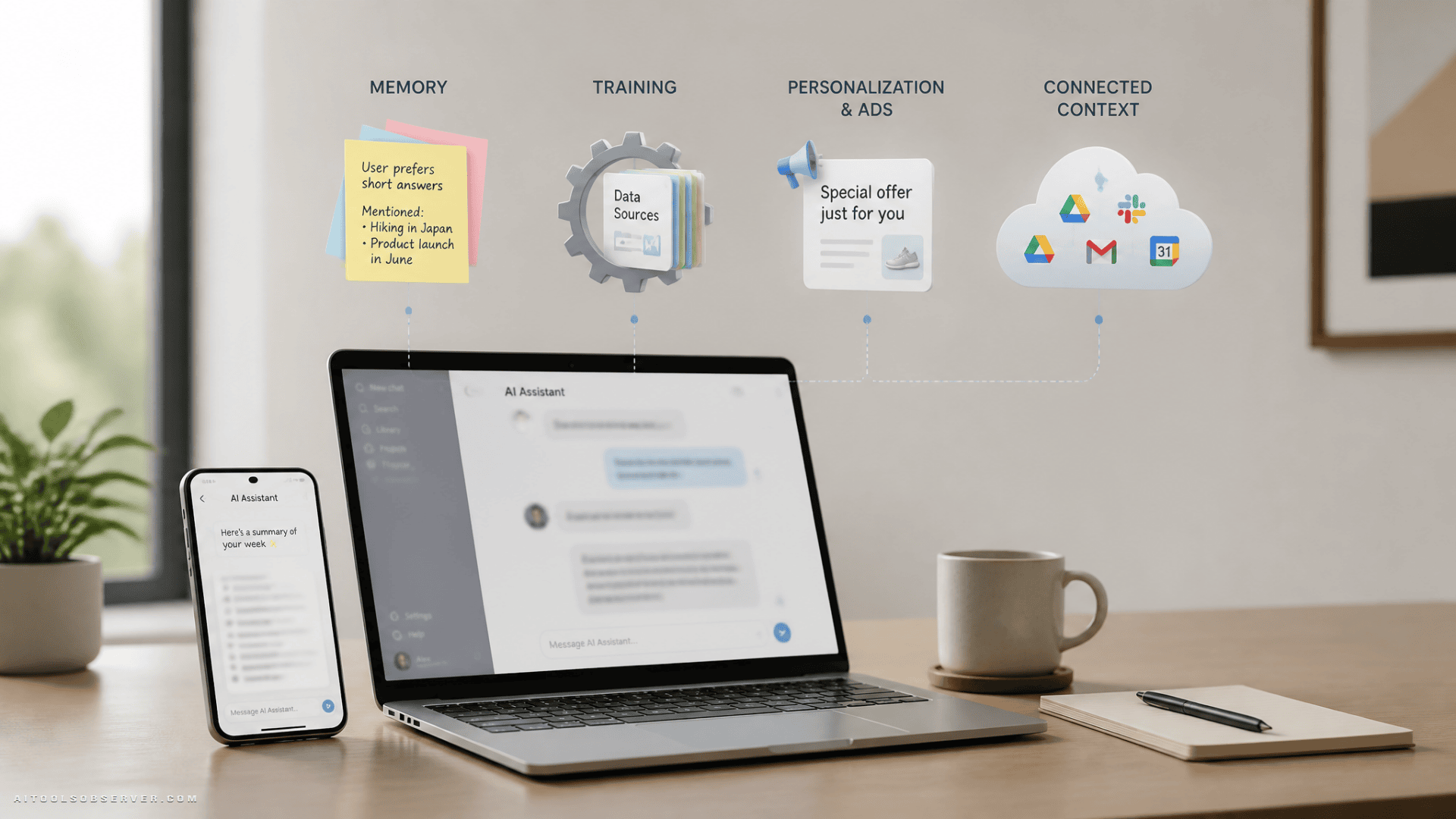
The four privacy layers that matter most
To make sense of chatbot privacy, break it into four separate buckets.
1. Memory
Memory is what lets a chatbot remember facts, preferences, or patterns over time.
This can be useful. You do not need to repeat your writing style, work role, or favorite tools every time. But it also means the assistant can build a more detailed profile of your habits and interests.
2. Training
Training refers to whether your conversations, files, or feedback may be used to improve future AI models.
This is the privacy topic most people know. It still matters, but it is not the whole story.
3. Personalization and ads
Some AI systems use your interactions to shape what content, recommendations, or ads you see later.
That matters because a personal conversation may become a signal about your interests, even if nobody is reading the chat line by line.
4. Connected context
This is where things get more powerful and more sensitive. A chatbot may draw from apps, websites, uploaded files, or account activity beyond a single conversation.
Once that happens, the assistant is no longer just reacting to what you typed today. It may be forming a broader picture of your life.
ChatGPT privacy in 2026: useful, flexible, but setting-heavy
OpenAI separates several important controls. That is good in one sense because you get more choice. It is harder in another because you need to check each control individually.
Memory is separate from training
ChatGPT can use memory to personalize future responses. That means you can turn off training and still allow the system to remember things about you.
That distinction matters. A lot of people assume “don’t train on my data” equals “don’t keep learning about me.” It does not.
Ads are a separate layer too
OpenAI now has ad controls that are distinct from training and memory settings. If personalized ads are enabled, past chats and memory may help make ads more relevant.
If ad personalization is off, ads may still use the context of the current conversation, but not other chat threads or memory. That is a narrower use, but still worth understanding.
Computer History raises a different kind of risk
On macOS, OpenAI introduced Computer History for some ChatGPT users. The feature is optional and off by default, but it changes the privacy equation because the assistant can use selected app and website activity as context.
That makes the tool more helpful, especially for ongoing work. But it also means your AI assistant may learn from what you do outside the chat box.
A few tradeoffs stand out:
- you choose which apps and websites contribute context
- you can pause collection and delete history
- the feature depends on Memories
- generated memory files remain on your Mac until you delete them
- those files are not encrypted by the feature itself
That last point is easy to overlook. If a local memory file exists on your device, privacy is no longer just about the AI company. It is also about your device security and what other software on your account might access.
When ChatGPT is the better choice
ChatGPT may suit people who want granular control and are willing to manage settings carefully. It gives you options, but you need to actively use them.
If you do nothing, convenience features can gradually expand what the service knows.
Google privacy in 2026: history matters more than people think
Google’s AI privacy story is closely tied to account history and saved media.
If Search Services History and Save Media are enabled, Google can save media from certain Search interactions. That can include files, images, audio, or video used in supported AI-powered Search experiences.
Why this matters
People often think of prompts as text. But uploads can be far more revealing than text alone.
A screenshot, a PDF, a voice recording, or a document draft may expose:
- names
- account details
- workplace context
- medical topics
- family information
- financial information
Turning off Save Media stops future media from being added to that history. But previously saved media does not disappear automatically. That is the key practical takeaway.
The important distinction
Changing a setting affects future collection. Deleting data affects what is already there.
Those are not the same action, and many users stop after flipping the switch.
When Google becomes more sensitive
Google becomes a bigger privacy concern when you regularly use Search as an AI workspace, especially if you upload documents or media for analysis. The more files you feed in, the more important account history settings become.
Meta privacy in 2026: the clearest ad connection
Meta takes one of the most direct approaches to personalization. Interactions with Meta AI can influence what content and ads you see across Meta products.
That means an AI conversation may become another signal in Meta’s broader personalization system.
For related context on Meta’s broader privacy posture, see Meta Scales Back Keystroke Tracking for AI Training.
What that means in practice
If you chat with Meta AI about a hobby, purchase category, or life interest, that can shape later recommendations or ads. Meta says it places limits on certain sensitive categories, but everyday topics can still feed personalization.
For privacy-conscious users, the issue is not just whether Meta stores a conversation. It is whether the conversation becomes part of the wider profile used across its platforms.
Incognito Chat is the important exception
Meta’s Incognito Chat offers a different mode for more private conversations. Based on the available context, this option is designed so conversations are not saved and are processed in a more protected environment.
That creates a clear fork in the experience:
- regular Meta AI use may feed personalization
- Incognito Chat is the better fit for personal or sensitive topics
If you use Meta AI at all, this is one of the most important settings to look for.
Apple privacy in 2026: strongest privacy posture, with one catch
Apple’s AI approach is more device-centered. Many requests are processed on-device first, which limits how much data needs to leave your hardware.
When a larger model is needed, Apple uses Private Cloud Compute. Based on Apple’s design, this is meant to send only the information required for the request and process it without retaining it afterward.
Why Apple feels different
Apple’s model is less about collecting broad conversational context across an ad ecosystem and more about minimizing what gets exposed in the first place.
That will appeal to users who want AI features without turning every interaction into a long-term data asset.
The catch: third-party AI inside Apple
Apple’s privacy protections apply to Apple’s own system. But Apple also lets some requests go to third-party services such as ChatGPT.
That changes the privacy model instantly.
If you use ChatGPT through Apple without signing into a ChatGPT account, the handling may be more limited. But if you connect your account, your OpenAI settings apply. At that point, you are no longer only in Apple’s privacy framework.
That is the subtle but important point: inside one interface, different AI providers may still have different privacy rules.
Quick comparison: ChatGPT vs Google vs Meta vs Apple
Here is the simple version.
ChatGPT
Best for users who want flexible controls, temporary chats, and memory management options. But you need to review training, memory, and ad settings separately.
Most important if you use AI-powered Search with uploads. History and saved media settings matter more than many users realize.
Meta
Most important if you care about ad personalization. AI chats can shape content and ad signals across Meta’s ecosystem, unless you use a more private mode like Incognito Chat where available.
Apple
Most privacy-forward by architecture, especially for on-device handling. But third-party integrations can shift the data rules depending on which model handles the request.
The settings that actually matter
If you only do a few things, do these.
In ChatGPT
- review Memory settings
- check Data Controls for model training
- check Ad Controls separately
- use Temporary Chat for sensitive topics
- review connected apps and remove ones you no longer need
In Google
- review Search Services History
- turn off Save Media if you do not want future uploads saved there
- delete previously saved media if needed
- be cautious with documents, screenshots, and voice uploads
In Meta
- review ad preferences and privacy settings
- assume regular Meta AI interactions may inform personalization
- use Incognito Chat when the conversation is personal
In Apple
- understand whether your request stays inside Apple’s system or goes to a third-party model
- be careful when linking outside AI accounts
- treat integrated third-party AI as its own privacy environment
How to stay safer without giving up AI
You do not need to stop using AI chatbots. You need to stop treating them like sealed private diaries.
Here is the practical approach.
Use private modes for sensitive conversations
If a platform offers Temporary Chat, Incognito Chat, or a similar mode, use it for anything personal, financial, legal, medical, or workplace-sensitive.
Convenience mode is not always the right mode.
Audit memory regularly
If a chatbot can remember you, check what it remembers. Delete anything that feels unnecessary, outdated, or too revealing.
Memory drift is real. Small details added over months can create a far richer profile than you intended.
Treat uploads as higher risk than prompts
A single uploaded file can reveal more than a dozen chat messages. Before uploading, remove metadata, redact sensitive details, and ask whether text-only input would work instead.
Clean up old connections
Connected apps make AI more useful, but also more invasive. If you linked services for a one-time project, disconnect them afterward.
Unused integrations are silent privacy debt.
Separate work and personal use
If possible, do not use the same AI account for everything. Mixing work drafts, personal questions, financial planning, and health-related prompts in one account makes profiling easier and mistakes more costly.
The real tradeoff: convenience vs exposure
Memory is not inherently bad. Personalized AI can save time, reduce repetition, and produce better results.
The issue is that helpful AI often becomes helpful by knowing more about you over time. That same context can create a detailed behavioral picture, especially when memory, uploads, account history, and ad systems start overlapping.
That is the tradeoff to watch in 2026. Not just “Is my data private?” but “How much of me is this tool quietly assembling?”
A simple rule for choosing the right chatbot
If your priority is convenience, you may accept more memory and personalization.
If your priority is privacy, choose tools and modes that minimize retention, limit cross-service context, and separate sensitive conversations from your everyday AI workflow.
The smartest move is not picking one chatbot and trusting it blindly. It is knowing which settings control memory, training, ads, and connected data before your most personal conversation happens.






Comments (0) No comments yet
Want to join this discussion? Login or Register.
No comments yet. Be the first to share your thoughts!