


What Is ComfyUI?
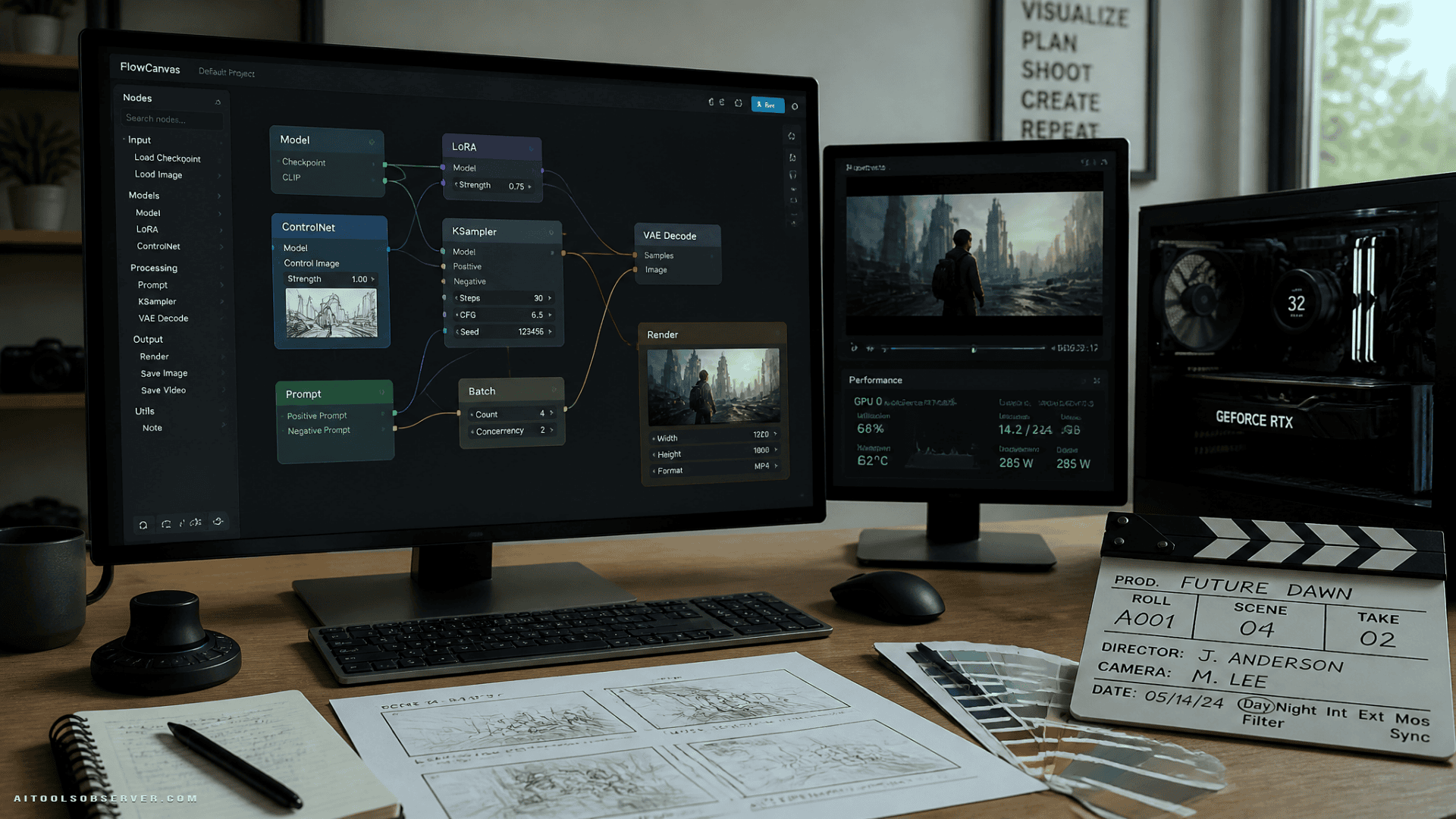
ComfyUI is an open-source, node-based interface for AI generation — images, video, and increasingly 3D content. Rather than presenting a single prompt field, it gives you a visual graph editor where each step of the generation pipeline is a discrete node. You connect them, configure them, and build workflows that are fully reproducible and shareable.
The platform runs locally on your own hardware. There is no cloud dependency, no usage cap, and no data leaving your machine. For professionals working with sensitive assets or simply wanting consistent performance, that matters, especially for readers interested in privacy-focused workflows.
Who It’s For
ComfyUI is positioned explicitly for advanced users. The description is direct about this: professional AI artists, game developers, filmmakers, designers, and researchers who have outgrown simpler web interfaces.
If you’re generating occasional images for social media, a one-click tool will serve you better. If you’re building repeatable production pipelines, experimenting with model combinations, or processing hundreds of outputs in a batch, ComfyUI is where that work belongs.
Node-Based Workflow Editor
The central mechanic is the node graph. Every operation — loading a model, encoding a prompt, applying a ControlNet, upscaling an output — exists as a node. You wire them together visually.
This approach has a real advantage: workflows are explicit. You can see exactly what is happening at each stage, save the entire pipeline as a file, version it, and share it with others who can run it identically. There is no hidden logic.
Model Support
ComfyUI supports a wide range of models: Stable Diffusion variants, Flux, SD3, ControlNet, IP-Adapter, and LoRAs, among others. In 2026, this has expanded to include video generation models and early 3D support.
The breadth here is not cosmetic. Being able to combine a base model with a LoRA, route it through ControlNet conditioning, and apply an IP-Adapter in a single pipeline — without switching tools — is a genuine capability advantage.
For readers comparing the broader ecosystem around Stable Diffusion, Stability AI is one reference point.
Batch Processing and Queuing
ComfyUI handles batch generation natively. You can queue hundreds of image or video generation tasks and let them run. For production workflows — game asset generation, dataset creation, iterative design exploration — this is a practical necessity, not a luxury.
Community Ecosystem
The open-source community around ComfyUI has produced thousands of custom nodes, pre-built workflows, and model integrations. This ecosystem is one of the platform’s compounding strengths: the tool becomes more capable over time without requiring changes to the core application.
Performance and Privacy
Running locally means performance is tied directly to your hardware. A capable GPU is not optional — it is a prerequisite, particularly for video generation or large models. This is a real constraint for users without access to appropriate hardware.
The privacy benefit is straightforward: nothing is transmitted externally. For creators working with proprietary assets, unreleased work, or client material, local operation removes an entire category of risk. That is part of why tools like this overlap naturally with Privacy-Focused AI Tools.
Where It Falls Short
The learning curve is the most honest criticism. The node graph interface is powerful precisely because it is explicit — but that explicitness requires understanding what each node does and how pipelines connect. New users will spend meaningful time learning before they produce results efficiently.
The interface can also feel dense. Compared to a single-page generation tool, a complex ComfyUI workflow can look intimidating. This is not a flaw in design so much as a reflection of genuine complexity — but it is worth naming clearly.
Hardware requirements are the second constraint. Video generation and large diffusion models demand significant GPU memory. Users on consumer hardware may find certain workflows impractical without optimization.
How It Compares
Simple web-based generation tools — whether text-to-image services or hosted diffusion platforms — offer speed and accessibility. ComfyUI offers depth and control. These are not competing for the same user at the same moment.
The more relevant comparison is with other local or advanced interfaces for Stable Diffusion and similar models. ComfyUI’s node-based approach gives it a structural advantage for complex, multi-step workflows that linear interfaces cannot replicate cleanly. The trade is that linear interfaces are faster to start with.
For readers looking at hosted diffusion platforms as a contrast, ThinkDiffusion is one example.
Verdict
ComfyUI earns its reputation as the most flexible local AI generation platform available in 2026. The node-based architecture is not a gimmick — it is a fundamentally different way of working with generative models that rewards investment in learning.
The platform is not for everyone. It asks for capable hardware, time to learn, and tolerance for complexity. What it gives back is complete control over the generation process, a thriving community of extensions, and workflows that scale from a single image to production-level batch output.
If you have outgrown the constraints of simpler tools and are willing to invest in the learning curve, ComfyUI is the logical next step. If you are still exploring AI generation casually, start somewhere simpler and return when the ceiling starts to feel low.
Get started with ComfyUI: quasa.io/projects/comfyui
For readers still exploring simpler options, see Top Free AI Image Generators 2026 (No Watermarks).














Comments (0) No comments yet
Want to join this discussion? Login or Register.
No comments yet. Be the first to share your thoughts!