


Why this launch matters
A lot of generative video tools are good at producing visual ideas quickly. They are less reliable when a filmmaker wants to adjust framing, camera position, scene depth, or how a character sits inside a world.
That tradeoff is fine for experimentation. It becomes a real production issue when a team needs consistency across shots, revisions, and sequences.
Based on the available description, Autodesk Flow Studio is trying to move AI video from “generate and hope” toward something closer to an editable production workflow. That matters because filmmakers do not just need output. They need control.
What Autodesk Flow Studio is adding
The launch combines two pieces:
- Canvas, which appears positioned as the AI generation layer
- 3D Editor, which adds 3D scene manipulation and editing control
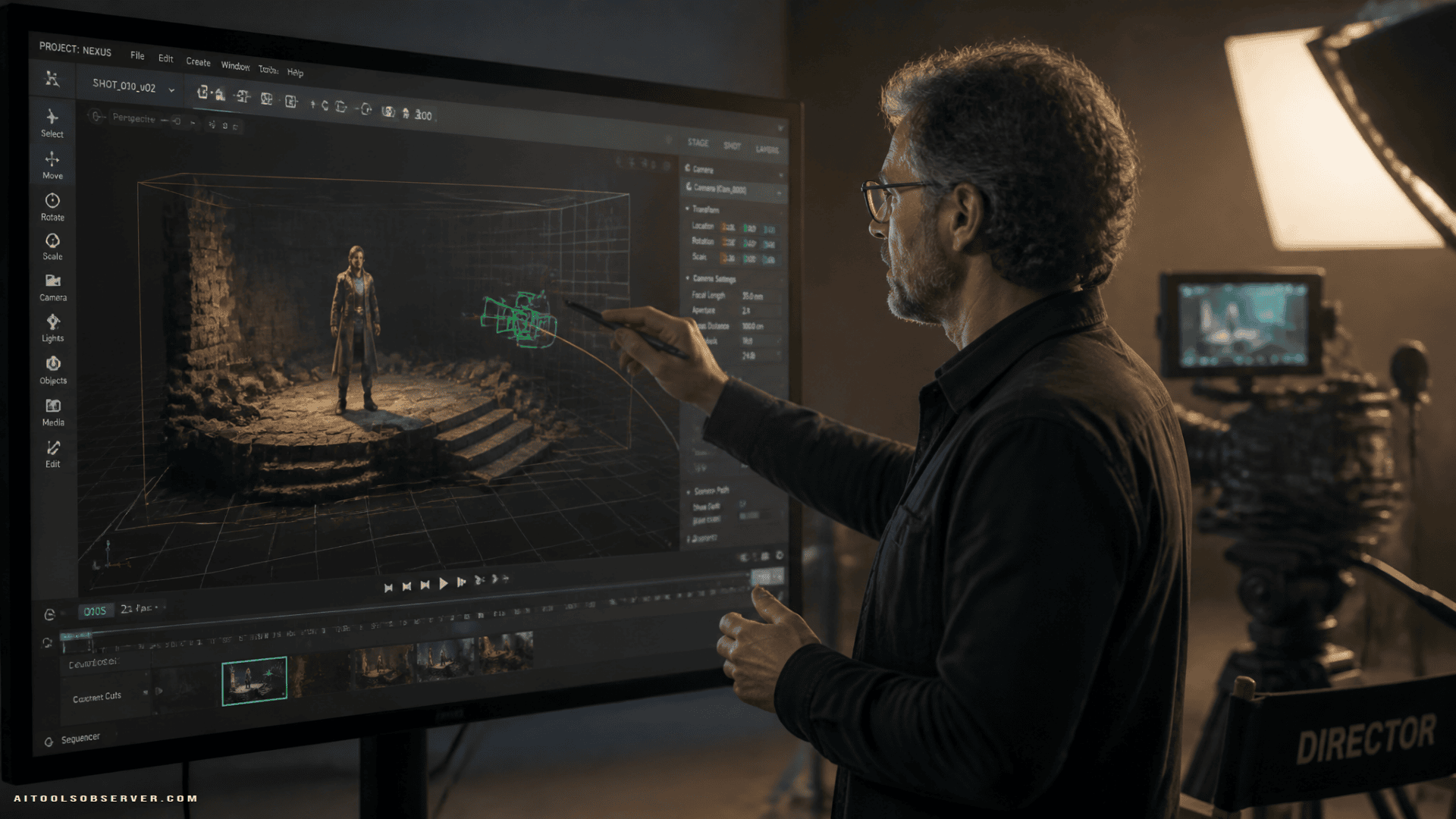
The practical idea is simple: instead of treating AI video like a flat image-generation problem, the tool introduces a more spatial way of working. That means creators can adjust scenes in a 360-degree context rather than repeatedly rewriting prompts and regenerating clips.
For filmmakers, that could make AI-generated shots feel less random and more directable.
The real pain point: 2D tools trying to solve 3D problems
Film language is inherently spatial. Directors think in camera moves, blocking, eyelines, depth, and composition. Most current AI video workflows still force those decisions through 2D prompts and repeated generations.
That creates a frustrating mismatch.
If a director wants:
- a tighter camera move at a specific moment
- a character placed differently in relation to the environment
- a more controlled point of view
- shot-to-shot continuity across a sequence
a purely prompt-driven workflow can become inefficient fast.
The description suggests Autodesk Flow Studio wants to reduce that friction by letting teams edit synthetic scenes more like CG or virtual production setups, without requiring the full complexity of specialist-heavy tools.
What this could look like in practice
The examples around the launch point to a few practical workflows filmmakers will care about.
1. Placing AI-generated characters into existing worlds
This is useful for previsualization, synthetic pickup shots, branded content, and hybrid production pipelines. If character placement can be adjusted with spatial control, teams may spend less time chasing acceptable outputs through endless rerolls.
2. Building environments around a character
This helps when the performance concept or subject is the priority, and the world needs to be shaped around it. That could be relevant for short-form storytelling, social video, concept scenes, and some studio workflows.
3. Refining camera and composition choices
This may be the most important part. AI video often looks impressive until a director asks for a very particular revision. A 3D editing layer is meant to make those revisions more feasible.
Who this is actually for
This launch looks most relevant for teams that already think in production terms, not just prompt terms.
The likely audience includes:
- Filmmakers and directors who need more precise control over synthetic shots
- Studios and production teams exploring AI-assisted scene creation
- Virtual production and post teams looking for a lighter bridge between generative output and CG workflows
- Content creators who want more control than typical text-to-video tools offer
It may be less relevant for casual users who only need quick standalone clips. If your goal is speed over control, a simpler AI video tool may still be enough.
Where it sits against other AI video tools
The easiest way to understand this launch is not as “another AI video generator,” but as an attempt to narrow the gap between generation and editability.
Many AI video tools focus on outputs. Autodesk Flow Studio appears to be focusing more on production usability. That distinction matters.
If the product can help teams control perspective, depth, character placement, and revision flow, then it is competing less on novelty and more on workflow value. For professional users, that is often the more important battle.
The larger signal for AI filmmaking
This launch points to a broader shift in synthetic filmmaking tools. The market is moving from “can AI make a shot?” to “can AI make a usable shot that fits a production pipeline?”
That is a different standard.
Studios and filmmakers do not just need scenes that look good in isolation. They need:
- continuity
- repeatability
- editability
- more predictable creative outcomes
A 3D layer is one of the more obvious ways to push AI video in that direction, closer to an AI production stack.
The tradeoffs to watch
More control is useful, but it does not remove the core questions around AI filmmaking.
A few issues still matter:
- Quality consistency: Better scene control does not automatically fix every visual artifact or uncanny result.
- Audience acceptance: More polished synthetic shots may reduce friction, but viewer tolerance is still an open question.
- Workflow complexity: Adding 3D control can improve precision, but it may also introduce more production decisions and learning overhead.
- Team fit: Tools like this tend to create the most value when they slot into existing studio or creator workflows, not when they sit beside them.
So the value of this launch will depend less on the demo and more on whether it helps teams make fewer compromises during actual production.
Why Autodesk Flow Studio may have an opening here
There is a middle ground in the market that has not been fully solved.
On one side, prompt-first AI tools are fast but often unpredictable. On the other, high-end CG and game-engine workflows offer control but can require specialized talent and heavier pipelines.
Autodesk Flow Studio seems to be aiming directly at that middle ground: more directable than pure generation, more accessible than full-scale 3D post workflows.
If that positioning holds up in real use, it could be appealing to both studios and creators who want synthetic shots that behave more like editable production assets.
What filmmakers should do next
If you are evaluating AI video tools for production, this launch is worth watching for one reason: it focuses on control, not just output.
The key question is simple. Can your team revise a synthetic shot the way you would revise a real one?
If the answer is increasingly yes, tools like Autodesk Flow Studio become more than experimentation software. They start becoming part of the filmmaking workflow. For directors and studios, that is the shift that actually matters.









Comments (0) No comments yet
Want to join this discussion? Login or Register.
No comments yet. Be the first to share your thoughts!