What Is AITextTune?
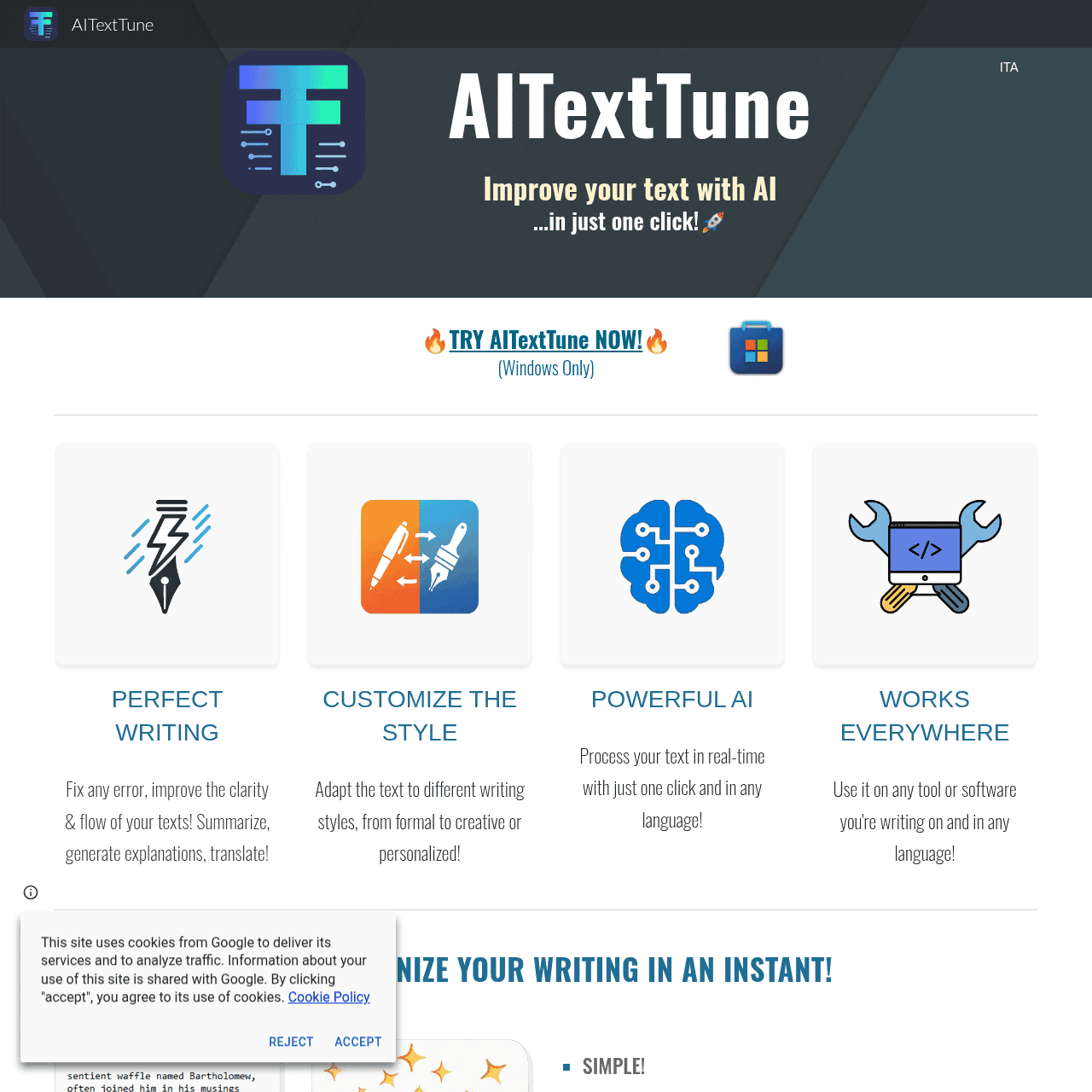
AITextTune is an AI-powered text assistant for Windows that works on top of any application, letting you optimize selected text using the CTRL+C+C hotkey. It corrects mistakes, improves clarity and flow, and adjusts tone from formal to creative or personalized in over 25 languages. The tool supports powerful AI functions like summarize, explain, translate, chat, and listen (text-to-speech). Users can pick from predefined writing styles or create custom styles to match their voice or brand. Leveraging Google Gemini AI*, AITextTune delivers fast, high-quality text enhancements tailored to your knowledge level and writing needs.
Quick Snapshot
AITextTune lets you instantly correct, refine, and restyle any selected text on Windows using a single keyboard shortcut. It boosts clarity, saves time, and works across all your apps and languages.
- Works on
-
- Web
- Pricing Model
- Cannot determine the price.
- Fits on
- Affiliate Program
- We could not identify an affiliate program.
- API Availability
- We could not identify whether an API is available.
- Key Features
-
- Instantly improve any selected text on Windows
- Correct, restyle, summarize, and translate in 25+ languages
- Use custom writing styles powered by Google Gemini
- Audience
-
- writers
- students
- professionals
- marketers
- content creators
- non-native speakers
- remote workers
Screenshot

Key Features of AITextTune
Hotkey-based assistant
Trigger AITextTune with the CTRL+C+C shortcut on Windows to optimize any selected text in any application without changing your workflow.
Text correction
Automatically fixes grammar, spelling, and phrasing issues to make your writing clearer and more professional.
Style and tone control
Switch between formal, creative, or personalized styles and create custom styles to match your unique voice or brand.
Summarize and explain
Condense long passages into concise summaries or generate clear explanations tailored to your knowledge level.
Translation in 25+ languages
Translate text across more than 25 languages while preserving meaning and adapting tone when needed.
Chat and guidance
Use chat-like interactions to refine ideas, ask for improvements, or request alternative versions of your text.
Text-to-speech listening
Listen to your text via text-to-speech to catch issues and better understand the flow and tone of your writing.
Powered by Google Gemini AI
Leverages Google Gemini AI* to deliver fast, high-quality text enhancements and multilingual capabilities.
Use Cases for AITextTune
Academic writing
Students can quickly correct grammar, refine arguments, and clarify explanations in essays or reports, all from within their existing writing apps.
Professional communication
Professionals can instantly polish emails, proposals, and internal documents for clarity and tone, reducing misunderstandings and editing time.
Content creation
Content creators and marketers can restyle copy from formal to creative, summarize long drafts, and adapt messaging for different audiences in seconds.
Multilingual support
Non-native speakers can translate text and adjust style in 25+ languages, making it easier to write confidently for global audiences.
Remote collaboration
Remote workers can use summaries, explanations, and text-to-speech to quickly process long messages and documents across tools like email, chat, and project platforms.
Frequently Asked Questions
What is AITextTune and how does it work on Windows?
AITextTune is an AI writing assistant for Windows that optimizes any selected text using the CTRL+C+C hotkey. It opens a small assistant window where you can correct, improve, restyle, summarize, explain, or translate the text and then paste the result back into your document.
Does AITextTune work inside any Windows application?
Yes, AITextTune is designed to run on top of your Windows environment and works with any application where you can select text, including word processors, email clients, browsers, and chat tools.
Which languages does AITextTune support?
AITextTune supports summaries, translations, and text improvements in over 25 languages, enabling you to write and refine content for multilingual audiences.
Can I customize the writing style in AITextTune?
Yes, AITextTune offers predefined writing styles such as formal or creative and also lets you create custom styles tailored to your personal or brand voice.
Is there a free version of AITextTune?
The available information indicates that there is no free version of AITextTune. For current pricing or trial options, you should check the official website.
Does AITextTune offer text-to-speech features?
Yes, AITextTune includes a listen function that converts text to speech, helping you review the flow and sound of your content.
Which AI model powers AITextTune?
AITextTune leverages Google Gemini AI* to provide its text enhancement, summarization, explanation, and translation capabilities.
AITextTune · Our Verdict
AITextTune stands out as a focused Windows-sidekick for everyday text improvement, especially if you frequently switch between apps. Its hotkey-first design and multi-language support make it a strong fit for users who want quick, in-context polishing without moving their content into a separate web editor.
AITextTune ·
-

Keevo
Stop losing traffic to stale content with AI
SEO Writing & Optimization -
Acti
Turn every keystroke into instant action
Productivity & Automation AI - Subscription
Outcast
Record once and repurpose content everywhere.
Podcast Editing Assistants - Subscription Premium
Papers
Discover, organize, and cite in one place
Academic & Research Writing - Freemium
Dear Ai
AI-crafted handwritten letters for every emotion
Text & Writing AI - Your Ad Here
-
NamingMagic
AI-powered startup naming in seconds
Brand Strategy & Positioning -
Cohere
Enterprise AI that’s private, secure, and controllable
AI Model Hosting & Deployment