
What Is GoWhisper?
GoWhisper is a cross‑platform desktop transcription app for Mac and Windows that runs AI models locally to convert audio and video into text. Because all processing happens on your own machine, recordings never leave your computer, providing strong privacy and data protection.
The app supports multiple languages and offers a simple three‑step workflow: drop your media, select a model, and export your transcript. With no required subscriptions or cloud uploads, it is particularly suited to researchers, journalists, podcasters, and other professionals handling sensitive or confidential recordings.
By combining offline processing with a desktop‑native interface, GoWhisper delivers fast, reliable transcription for everyday and high‑compliance use cases.
Quick Snapshot
GoWhisper keeps every transcription fully on your computer, eliminating cloud privacy risks while delivering fast, accurate speech-to-text. It’s ideal for professionals who need secure, repeatable transcription without ongoing subscription costs.
- Works on
-
- Web
- Mac
- Pricing Model
- Freemium
Starting at $25 one-time — GoWhisper offers a free tier with core local transcription features, plus a Pro license available for a one‑time payment of $25. The Pro plan unlocks advanced functionality and unlimited usage without ongoing subscriptions. - Fits on
- Affiliate Program
- We could not identify an affiliate program.
- API Availability
- We could not identify whether an API is available.
- Key Features
-
- Keep all transcripts fully local and private
- Transcribe audio and video on Mac and Windows
- Simple offline workflow without subscriptions
- Audience
-
- researchers
- journalists
- podcasters
- content creators
- students
- business professionals
- privacy conscious users
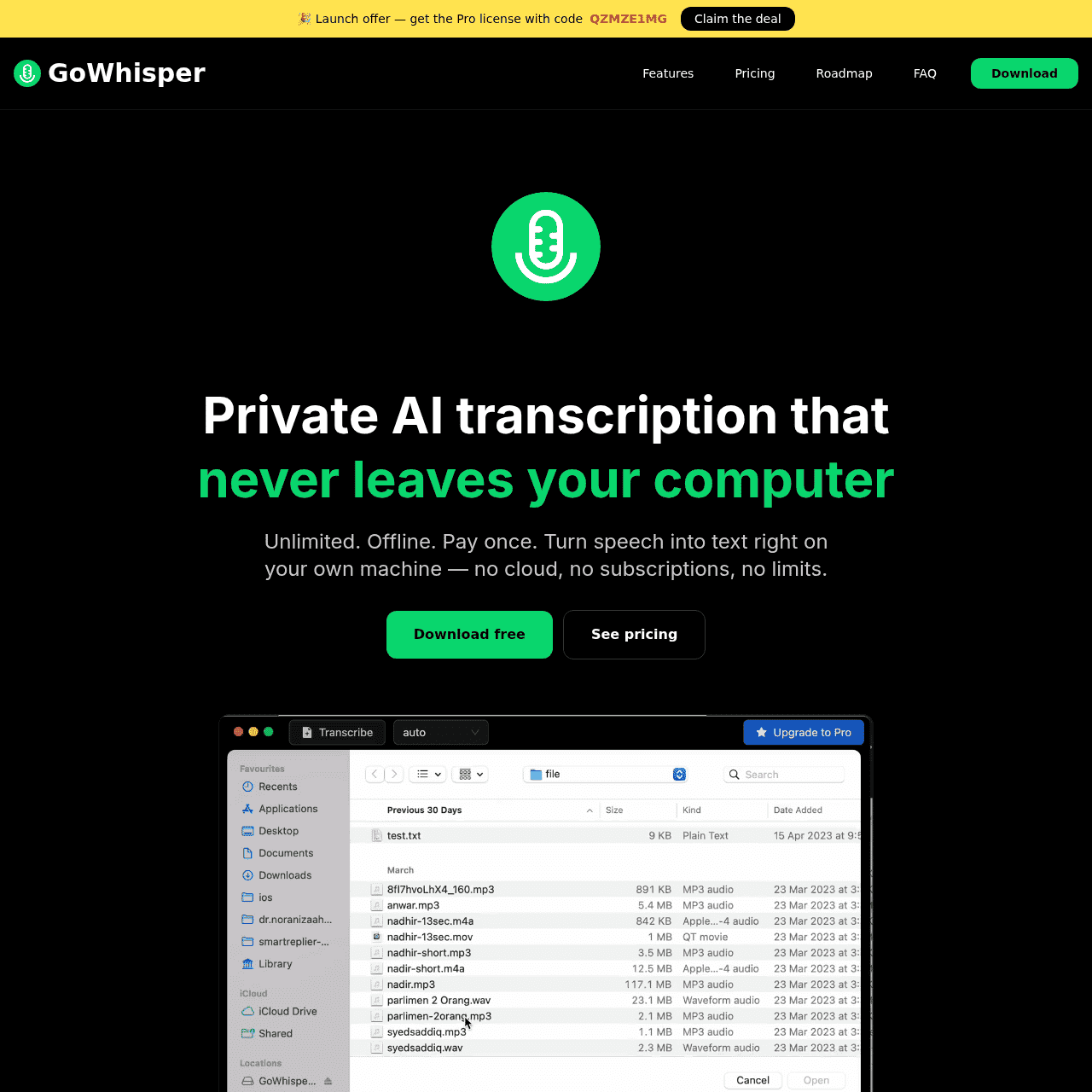
Screenshot

Key Features of GoWhisper
Local AI transcription
Runs AI speech‑to‑text models directly on your Mac or Windows computer so audio and video files are processed entirely offline.
Cross‑platform desktop app
Provides a native application for both Mac and Windows, enabling a consistent transcription workflow across operating systems.
Audio and video support
Converts both audio and video recordings into text, streamlining transcription for varied media sources.
Simple three‑step workflow
Lets you drop your media, select a model, and export your transcript with an intuitive, minimal interface.
Multi‑language capability
Supports transcription in multiple languages, making it useful for global teams and multilingual content.
One‑time Pro upgrade
Offers a Pro license for a single $25 payment, unlocking advanced features and unlimited usage without recurring fees.
Use Cases for GoWhisper
Academic research interviews
Transcribe sensitive research interviews locally so recordings never leave institutional or personal devices, supporting stricter data protection requirements.
Journalistic reporting
Convert interviews and field recordings to text offline, protecting sources while speeding up article drafting and fact‑checking.
Podcast production
Generate episode transcripts directly on your computer for show notes, SEO, and accessibility without sending audio to third‑party servers.
Business meetings
Transcribe internal meetings or confidential calls on local machines, helping keep sensitive corporate information out of the cloud.
Lecture and class notes
Students can turn lecture recordings into searchable text offline, keeping educational content private while improving study efficiency.
Frequently Asked Questions
Does GoWhisper upload my recordings to the cloud?
No. GoWhisper processes all audio and video files locally on your Mac or Windows computer, so your recordings never leave your device.
Which platforms does GoWhisper support?
GoWhisper is available as a desktop application for both Mac and Windows, offering a similar local transcription experience on each platform.
Is an internet connection required to use GoWhisper?
Once installed and set up, GoWhisper performs transcription locally using on‑device AI models, so you can transcribe files without an active internet connection.
Does GoWhisper support multiple languages?
Yes. GoWhisper supports transcription in multiple languages, making it suitable for international users and multilingual projects.
How is GoWhisper priced?
GoWhisper provides a free tier with core local transcription features and a Pro license available for a one‑time payment of $25, with no ongoing subscription fees.
GoWhisper · Our Verdict
GoWhisper stands out for users who prioritize privacy and local control over their transcription workflows. By avoiding cloud uploads and subscriptions, it offers a straightforward, desktop‑native solution that fits well in security‑sensitive or offline environments. Its focus on simplicity and multi‑language support makes it a practical option for professionals who transcribe frequently.
GoWhisper ·
-
 Subscription
 Outcast
Record once and repurpose content everywhere.
Podcast Editing Assistants - Freemium
Notewand
AI medical scribe that writes your notes
Healthcare AI - One-Time
SpeechPulse
Offline voice typing for every desktop app
Speech-to-Text Transcription - Freemium
Auro – AI Voice Memo Summary
Speak your mind, get instant AI notes
Meeting Summarizers & Note-Takers - Subscription
Castmagic
Turn every recording into publish-ready content
Productivity & Automation AI - Your Ad Here
- Freemium
UniDub
Create or dub videos in 40+ languages
Audio & Voice AI -
Codiga
Customizable static code analysis that follows you everywhere.
AI Developer Tools