


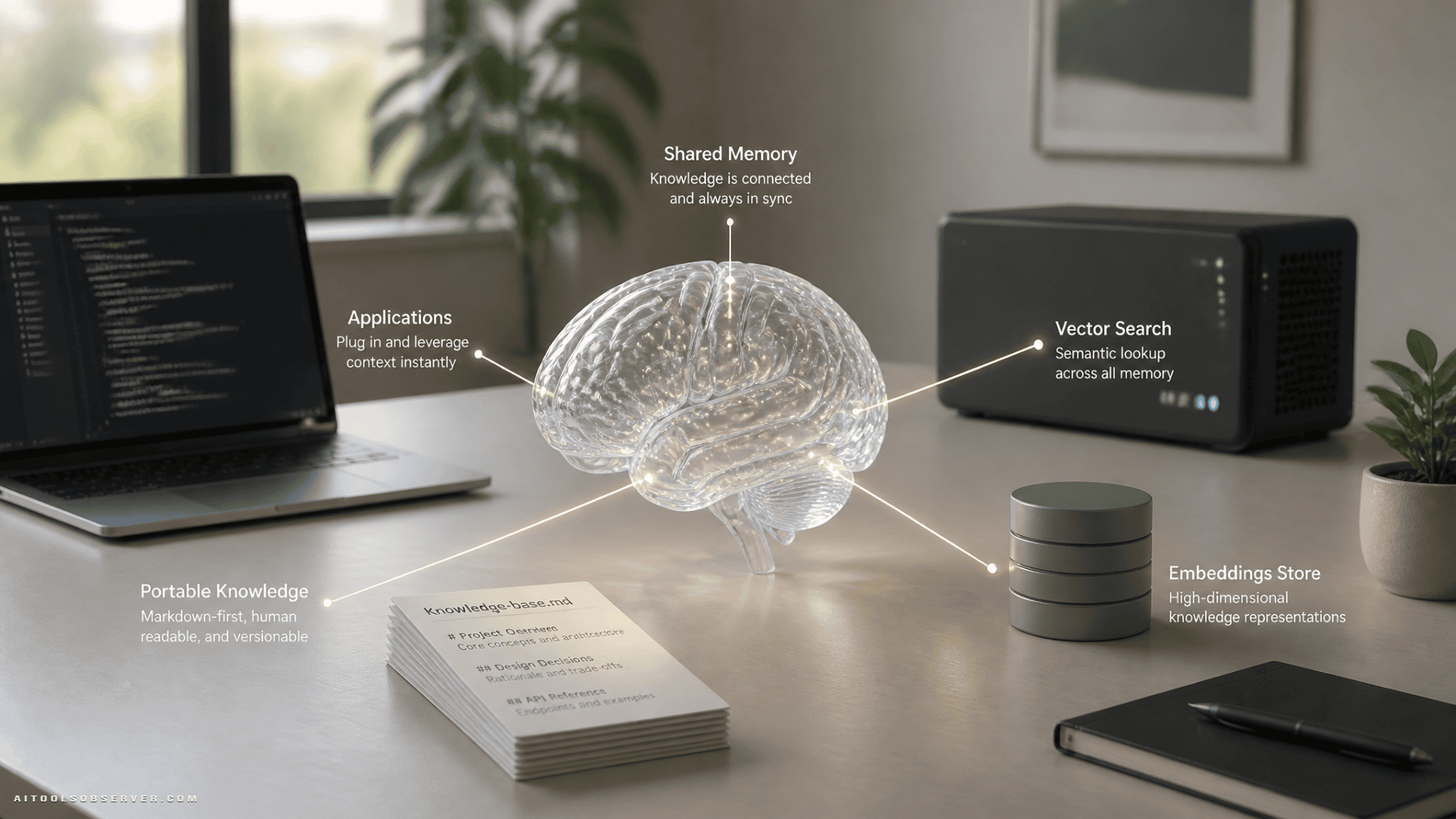
What You’re Actually Building
The brain has three layers, all in one database:
- Content — everything you’ve made, stored as rows you can read back as JSON documents
- A compiled wiki — synthesized topic pages over that content, self-maintaining as you add more
- Agent memory — what your agents learn, in four distinct flavors
On top of that:
- An MCP server — the brain as a tool for any AI client; switch chat apps freely, the brain stays put
- Agents — starting with a self-improving research agent that gets sharper every time you use it
The whole system runs on Oracle AI Database, which handles relational data, JSON documents, vector search, and in-database embeddings in one engine. Less glue code. Your data, its meaning, and your agents’ memory all live together.
It runs locally first (free container on your laptop), then lifts to Oracle Cloud when you want it always-on. The Always Free tier includes two Autonomous AI Databases, a compute VM to host the MCP server, and 10 TB of monthly outbound transfer—no time limit.
Why a Database and Not Just a Markdown Vault
Many solid second-brain setups start as a folder of markdown files. This build keeps markdown at its core—sources/ holds your content as plain markdown with frontmatter, the portable canonical copy. What changes is the layer around it.
Four goals here are, at heart, database requirements:
Search by meaning. Semantic search needs embeddings, and embeddings need an indexed store. This build puts the text, its vectors, and the embedding model itself in one engine. No external embedding API to call.
Privacy that’s enforced, not remembered. With files, keeping private material out of a pipeline relies on every script honoring a folder convention. A visibility column turns that intent into a constraint the engine applies on every read path—search, the wiki compiler, memory consolidation, MCP tools.
The document feel without document rot. JSON Relational Duality lets you declare how normalized tables compose into a document. Your app and your agents read a wiki page as one JSON document with citations nested. Underneath, every citation is a foreign key the engine keeps consistent as your content changes.
Memory that consolidates concurrently. Agent memory is queryable state. Recall is a vector search. Consolidation rewrites facts transactionally. The MCP server, the daily sync, and multiple agents can read and write the same brain at the same time.
The framing isn’t markdown or a database. It’s markdown where it shines (authoring, portability), a database where the work is (retrieval, relationships, memory, governance). If you want to explore related tooling patterns, see Knowledge Management.
What You Need
- A Mac with Homebrew
- Python 3.12
- About 20 minutes
- No prior Oracle experience required
Every step below is copy-pasteable. If something errors, paste it into Claude or ChatGPT and keep moving.
Step 1: Stand Up Oracle AI Database Locally
Run the free Oracle AI Database container image locally. It’s the same engine as the cloud, so AI Vector Search, JSON Relational Duality, and in-database ONNX embeddings all work on your machine.
# Get the code
git clone https://github.com/oracle-devrel/oracle-ai-developer-hub.git
cd apps/second-brain

# Container engine (headless, no Docker Desktop needed)
brew install colima docker docker-compose
colima start --cpu 4 --memory 8 --disk 60

# Python environment
brew install python@3.12
python3.12 -m venv .venv
./.venv/bin/pip install -r oracle/agent/requirements.txt yt-dlp

# Config (the CHANGE_ME_* placeholders work for the local sandbox)
cp oracle/.env.example oracle/.env

# Start Oracle AI Database, apply schema, load the embedding model
docker-compose -f oracle/docker-compose.yml up -d
./oracle/download-model.sh
./oracle/bootstrap.sh
Confirm it’s running:
./.venv/bin/python -c "import sys; sys.path.insert(0, 'oracle/agent'); import db; print(db.connect().cursor().execute("select product from product_component_version where product like 'Oracle %'").fetchone()[0])"You now have a live database with the content schema, the Duality view, four memory tables, and the MiniLM embedding model loaded. Everything below runs against it.
Step 2: Store Content, Read It as Documents
Load a public YouTube channel as sample data so you can watch the pipeline before pointing it at your own content:
mkdir -p exports/youtube

./.venv/bin/yt-dlp --skip-download --dump-json --playlist-items 1-7
  "https://www.youtube.com/@oracledevs/videos" > exports/youtube/videos.jsonl

./.venv/bin/python scripts/youtube.py
Why JSON Relational Duality Matters Here
The classic tension in app development: your code thinks in documents (a post is one thing—its text, platform, media), but your database wants normalized rows (platforms stored once, media in its own table, consistency enforced).
JSON Relational Duality doesn’t make you pick. You declare once, in SQL, how the relational tables compose into a document. The database serves both interfaces over the same rows. Read the view, you get one JSON document with everything nested. Write JSON through the view, and the engine updates the underlying normalized tables. Change a row relationally, the document reflects it instantly.
CREATE TABLE posts (
  post_id NUMBER GENERATED BY DEFAULT AS IDENTITY PRIMARY KEY,
  platform_id VARCHAR2(20) NOT NULL,
  kind VARCHAR2(20) DEFAULT 'post',
  title VARCHAR2(1000),
  caption CLOB,
  content_embedding VECTOR(384, FLOAT32)
);

CREATE OR REPLACE JSON RELATIONAL DUALITY VIEW post_dv AS
posts @insert @update @delete {
  _id post_id
  title title
  caption caption
  kind : kind
  platform platforms { name: display_name }
  media media { { url: url kind kind } }
};
Your app reads the view as JSON. The engine keeps the relational tables consistent underneath. No ORM, no sync code. In Step 5, every wiki read the agent makes goes through a Duality view—one query returns the page with its citations already nested.
Step 3: Search by Meaning
To search by meaning you need embeddings. With Oracle AI Database, you don’t call an external embedding API. You load a small ONNX model (MiniLM) into the database once—Step 1 already did this—then generate embeddings in SQL.
EXEC DBMS_VECTOR.LOAD_ONNX_MODEL(
  directory => 'VEC_MODELS',
  file_name => 'all_MiniLM_L12_v2.onnx',
  model_name => 'MINILM',
  metadata => JSON('{"function": "embedding", "embeddingOutput":"embedding",
    "input":{"input" : ["DATA"]}}')
);
From this point on, VECTOR_EMBEDDING(MINILM USING :text AS DATA) works anywhere SQL runs. Semantic search becomes a single query—no API keys, no data leaving the database:
SELECT title, caption FROM posts
ORDER BY VECTOR_DISTANCE(
  content_embedding,
  VECTOR_EMBEDDING(MINILM USING :q AS DATA),
  COSINE
)
FETCH FIRST 5 ROWS ONLY;
Test it:
./.venv/bin/python -c "import sys; sys.path.insert(0, 'oracle/agent');
  import db, content;
  [print(f"{r['dist']:.3f} {r['title']}")
  for r in content.search_content(db.connect(), 'protecting data in the cloud', k=3)]"
If you’re comparing related discovery patterns, see AI Search Engines.
Two Refinements Worth Knowing
The repo chunks long content (transcripts, AI chats) into a content_chunks table so a query lands on the right passage, not just the right item. It also fuses vector search with a keyword pass via Reciprocal Rank Fusion, so exact names, handles, and error codes that pure-vector search can miss still surface. The fusion weights by source type—your published work wins close calls over your AI-chat notes.
Step 4: The Research Agent and Four Kinds of Memory
Add your API key to oracle/.env and run the agent:
# oracle/.env:
ANTHROPIC_API_KEY=sk-ant-...

cd oracle/agent && ../../.venv/bin/python demo_research.py
The agent is a small, transparent loop—Claude plus tools, with the database doing the heavy lifting. Its tools: search your content, read a post, read a wiki page, search the live web. It grounds claims about your work in your content and uses the web for what’s current.
What Makes This a Second Brain, Not a Search Box
Memory. The build models four long-term memory types, each a table in the same database:
| Memory Type | Table | What It Stores |
|---|---|---|
| Episodic | agent_memory | Every past research run: question, outcome, sources, lesson |
| Semantic | semantic_memory | Durable facts distilled from those runs |
| Conversational | conversations | The current multi-turn context |
| Procedural | procedural_memory | The agent’s tools, retrieved by relevance per question |
Before answering, the agent recalls relevant past runs and learned facts, and ranks its own toolset against the question. That’s procedural memory—with four tools it’s a hint; at forty tools it’s how you’d decide which ones to send at all.
After answering, it records the run. A distillation step runs automatically: “what happened” becomes “what I now know about this creator.” The more you use it, the more it knows your themes, recurring questions, and gaps—and stops re-deriving them every time.
The LLM Is a Config Switch
Set LLM_PROVIDER in oracle/.env to anthropic (default), openai, or ollama. The wiki compiler, memory consolidation, classifiers, and idea agent all follow. No code edits.
Want it free and fully local? Use Ollama:
brew install ollama && ollama pull llama3.2
# Then in oracle/.env:
LLM_PROVIDER=ollama
LLM_MODEL=llama-3.2
The entire build runs locally. The database, schema, semantic search, and MCP server are LLM-free. Embeddings use open-source MiniLM running inside Oracle—search needs no API key at all. If you want an example of an open-source client, you can explore that separately.
Step 5: The Self-Maintaining Wiki
The wiki layer synthesizes topic pages over your content. Each page is generated from your actual posts and chunks, cited and linked, and updates as you add more material.
The Duality view makes wiki reads clean. One query returns a page with its citations already nested as a JSON document. The agent doesn’t need to join tables or reassemble fragments—it reads one object and has everything it needs.
The wiki compiler runs on whatever LLM you’ve configured. It classifies new content, identifies relevant topics, regenerates or extends pages, and updates citations. Point it at your own sources and it builds a knowledge base that reflects your actual work, not a generic summary of a domain.
This is the self-improving loop in practice: ingest content, embed it, classify it, add it to the wiki, update memory. The research agent and every agent you build after it get sharper as you add more material.
Step 6: The MCP Server—Your Brain in Any AI Client
MCP (Model Context Protocol) is what makes the brain portable. The system exposes the brain through an MCP server, so any compatible client can connect to it without you moving your data.
The MCP server exposes tools for:
- Semantic search over your content
- Reading posts and wiki pages
- Writing to agent memory (with human approval gating write operations)
- Recalling past research runs
Because the server sits in front of the database, the privacy rules you set—visibility scoping, private-data exclusion—apply to every client that connects. Claude can’t retrieve what you’ve marked private. Neither can ChatGPT. The constraint lives in the engine, not in each client’s configuration.
To connect Claude Desktop, add the MCP server to your Claude config. To connect ChatGPT or an open-source client, point it at the same server. The brain doesn’t move. The clients do.
Step 7: Point It at Your Own Content
The sample data (a public YouTube channel) shows you the pipeline works. Now swap in your own sources.
The loaders the repo includes handle:
- Markdown vaults
- YouTube channels
- Instagram, LinkedIn exports
- Notion exports
- AI chat exports
- Docs and bookmarks
Each loader normalizes content into the same schema, runs secret scanning before ingestion, classifies items as content or private, and generates embeddings in the database. Private items are stored but excluded from every retrieval path—search, wiki compilation, memory consolidation, MCP tools.
Add a source, run its loader, and the wiki updates. The research agent’s next run knows about the new material.
Step 8: Lift to Oracle Cloud (When You Want It Always-On)
Steps 1–7 run entirely locally. When you want the brain available from any device, any client, at any time, move it to Oracle Cloud.
The Always Free tier covers what you need:
- Two Autonomous AI Databases (1 OCPU, 20 GB each)
- An Always Free compute VM to host the MCP server
- 10 TB of monthly outbound transfer
- No time limit
The same code runs on both. Change the connection string in oracle/.env to point at your Autonomous Database, deploy the MCP server to the compute VM with authenticated hosting, and the brain is live. Your local setup becomes a development environment. The cloud instance is what your AI clients connect to.
Privacy and Security: What the Build Enforces
This is worth being explicit about because a second brain holds sensitive material.
The build’s security model has several layers:
- Visibility scoping — a column the engine enforces on every read path, not a folder convention you have to remember
- Secret scanning — runs before ingestion; credentials and tokens don’t enter the database
- Private-data exclusion — private items are stored but never surface in search, wiki compilation, or memory consolidation
- Least-privilege database access — the MCP server and agents connect with accounts scoped to what they need
- Authenticated MCP hosting — the server requires authentication; it’s not an open endpoint
- Human approval for write tools — MCP tools that write to the brain require explicit approval
The privacy model is enforced by the database, not by trusting every script in the pipeline to honor a convention. That’s the practical difference between a rule and a reminder.
If you’re thinking about client-side risks such as prompt injection, keep that concern in mind alongside these controls.
What You Can Ask It That No Generic Assistant Can Answer
Once the brain is running and fed with your content, the research agent can handle questions that require knowing your actual work:
- “Find that conversation where I worked through X idea.”
- “Prep me for a conversation with this guest: how I usually interview, what I’ve covered with them before, what’s new in their domain.”
- “Help me draft the next post in my series, in my tone, building on what I’ve already covered.”
These aren’t prompts you can send to a generic assistant and get useful answers. They require a system that knows your content, remembers what it’s learned, and can retrieve the right context by meaning rather than keyword.
The Practical Takeaway
The brain is the product. MCP is how everything reaches it. Agents are what you keep building on top.
The architecture here is deliberately sustainable. One database holds content, embeddings, the wiki, and agent memory. One MCP server exposes all of it to any client. One config switch changes the LLM. You’re not building a setup tuned to one use case that needs replumbing for the next—you’re building a foundation that serves different uses of the same knowledge as your needs change.
Feed it your content. Use it daily. It gets more useful as it grows, and it survives whatever tool churn comes next.
The complete project—every loader, the agent, the MCP server—is at GitHub.










Comments (0) No comments yet
Want to join this discussion? Login or Register.
No comments yet. Be the first to share your thoughts!