


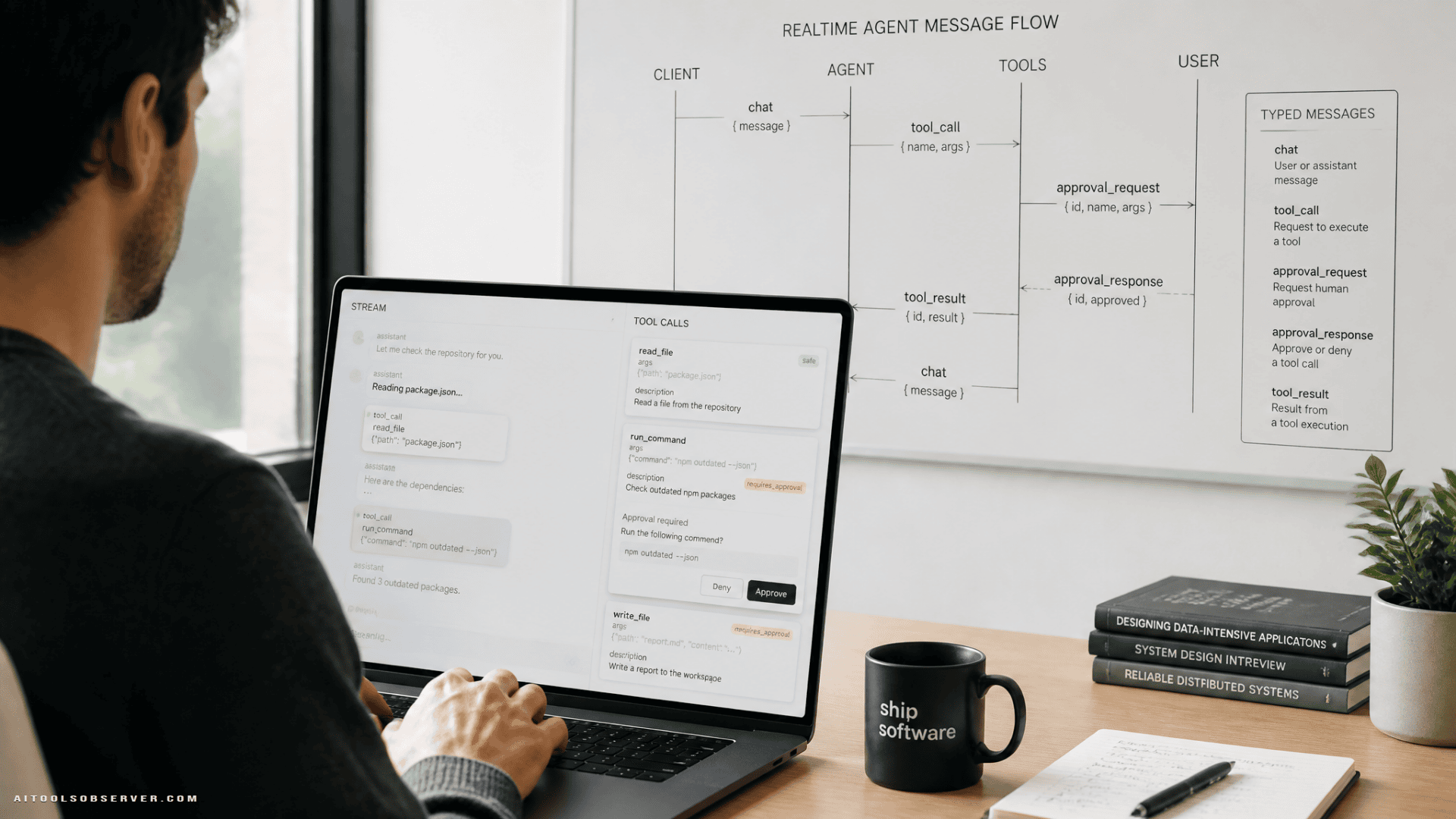
What you’re building
The pattern is simple:
- The user sends a prompt over a WebSocket
- The agent streams text back in realtime
- Tool calls stream as separate UI events
- Destructive tools pause for human approval
- The client approves or denies
- The run resumes with the same conversation state
The demo shape here is a task assistant. Safe tools run normally. Destructive tools, like deleting tasks, stop and wait for the user.
That pause-resume loop is the whole reason WebSockets fit better than a one-way stream. A conversation is not just output. It’s back-and-forth with interruptions.
Why this stack works
Pydantic AI and typed WebSockets solve the same annoying class of problem: hidden contracts.
With many agent setups, tool inputs, outputs, and UI messages drift apart over time. The backend “knows” what it sends. The frontend “sort of knows” what it receives. Then someone renames a field and your app learns humility in production.
The alternative is to define everything as types:
- agent dependencies are typed
- tool arguments are typed
- outputs are typed
- WebSocket messages are typed
- the frontend client is generated from the same contract
That gives you a system where backend and frontend are reading from the same map instead of exchanging vibes.
Start with the agent, not the socket
Before thinking about transport, define what the agent can return.
In this pattern, every run ends as one of two things:
- a final structured answer
- a deferred tool approval request
That distinction matters. It forces your app to handle “I’m done” and “I need permission” as separate states instead of burying them in freeform text.
A practical output shape looks like this:
TextAnswercontentfollow_ups
DeferredToolRequests
The structured answer is more useful than a plain string. The agent can return the main response plus suggested next prompts, and the UI can render those suggestions as clickable chips without scraping text.
The dependency object should also be typed. In the task assistant example, the key dependency is the conversation_id, so each tool operates on the correct task list.
That gives you a clean mental model:
- the model reasons
- tools act on conversation-scoped data
- outputs are validated objects
- approval requests are first-class results
Mark destructive tools for approval
This is the nice part.
Safe tools can run directly. Destructive tools should be marked as requiring approval. When the model chooses one of those tools, the run stops before execution and returns a deferred approval object instead.
That means the agent does not delete anything yet. It hands the app a typed “pending action” and waits.
A good example split is:
- safe:
add_task,list_tasks,update_task_title - approval-gated:
delete_task,clear_all_tasks
This separation keeps approval logic out of the tool body. The tool remains a tool. The runtime decides whether execution is immediate or deferred.
That’s cleaner than stuffing confirmation prompts into your own business logic.
If you want more background on the tool loop, this pattern fits naturally with approval-gated execution.
Define the WebSocket contract up front
This is where most realtime apps get sloppy.
If your WebSocket server has a single receive_json handler with branching on string keys, you don’t have a protocol. You have a tradition.
Instead, define each message as a typed model with a literal action field. That action acts as the discriminator for validation and routing.
A compact protocol is enough.
Client to server:
chattool_decision
Server to client:
user_messagestream_starttext_deltatool_calltool_resultapproval_requeststream_endsuggestionshistorytasks_updatednotificationagent_error
This is already miles better than “send a blob and hope the UI guessed right.”
It also gives you a documentation artifact. If your message models generate an AsyncAPI schema, the contract stops being tribal knowledge and becomes something teammates and generated clients can actually use.
Stream structured output without cheating
Streaming plain text is easy because the model gives you text.
Streaming structured output is trickier because the final answer is an object, not a token stream you can blindly relay. The practical solution is to stream partial structured snapshots and turn them into deltas.
The flow looks like this:
- Start the agent run
- Listen for partial
TextAnswersnapshots - Compare the current
contentto the previously sent content - Send only the new suffix as
text_delta
So the UI still gets realtime typing behavior, but your backend keeps the stronger contract of validated structured output.
That’s the useful tradeoff here:
- plain text streaming is simpler
- structured output gives the UI richer, safer data
You can have both if you diff snapshots into deltas.
Stream tool activity separately from text
Tool activity should not be smuggled inside prose.
When the agent calls a tool, send a dedicated tool_call event. When the tool completes, send a tool_result event. The UI can render those as live cards, badges, or timeline items while text continues to stream.
This separation pays off immediately:
- users can see what the agent is doing
- tool execution is inspectable
- your rendering logic is simpler
- tool state does not depend on text formatting
And the loop stays generic. It doesn’t need special rendering logic for each individual tool. It just forwards typed events.
Handle deferred tools as a special case
There’s one subtle edge case worth knowing.
A deferred tool call is not executed yet, so it won’t emit the same event stream as a normal tool execution. In other words: no execution, no tool result event.
That means your server needs to explicitly announce the paused tool call before sending the approval_request.
Why bother? UI consistency.
If normal tool calls and approval-paused tool calls both produce the same tool_call card shape, the client does not need two rendering paths. It simply shows the tool card, then either:
- marks it as running
- marks it as awaiting approval
Small backend decision. Big frontend simplicity.
Make the run backgrounded and broadcast-based
If you await the full agent run inside the WebSocket request handler, it will work for a demo and annoy you later.
Three common problems show up fast:
- the handler is blocked during the run
- refreshing the page can kill the stream
- multiple tabs drift out of sync
The better pattern is to broadcast to a conversation group and run the agent work in the background.
That changes the shape of the system:
- each socket joins a per-conversation group
- the agent run publishes events to that group
- every connected tab receives the same stream
- the run can outlive any single connection
Now a refresh isn’t catastrophic. Reconnect, replay history, continue receiving live events.
This also makes your own prompt echo cleaner. Instead of the sending client appending its local message and everyone else seeing a different sequence, broadcast the user_message event to all tabs, including the sender. One source of truth. Less UI weirdness.
This is especially relevant in systems that rely on human-in-the-loop decisioning.
Add concurrency rules early
Realtime agents need guardrails.
If two runs start at once for the same conversation, state gets messy fast. A simple per-conversation running registry is often enough to reject concurrent runs with a typed agent_error.
That is not glamorous architecture. It is useful architecture.
At minimum, decide:
- can one conversation have multiple active runs?
- what happens if a second prompt arrives mid-run?
- what happens if approval is pending and another action arrives?
Typed error messages help a lot here. They keep failure states visible and explicit instead of silently ignored.
Build the human approval loop
This is the flow users actually notice.
A good approval cycle looks like this:
- The model requests a destructive tool
- The run ends with deferred approvals
- The server emits the paused
tool_call - The server emits
approval_request - The UI renders Approve and Deny controls
- The user sends a
tool_decision - The server resumes the run with those decisions
- Approved tools execute, denied tools return denial context to the model
- The model finishes the response and streams it normally
The important design choice is that approval decisions are data, not ad hoc chat messages.
A decision payload can include:
tool_call_idapproved- optional denial reason
- optional argument overrides
That last one is especially practical. Sometimes the user wants to approve the action, just not with the exact original arguments. Let them edit before approving.
Thinking of approval decisions as explicit workflow data makes the system easier to govern.
Keep approvals tied to the conversation, not the connection
If pending approvals are stored against a socket, your product gets fragile fast.
Refresh the page? Approval disappears.
Switch devices? Dead end.
Use two tabs? Confusion.
Instead, key pending approvals by conversation. Then any new connection for that conversation can receive the open approval request and act on it.
That gives you a few nice properties:
- approval survives reconnects
- another tab can approve the request
- another device can approve the request
- stale clients can detect that the request was resolved elsewhere
That’s the sort of small infrastructure choice users never praise and always notice when it’s missing.
Tell the model not to “helpfully” ask in chat
This is an easy miss.
If your instructions say something like “destructive actions require user approval,” the model may decide to ask for permission in plain chat instead of calling the gated tool. Polite. Wrong.
You need to be explicit about the division of labor:
- the model should call the destructive tool directly
- the system will pause execution automatically
- the UI handles approval
- the model should not ask for confirmation in prose
Without that instruction, the agent may bypass your nice typed approval flow with a friendly “Are you sure?” That’s not malicious. It’s just being literal in the most inconvenient way possible.
Generate the frontend client from the contract
Once you have a typed message schema, don’t waste it.
Generate the TypeScript types and client bindings from the AsyncAPI contract so the React app consumes the exact same protocol the server declares.
That closes one of the most common realtime failure loops:
- backend adds a new event
- frontend doesn’t know it exists
- payload shape changes
- everyone learns through bugs
Generated types won’t fix product decisions, but they do eliminate a lot of avoidable mismatch.
For a team, this also improves onboarding. A new developer can inspect the contract and understand the conversation surface quickly, instead of reading backend handlers and frontend reducers side by side like a detective with too much coffee.
Test the flow without calling a live model
This architecture is very testable if you keep the agent build as a factory instead of a global singleton.
That lets you swap in a fake model and validate the hard parts without hitting an external LLM:
- streaming text deltas
- tool call rendering
- deferred approvals
- resumed runs
- multi-tab broadcasts
- reconnect behavior
- concurrent-run rejection
This is one of the quiet advantages of typed contracts. Tests can assert on actual message shapes and sequences, not just string fragments and side effects.
For realtime systems, that matters a lot.
Useful UI patterns for this setup
The backend contract is only half the story. A few UI choices make the experience feel much more coherent:
Render text and tool activity separately
Treat the assistant response as two synchronized streams:
- prose via
text_delta - actions via
tool_callandtool_result
Users can read while also seeing what the agent is doing.
Add clickable follow-up chips
If your final answer includes follow_ups, show them as one-tap prompts after stream_end. Structured output makes this easy and removes brittle prompt scraping.
Show approval state inline
When a destructive tool pauses, keep the tool card visible and mark it as awaiting approval. Don’t hide it in a modal if you can avoid it. Inline state is easier to understand and easier to revisit across tabs.
Replay history on reconnect
A reconnect should feel boring. That’s a compliment. The user should see the previous transcript, any pending approval, and any live resumed events without having to guess what happened while the socket was gone.
When WebSockets are worth it
Not every AI interface needs WebSockets.
If your use case is just “user sends prompt, server streams answer, done,” simpler transports can be enough. But once you need any combination of these, WebSockets start earning their keep:
- bidirectional messaging
- human approval loops
- multiple tabs
- reconnect continuity
- background jobs pushing into conversations
- long-running tool activity
- notifications outside the immediate request
The more your agent behaves like a collaborator instead of a text vending machine, the more this pattern makes sense.
A practical build order
If you want to implement this without getting lost, do it in this order:
- Define the agent output types
- Mark approval-required tools
- Define all WebSocket message models
- Generate the AsyncAPI contract
- Implement
chatandtool_decision - Stream text deltas from structured snapshots
- Stream tool call and tool result events
- Handle deferred approvals and run resumption
- Move runs into background group broadcasts
- Add reconnect replay and multi-tab support
- Generate the React client types
- Add fake-model tests for all critical flows
This sequence keeps the architecture stable while complexity rises gradually.
Common mistakes to avoid
A few traps show up often:
- treating WebSocket payloads as loose JSON blobs
- mixing tool activity into assistant prose
- storing approvals per connection instead of per conversation
- asking the model to handle user confirmation in chat
- awaiting long agent runs directly in the request handler
- appending the sender’s message locally instead of broadcasting it uniformly
- skipping a contract and hoping frontend/backend stay aligned by habit
All of these “work” for a while. Then they invoice you later.
The takeaway
If you want realtime AI agents that survive contact with actual users, build the contract first.
Use typed outputs for the agent. Use typed messages for the socket. Treat approval as a first-class state, not a chat hack. Broadcast by conversation, not by connection. Generate the client from the same schema the server declares.
The end result is not flashy. It’s better: a system where streaming, tool calls, approvals, and UI behavior line up cleanly enough that you can change the product without breaking the floor beneath it.
















Comments (0) No comments yet
Want to join this discussion? Login or Register.
No comments yet. Be the first to share your thoughts!