


What Is Tool Calling (and Why Does It Matter)?
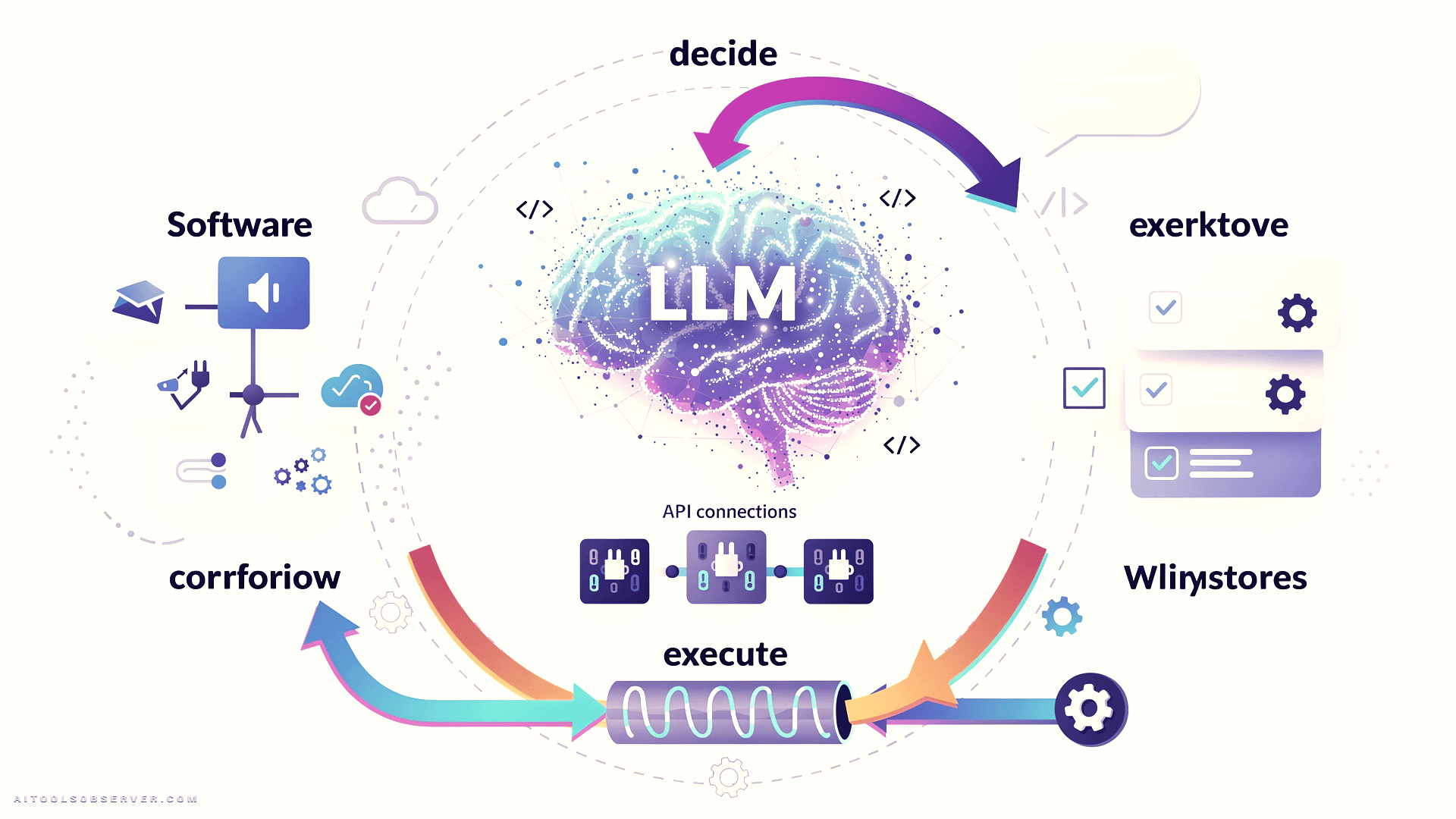
Tool calling — sometimes called function calling — is the mechanism that lets an LLM request the execution of an external function or API as part of generating its response.
Instead of just returning text, the model can signal: “I need to call this specific function with these specific arguments.” Your code then runs that function, gets a result, and feeds it back to the model. The model uses that result to produce a final, grounded response.
This is what separates a passive LLM from an agentic one.
Without tool calling, a model asked “What’s the weather in Athens right now?” will either hallucinate an answer or admit it doesn’t know. With tool calling, it can reach out to a live weather API and return accurate, real-time data.
The Critical Distinction: Deciding vs. Doing
Here’s the single most important thing to understand about tool calling, and the most common source of confusion.
The model does not execute the tool. It only decides which tool to call and with what arguments.
The actual execution happens in your code. The model generates a structured instruction — essentially a machine-readable decision — and your application takes it from there. Once the tool runs and returns a result, that result goes back to the model, which then generates a natural language response for the user.
This separation matters enormously for how you design agentic systems.
The Tool Calling Loop, Step by Step

Understanding the flow makes everything else click. Here’s how a complete tool calling cycle works:
Step 1 — User sends a message.
Something like: “What’s the weather like in Athens right now?”
Step 2 — The model reads the message and decides.
It looks at the available tools, their descriptions, and their parameters. It determines which tool is relevant and what arguments to pass. It does not generate a text answer yet.
Step 3 — The model returns a structured tool call, not text.
The response has content: None. Instead, it contains a structured instruction specifying the tool name and arguments — for example, get_current_weather with city: "Athens" and unit: "celsius".
Step 4 — Your code executes the tool.
No model involvement here. Your application runs the function, hits the API, gets the result.
Step 5 — The result goes back to the model.
You append the tool result to the message history and send everything back to the model.
Step 6 — The model generates a final response.
Now it has real data to work with. It produces something like: “It’s currently 29°C in Athens. Sounds like a great day to be outside.”
That loop — decide, execute, respond — is the foundation of every agentic AI workflow.
How the Model Knows Which Tool to Call
This is where tool definitions become critical.
When you set up tool calling, you define each tool with three things: a name, a description, and a parameter schema. The model reads these definitions and uses them to decide whether a tool is relevant to the user’s request — and if so, what arguments to extract.
For a weather tool, the description might be: “Get the current weather for a given city.” The parameters define what inputs are needed: a city name (required) and a temperature unit (optional, either celsius or fahrenheit).
The model never sees the actual API code. It only sees the description and schema. This means how you write your tool descriptions directly determines how reliably the model selects and uses them.
Vague descriptions lead to wrong tool selections. Clear, specific descriptions lead to accurate, consistent behavior. This is not a minor implementation detail — it’s a core design decision.
A Real Example: Weather API with One Tool

The classic starting point for tool calling is a weather assistant. The goal is simple: when a user asks about the weather, instead of letting the model guess, you want it to call a real API and return actual data.
Using Open-Meteo — a free, open-source weather API that requires no API key — the flow looks like this:
You define the tool in a tools list, specifying the function name, description, and parameters. You send the user’s message to the model along with that tool definition. The model responds not with text, but with a structured tool call identifying get_current_weather and the extracted arguments.
Your code then calls the Open-Meteo geocoding API to convert the city name to coordinates, fetches the current temperature, and returns the result. That result gets appended to the message history with a role: "tool" entry, linked back to the original tool call ID. The model receives everything and generates its final natural language response.
The output: a grounded, accurate answer based on live data — not a hallucination.
Scaling Up: Letting the Model Choose Between Multiple Tools
Single-tool examples are useful for learning. Real agentic applications almost always involve multiple tools, and the model needs to figure out which one applies to any given user request.
Extend the weather example by adding a currency conversion tool — using Frankfurter, another free API that provides European Central Bank daily exchange rates with no API key required.
Now the model has two tools available: get_current_weather and convert_currency. The routing logic is entirely driven by the tool descriptions and the user’s message.
How the Model Routes Requests
Ask “What’s the weather in Athens?” — the model calls get_current_weather.
Ask “How much is 200 USD in EUR?” — the model calls convert_currency, extracting amount: 200, from_currency: "USD", and to_currency: "EUR" from the user’s message.
Ask something unrelated to either tool — the model responds in plain text without calling any tool at all.
This is intelligent routing without any hardcoded logic on your end. The model reads the intent, matches it to the right tool, extracts the right arguments, and signals what needs to happen next. Your code handles the execution.
Why This Architecture Is Powerful
The model acts as a reasoning layer that sits above your tools. You can add new tools, update descriptions, or expand capabilities without rewriting routing logic. The model adapts based on what’s available and what the user is asking.
This is the core pattern behind most production agentic systems — from customer support bots that can look up orders and process refunds, to research assistants that can search the web and summarize documents.
What Makes Tool Calling the Backbone of Agentic AI
Tool calling is not just a feature. It’s the mechanism that transforms an LLM from a text generator into an agent that can interact with the real world.
Every meaningful agentic workflow — autonomous research, multi-step automation, AI-powered applications that connect to live data — depends on this loop. The model reasons about what needs to happen. Your code makes it happen. The model interprets the result and decides what comes next.
Understanding this distinction between deciding and doing is what separates developers who build reliable AI systems from those who end up debugging unpredictable behavior.
What to Watch When Evaluating Agentic AI Tools
If you’re assessing AI platforms, agent frameworks, or LLM-powered products, tool calling capability is a key signal worth examining closely.
Ask these questions: Does the platform support multi-tool routing? How does it handle cases where no tool applies? Can you inspect the tool call decisions the model makes, or is it a black box? How are tool results passed back into the conversation context?
The answers tell you a lot about how robust and trustworthy an agentic system actually is — versus how it’s marketed.
Conclusion
Tool calling is one of those concepts that sounds technical until you see the loop in action. Once you do, you start seeing it everywhere — in every AI assistant that pulls live data, every agent that takes action on your behalf, every workflow that connects language models to the real world.
The model decides. Your code acts. The result comes back. That cycle, repeated and composed, is what agentic AI is actually made of.












Comments (0) No comments yet
Want to join this discussion? Login or Register.
No comments yet. Be the first to share your thoughts!