



What AI-Assisted Coding Actually Means
AI-assisted coding is the use of AI tools—typically large language models trained on code—to help write, explain, debug, or review software while a developer still directs the work.
The key phrase is “while a developer still directs.” That’s what separates AI-assisted coding from the alternatives.
Agentic coding takes it further: the AI plans and executes multi-step tasks—writing, running, and fixing code—with minimal human supervision.
Vibe coding, a term AI researcher Andrej Karpathy coined in early 2025, describes the loosest approach: describe what you want in plain language and accept the output without closely reviewing it. It’s fast. It’s also the approach most likely to produce code you don’t understand and can’t maintain.
Understanding these distinctions matters practically. Job listings increasingly expect developers to direct AI tools skillfully, not just use them passively.
The Real Benefits—With Numbers Behind Them
The productivity case for AI-assisted coding is well-supported. In a 2023 controlled study, GitHub and Microsoft Research found developers using Copilot completed a coding task 55% faster than those working without it.
A separate field study tracking nearly 5,000 developers across Microsoft, Accenture, and a Fortune 100 electronics firm confirmed those gains hold outside the lab too.
Two findings from those studies are worth highlighting:
- Speed gains are real, especially on routine and boilerplate work.
- Less experienced developers benefit most. The productivity gap between junior and senior developers narrowed when both used AI tools. That’s a meaningful leveling effect for anyone early in their career.
The caveat: those gains assume the developer is reviewing and verifying output. Passive acceptance of AI suggestions tends to create new problems faster than it solves old ones.
What AI Coding Assistants Can Actually Do
Most AI coding tools handle several functions in a single interface. Here’s where they’re genuinely useful—and where uncritical reliance creates risk.
Code Generation and Autocomplete
This is the original use case: turning a comment, prompt, or partial line into working code, from single-line completions to entire functions.
It’s fastest on repetitive and boilerplate tasks. The risk is that generated code can look correct while relying on outdated libraries or introducing security vulnerabilities a skilled developer would typically catch.
Debugging and Bug Fixing
Paste an error message, a stack trace, or a description of unexpected behavior, and most AI tools will offer a diagnosis and a suggested fix. It’s a useful first pass, especially for common, well-documented errors.
It’s not reliable enough to be the last pass. Stack Overflow’s 2025 Developer Survey found 45% of developers report losing significant time debugging AI-generated code. The tool that created the bug isn’t always the best tool to find it.
Code Explanation and Documentation
AI tools can summarize what an unfamiliar function or codebase does in plain language and generate documentation for code that has none. This is genuinely useful for onboarding onto legacy projects.
The limitation: explanations can be confidently wrong. An AI model can misdescribe what code actually does. Treat any explanation as a starting point, not a substitute for reading the code yourself.
Test Generation
Several tools can write unit tests based on existing code, and some run those tests automatically and fix issues they surface.
The catch is important: AI-generated tests often validate whatever the code currently does—bugs included—rather than what the code is supposed to do. You still need to check tests against intended behavior.
Code Review and Refactoring
AI tools can review a pull request for style issues, obvious bugs, and some security problems, and suggest refactors for readability or efficiency.
This works well as a first-pass filter. It doesn’t replace a thorough human review, particularly for logic errors or anything requiring business context the model was never given.
The Risks You Need to Take Seriously
Most of AI coding’s real risk lives in how carefully you review the output—not in the tool itself. But a few specific risks are worth naming directly.
Security Vulnerabilities
A 2025 Veracode analysis of more than 100 AI models found they introduced security vulnerabilities in 45% of coding tasks, with failure rates exceeding 70% in Java specifically. AI-generated code contained roughly 2.74 times more vulnerabilities than human-written code in a separate comparison.
That’s not a reason to avoid AI coding tools. It is a reason to treat every generated snippet as untrusted code until you’ve reviewed it.
Intellectual Property Exposure
AI models learn from public code repositories, much of which carries open-source licenses. Those licenses can require crediting the original author, bar commercial use, or require you to release your own project under the same terms.
AI tools don’t reliably track which license applies to a given snippet. A business can end up shipping code that violates someone else’s license without anyone realizing it. If you’re building something commercial, this deserves legal attention.
Deskilling, Especially Early in a Career
Junior developer employment fell nearly 20% since 2024 even as senior roles grew, according to Stanford’s 2026 AI Index. That’s a structural shift worth taking seriously.
Developers who skip foundational skills because AI handles them tend to struggle when the AI is wrong—which it regularly is. Knowing what a variable, function, or error message means is what lets you catch bad suggestions. That knowledge doesn’t come from accepting AI output; it comes from writing code yourself.
The Best AI Coding Tools Right Now
These tools span a range—from AI-enhanced editors to autonomous agents that can build and deploy an app with minimal input. The right choice depends on your experience level and what you’re building.
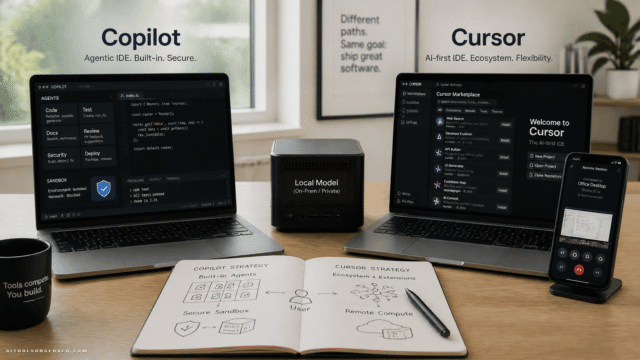
For a broader look at leading AI coding tools, it helps to compare how they differ in workflow and capabilities.
GitHub Copilot
The most widely used dedicated coding tool, with 68% of developers using it according to Stack Overflow’s 2025 survey. It’s built directly into GitHub and VS Code, which means it fits into workflows many developers already use.
It offers inline code completion, a chat interface, agent mode for multi-step tasks, automated code review, and a command-line tool. It works across virtually every major programming language.
A limited free tier is available, with paid individual and business plans above that. It’s the most beginner-friendly option for anyone already inside the GitHub ecosystem.
Cursor
An AI-first code editor built on top of VS Code, designed around AI assistance rather than bolting it on. Features include Tab completions, Composer mode for editing multiple files at once, Agent mode for longer background tasks, and the ability to choose which underlying model—Claude, GPT, or others—handles a given task.
A free Hobby tier is available alongside paid individual and team plans. It assumes more comfort with a code editor than Copilot does, making it a better fit for developers who want heavier agentic features.
Claude Code
Claude‘s terminal-based agentic coding tool. Rather than working through a chat window, it reads, writes, and executes code directly inside your own environment. It can plan and carry out multi-step tasks across an entire codebase, checking its own work as it goes.
There’s no standalone subscription—it’s part of paid Claude packages, with pay-as-you-go API access available through a Console account. It’s command-line based, so it suits developers already comfortable in a terminal.
For readers comparing dedicated options, Claude Code is often discussed alongside other major coding assistants.
ChatGPT and Codex
ChatGPT is OpenAI’s general-purpose chat assistant, capable of writing and explaining code in plain conversation. Codex is OpenAI’s dedicated coding agent built on top of it, adding a command-line tool, an IDE extension, and a cloud-based agent that can complete tasks and open pull requests autonomously.
Plans range from a free tier to higher-priced monthly plans. ChatGPT’s plain-language interface makes it arguably the most approachable starting point for someone who has never written code before.
Replit Agent
A browser-based tool that can build, debug, and deploy a working application from a plain-language description—no local setup required. It writes its own code, runs and fixes its own tests, and handles hosting and deployment on the same platform.
A free Starter tier is available, with higher-priced monthly and annual plans above that. It’s one of the most beginner-friendly options available, aimed at people who want to go from idea to deployed app without configuring a development environment first.
How to Start Using AI Coding Tools Effectively
Getting started takes fewer technical steps than most beginners expect. The quality of your first prompt matters more than which tool you pick.
Asking an AI to “build a login page” invites a generic, hard-to-verify answer. Specifying the framework, the required fields, and how errors should be handled gives the AI enough to produce something actually usable.
A practical starting sequence:
- Choose one tool and start with its free tier. You don’t need to pay to learn the basics.
- Pick a small project with a clear, testable outcome. A to-do list app where you can add a task, mark it complete, and confirm it disappears from the active list is enough. If that doesn’t work, you know immediately something needs fixing.
- Write specific prompts. Describe the input, the desired output, and any constraints—not just the end goal.
- Read every suggestion before accepting it. Even if it slows you down at first.
- Run and test the code yourself.
- Ask the AI to explain code you don’t understand.
- Gradually take on tasks the tool struggles with so your skills keep pace with the tool.
Habits That Separate Good AI Coders from Passive Ones
Developers who capture the productivity gains AI tools promise tend to share a few habits:
- Be specific in prompts. Include context, constraints, and an example of the format you want.
- Treat the first answer as a draft. Iterate on it rather than accepting it wholesale.
- Keep your fundamentals sharp by periodically writing code without AI assistance.
- Learn to read a diff—the line-by-line view showing what code was added, changed, or removed—so you know exactly what changed before you accept it.
- Don’t paste sensitive or proprietary code into a public AI tool without checking your company’s policy.
- Don’t skip testing because the code looks right.
These habits matter beyond any single project. The developers who use AI deliberately—rather than passively accepting its output—are the ones actually capturing the productivity gains the tools promise.
The Bottom Line
AI-assisted coding is a genuine productivity tool with real, measurable benefits. It’s also a skill in its own right—one that requires knowing how to prompt well, verify output carefully, and maintain the foundational knowledge that lets you catch when the AI is wrong.
The tools are widely available and mostly free to start. The limiting factor isn’t access. It’s whether you use them deliberately enough to actually get better, rather than just faster at producing code you don’t fully understand.
Start small, stay specific, and review everything. That’s the approach that holds up.










Comments (0) No comments yet
Want to join this discussion? Login or Register.
No comments yet. Be the first to share your thoughts!