Raycast
Your keyboard-first shortcut to everything

What Is Raycast?
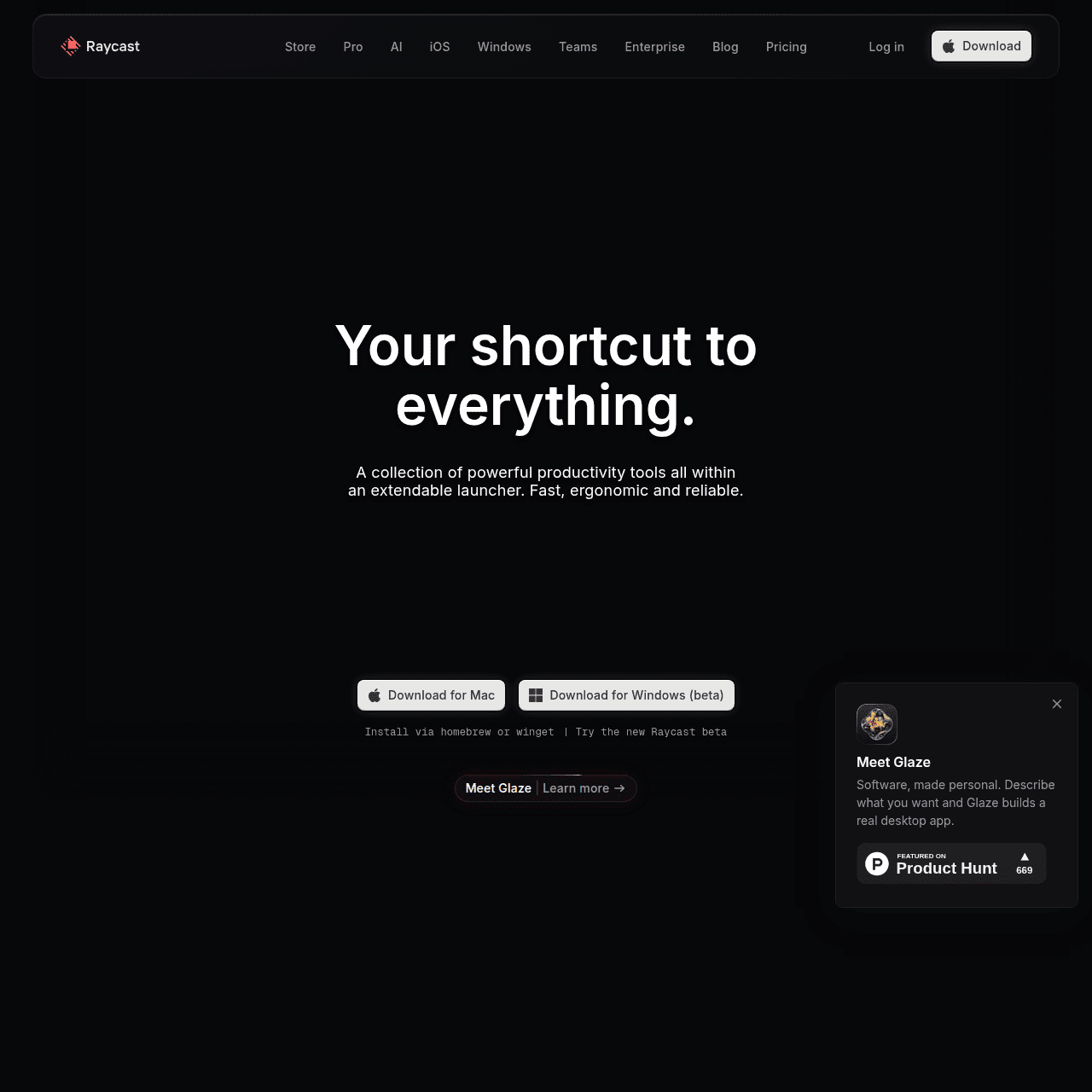
Raycast is a powerful productivity launcher that brings apps, files, commands, and AI into one quick-access command bar on your desktop. From anywhere, you can open apps, search files, manage windows, run scripts, control system settings, and trigger third‑party integrations without leaving the keyboard.
Raycast AI adds conversational help, code assistance, and content generation directly into the launcher. A growing store of extensions covers workflows in design, development, project management, and more, while teams can share custom commands, Quicklinks, and extensions to standardize processes across an organization.
With its keyboard-first design and deep integration into everyday tools, Raycast helps power users and teams work faster and cut down on context switching.
Quick Snapshot
Raycast unifies apps, files, commands, and AI into one blazing-fast command bar so you can navigate, automate, and get answers without leaving the keyboard. It helps individuals and teams reduce context switching and move faster across everyday workflows.
- Works on
-
- Mac
- iOS
- API
- Browser Extension
- Pricing Model
- Freemium
Starting at $8/month — Raycast offers a free plan with core features for personal use. Paid Pro plans start at $8/month and add advanced AI, Cloud Sync, personalization, and team options for collaborative and enterprise deployments. - Fits on
- Affiliate Program
- 30% recurring
- API Availability
- Raycast has an API available.
- Key Features
-
- Unify apps, files, and commands in one bar
- Built-in AI assistance for code and content
- Extensible launcher with team-ready workflows
- Audience
-
- developers
- designers
- knowledge workers
- product managers
- remote teams
- startups
- power users
Screenshot

Key Features of Raycast
Command launcher
Invoke a keyboard-first command bar to open apps, search files, manage windows, and control system settings from anywhere on your desktop.
Integrated AI assistant
Use Raycast AI for conversational assistance, code help, and content generation directly inside the launcher to speed up everyday tasks.
Extensions store
Access a growing library of extensions that connect Raycast to popular tools for design, development, project management, and more.
Custom commands
Create and run your own commands and scripts to automate repetitive workflows and tailor Raycast to your specific needs.
Team sharing
Share custom commands, Quicklinks, and extensions across your organization to standardize workflows and improve team productivity.
Keyboard-first design
Operate almost entirely from the keyboard with fast search, shortcuts, and navigation that keep you in flow without reaching for the mouse.
Use Cases for Raycast
Developer productivity
Quickly open projects, run scripts, and access documentation or code help through Raycast AI and extensions, reducing time spent switching between terminals, editors, and browsers.
Design and creative workflows
Launch design tools, search assets, trigger design-related extensions, and manage windows from the keyboard, keeping focus on creative work instead of navigation.
Knowledge work & research
Search files, notes, and apps from a single bar while using Raycast AI for summarization, drafting, and answering questions, minimizing context switching across tools.
Team workflow standardization
Share custom commands, Quicklinks, and extensions so teams follow consistent processes, speeding up onboarding and making common tasks repeatable and reliable.
Automation & scripting
Trigger scripts and system commands instantly from the launcher to automate repetitive actions, freeing up time for higher-value work.
Frequently Asked Questions
What is Raycast and how does it work?
Raycast is a desktop productivity launcher that provides a keyboard-first command bar to open apps, search files, run commands, and access AI from anywhere on your computer. You trigger it with a shortcut, type what you need, and execute actions instantly.
Is Raycast free to use?
Yes, Raycast offers a free plan that includes core launcher features suitable for personal use. Advanced AI capabilities, Cloud Sync, and team features are available on paid plans.
Who should use Raycast?
Raycast is ideal for developers, designers, knowledge workers, product managers, startups, remote teams, and power users who prefer keyboard-driven workflows and want to reduce context switching across tools.
What does Raycast Pro include?
Raycast Pro, starting at $8/month, adds advanced AI features, Cloud Sync, and deeper personalization on top of the free core launcher features. Team and Enterprise plans provide additional collaboration and management options.
Does Raycast support extensions and integrations?
Yes, Raycast has a growing store of extensions that integrate with popular services and tools across design, development, project management, and more, plus support for custom commands and scripts.
Can teams collaborate with Raycast?
Teams can share custom commands, Quicklinks, and extensions to align on common workflows, making it easier to standardize processes and improve team productivity.
Raycast · Our Verdict
Raycast stands out as a highly polished, keyboard-first productivity layer that replaces many scattered utilities with one coherent command bar. Its tight integration of AI, an extensible extension store, and team collaboration features makes it particularly compelling for developers, designers, and power users who live on their keyboards and want to standardize workflows across a team.
Raycast ·
-

Keevo
Stop losing traffic to stale content with AI
SEO Writing & Optimization -
Cohere
Enterprise AI that’s private, secure, and controllable
AI Model Hosting & Deployment - Freemium
Ask AI by Coora
Elevate shopping with intelligent product Q&A
E-commerce & Retail AI - Credit-Based
Lami AI Music Generator
Create royalty-free AI music and sound in minutes
AI Music Composition Tools - Subscription
Periodix AI
AI sales agent that turns outreach into booked calls
Sales & Marketing AI Agents - Your Ad Here
-
Acti
Turn every keystroke into instant action
Productivity & Automation AI - Free
Redesign by Nodewave
Turn your codebase into on‑brand social posts
Social Media Content Creation