


What Adobe is launching
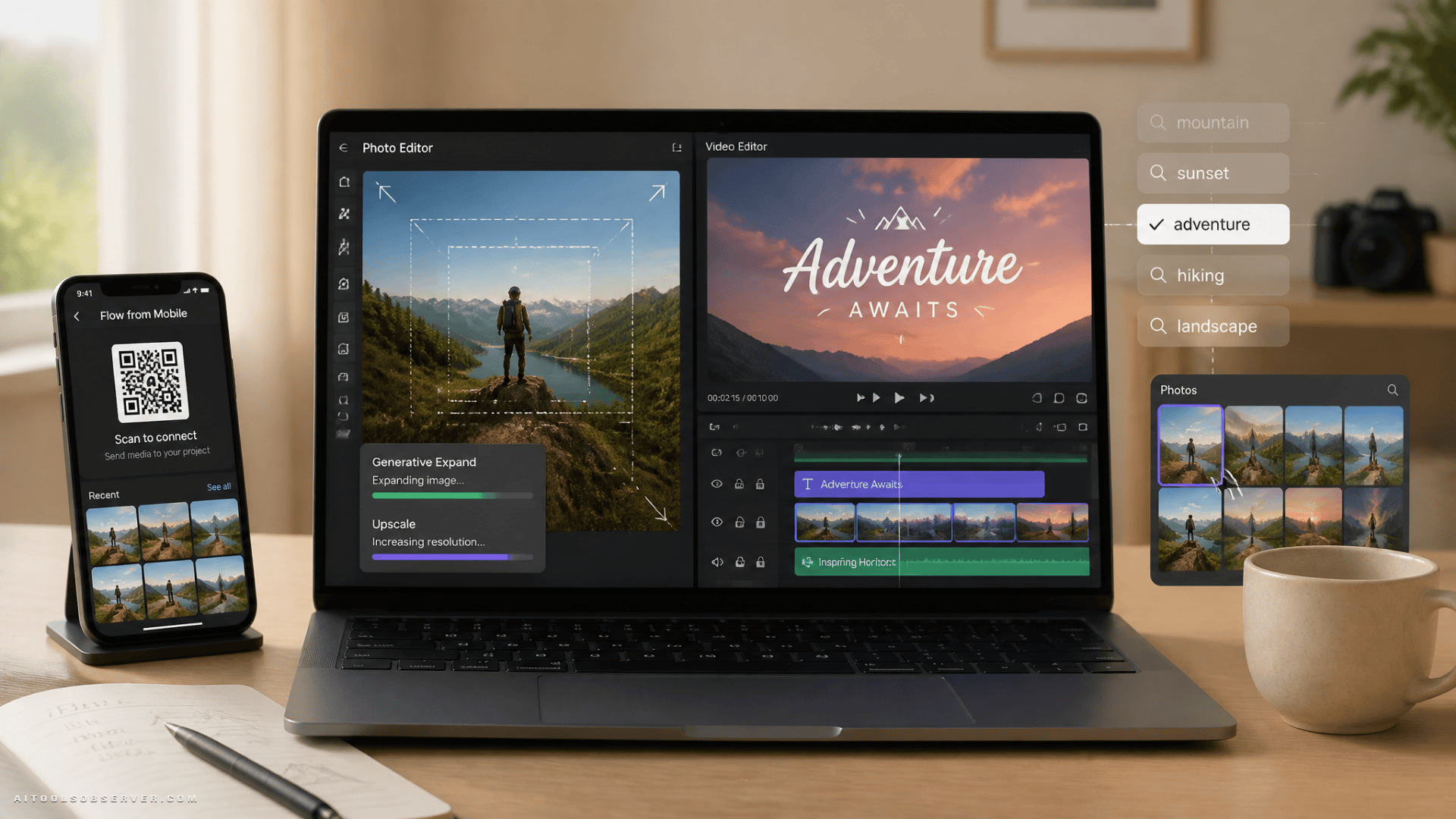
Adobe has introduced updated versions of both Photoshop Elements and Premiere Elements for macOS and Windows. The release centers on beginner-focused editing, with AI Assistant, generative editing features, and a stronger media organization layer.
This is not the same pitch as Adobe’s professional Creative Cloud products. Elements remains the more approachable line for users who want guided edits, templates, and fast results rather than deep production workflows.
The main upgrade: AI that tries to remove decision fatigue
A recurring problem in consumer editing software is not lack of features. It is too many features placed behind menus that new users do not understand. Adobe’s update appears aimed at that exact issue.
The new AI Assistant in both apps offers step-by-step guidance tied to the media being edited. That matters because beginners rarely ask for a tool by name. They ask for an outcome:
- sharpen the image
- make colors brighter
- improve resolution
- help fill an empty section
- turn text into something visually interesting
If the assistant can reliably map those requests to actual edits, it makes the software easier to use in a very concrete way. It shifts the experience from “find the right panel” to “describe the task.”
Premiere Elements 2027: AI for filling gaps and speeding up simple video work
Premiere Elements 2027 gets a similar treatment, but the video use cases are more workflow-oriented.
For readers tracking AI video editing, this release emphasizes guided completion over complex production control.
Generated content for timeline gaps
Filling timeline gaps is one of those tasks that sounds small until you are editing a short family video, travel reel, or beginner project and the sequence just does not flow. A feature that helps generate content to bridge those gaps suggests Adobe is trying to smooth out rough edits without requiring users to manually rebuild transitions or insert placeholder clips.
For casual editors, that can mean less time wrestling with dead space and more time finishing the project.
Generative Title Art
Generative Title Art turns plain text into a designed graphic treatment. The example provided suggests prompt-based styling, such as transforming a title into scene-relevant visual art.
This feature is likely to appeal to users making:
- vacation videos
- school projects
- social clips
- hobby content
- personal highlight reels
The advantage is speed. Many beginners want polished titles, but not enough to design them from scratch.
Contextual Toolbar and sample media
The Contextual Toolbar appears intended to guide users toward the right tool at the right moment. That is a sensible product choice for entry-level video editing, where uncertainty often stops progress.
Sample media is another useful inclusion. It lowers the barrier to experimentation, especially for users who want to learn the app before importing personal footage.
Better organization may be one of the most useful updates
The editing features will get more attention, but the updated Elements Organizer may be just as important for real-world use.
Adobe says the Organizer now supports stronger photo management, including duplicate detection and Semantic Search. That means users can potentially search by meaning rather than relying only on file names, folders, or manual tags.
For people with large, messy photo libraries, this solves a different kind of editing problem: finding the asset in the first place.
Why Semantic Search matters
Most casual users do not maintain disciplined media libraries. They remember moments, not filenames. Search that understands concepts can be more valuable than another effect or filter.
If Semantic Search works well, it can reduce the time spent doing all the non-creative work around editing:
- locating older photos
- finding similar images
- identifying duplicates
- pulling images for albums or projects faster
The QR code feature for transferring edited photos to mobile devices also fits this convenience-first approach. It is simple, but it aligns with how many people actually finish their workflow: edit on desktop, share on phone.
Pricing and license model: simple to buy, less flexible over time
Adobe is offering Photoshop Elements 2027 and Premiere Elements 2027 at $100 each, or $150 as a bundle. Both come with a three-year license for macOS and Windows.
That pricing structure is straightforward, but the license model deserves attention. After the three-year term ends, access to the editing apps is lost, while the media catalog remains accessible in Elements Organizer.
This creates a different value calculation than a traditional perpetual license. Buyers should think about the software less as a one-time permanent purchase and more as a time-limited ownership model.
For some users, that will still be attractive:
- they prefer paying once rather than subscribing monthly
- they want desktop apps without full Creative Cloud complexity
- they edit occasionally, not professionally
For others, the loss of app access after the license expires may be an important drawback.
Who this launch is actually for
The strongest fit appears to be users who want capable editing without professional-software overhead.
That likely includes:
- beginners learning photo or video editing
- families organizing and improving personal media
- hobbyists creating travel, event, or memory projects
- users upgrading from very basic editors
- people who want guided AI help instead of deep manual control
These tools appear less suited to professionals who need advanced collaboration, detailed timeline control, or sophisticated compositing. Elements is still the simplified lane in Adobe’s portfolio, even with AI added.
What stands out in this release
A lot of AI product updates promise creativity, but the stronger signal here is operational convenience. Adobe seems to be focusing on common user bottlenecks:
- not knowing which tool to use
- needing a larger image or wider frame
- struggling to search large media libraries
- wanting better titles without design work
- getting stuck midway through a video edit
That is a more grounded strategy than adding AI for novelty alone, even within the broader market for consumer photo editor tools.
The broader product signal
Adobe’s approach with Elements 2027 reflects a wider shift in AI tooling: less emphasis on expert control, more emphasis on guided outcomes. Instead of expecting users to learn editing language, the software increasingly tries to interpret intent.
For AI tool watchers, that is the useful takeaway. The launch is not only about generative image and video features. It is about product design moving closer to assisted completion, where the software helps users decide, locate, and finish.
Bottom line
Photoshop Elements 2027 and Premiere Elements 2027 look like a focused update for casual creators who want faster results with less friction. The most valuable additions are not necessarily the flashiest ones, but the features that help users find tools, organize media, and complete edits without stalling.
If you want desktop editing software with AI assistance but do not need the weight of Adobe’s professional stack, this launch is worth watching closely. The key question is simple: whether a three-year license and guided workflow match how often you actually edit.

















Comments (0) No comments yet
Want to join this discussion? Login or Register.
No comments yet. Be the first to share your thoughts!