
What Is TinaMind?
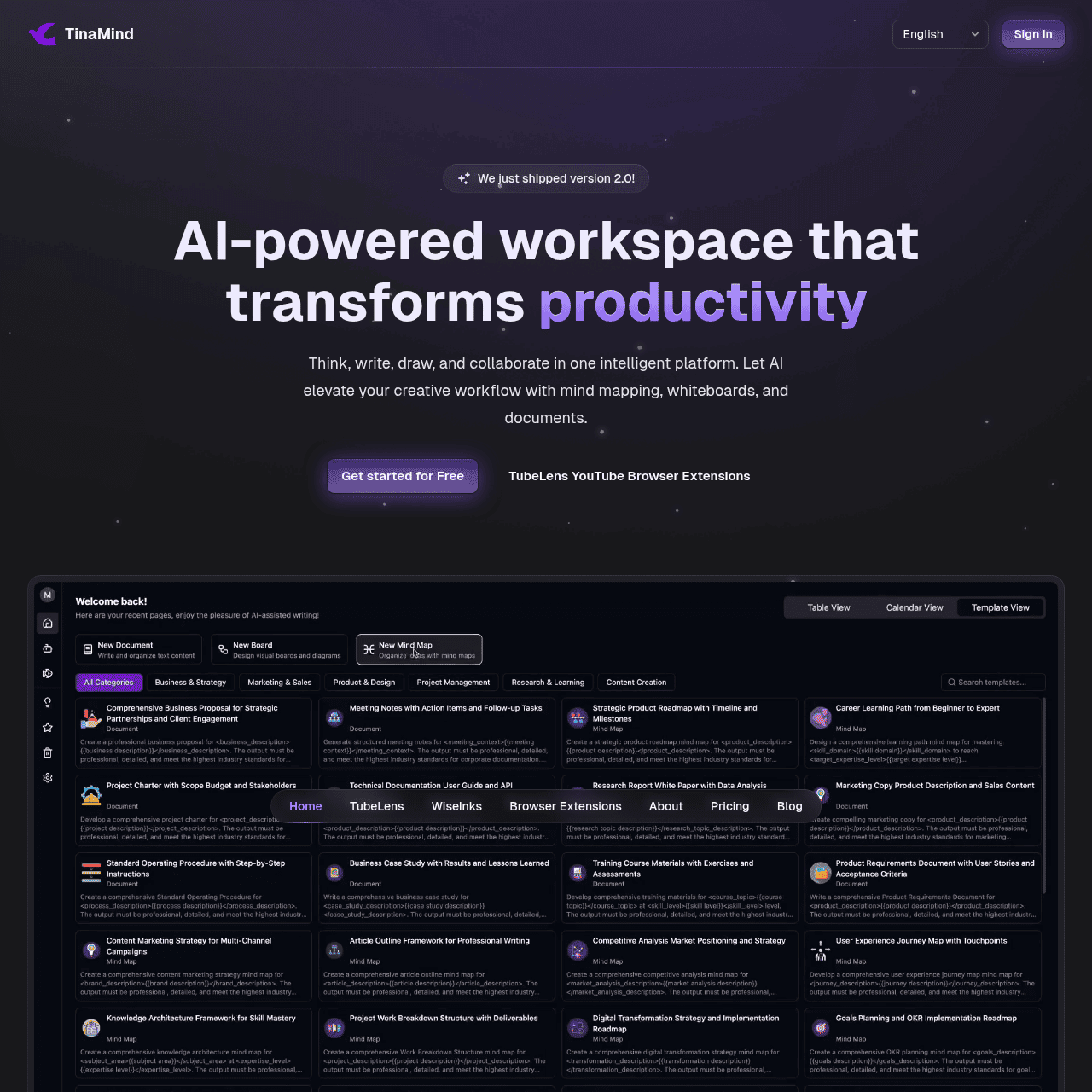
TinaMind is an AI workspace that unifies XMind-compatible mind maps, intelligent whiteboards, an AI chatbot, and smart documents to streamline how individuals and teams work. It is designed for brainstorming, project planning, content creation, and ongoing collaboration without jumping between multiple apps.
Users can capture ideas visually, refine them with AI, and coordinate tasks in a single, coherent environment. The platform integrates with tools like Google Drive, Notion, and Slack so it can fit into existing workflows. With enterprise-grade encryption and secure infrastructure, TinaMind is also suitable for professional and organizational use.
Quick Snapshot
TinaMind centralizes mind mapping, AI writing, whiteboarding, and collaboration so teams can think, plan, and create in one intelligent workspace. By reducing context switching, it helps users move from scattered tools to faster decisions and higher-quality output.
- Works on
-
- Web
- Chrome Extension
- AI Agent
- Pricing Model
- Cannot determine the price.
- Fits on
- Affiliate Program
- We could not identify an affiliate program.
- API Availability
- We could not identify whether an API is available.
- Key Features
-
- Unify mind maps, documents, and whiteboards
- Reduce context switching with one AI workspace
- Integrate securely into existing team workflows
- Audience
-
- knowledge workers
- product teams
- founders and startup teams
- students and researchers
- content creators
- remote teams
Screenshot

Key Features of TinaMind
AI-powered mind maps
Create and manage XMind-compatible mind maps, using AI to expand branches, organize thoughts, and refine structures for clearer thinking.
Intelligent whiteboards
Visual whiteboards enhanced by AI to support brainstorming, planning, and collaboration with teams in a flexible canvas environment.
Integrated AI chatbot
Chat with an AI assistant directly inside the workspace to generate ideas, answer questions, and improve drafts and plans.
Smart documents
Write and edit documents with built-in AI support to help with outlining, drafting, summarizing, and refining content.
Workflow integrations
Connect with tools like Google Drive, Notion, and Slack so TinaMind fits smoothly into existing productivity and communication workflows.
Secure infrastructure
Enterprise-grade encryption and a secure architecture make TinaMind suitable for professional and organizational use cases.
Use Cases for TinaMind
Brainstorming & ideation
Capture and structure ideas in XMind-compatible mind maps and whiteboards, then use AI to expand, organize, and refine concepts into clear directions.
Project planning
Turn visual maps into actionable plans, keeping tasks, notes, and AI-generated documentation in one workspace to streamline coordination across teams.
Content creation
Draft, edit, and improve articles, reports, and documents using the AI chatbot and smart documents while keeping research and outlines visually organized.
Team collaboration
Collaborate on shared whiteboards, documents, and mind maps with integrated AI assistance, reducing tool-switching during meetings and async work.
Research & study
Students and researchers can map complex topics, summarize information with AI, and maintain organized notes and documents in a single secure environment.
Frequently Asked Questions
What is TinaMind and who is it for?
TinaMind is an AI-powered workspace that combines mind maps, intelligent whiteboards, an AI chatbot, and smart documents. It is designed for knowledge workers, product teams, founders, students, researchers, content creators, and remote teams who want a centralized place to think, write, and collaborate.
How does TinaMind improve productivity?
TinaMind reduces context switching by bringing ideation, writing, planning, and collaboration into a single AI-augmented workspace. This centralization helps teams move from scattered notes and tools to faster decision-making and higher-quality content.
Can TinaMind integrate with my existing tools?
Yes. TinaMind integrates with popular tools such as Google Drive, Notion, and Slack, allowing you to embed it into your existing workflows instead of replacing everything at once.
Is TinaMind secure enough for business use?
TinaMind is built with secure infrastructure and enterprise-grade encryption, making it suitable for professional and organizational use where data protection and privacy are important.
Does TinaMind support XMind mind maps?
Yes. TinaMind supports XMind-compatible mind maps, allowing users to work with familiar mind mapping formats within its AI-powered workspace.
How much does TinaMind cost?
Pricing information is not specified in the provided materials. To see current plans and pricing, visit the TinaMind website.
TinaMind · Our Verdict
TinaMind stands out by genuinely unifying mind mapping, AI-assisted writing, and whiteboarding instead of offering a single-point feature. Its integration with tools like Google Drive, Notion, and Slack makes it more practical for real workflows than many isolated AI apps.
For teams battling context switching across scattered tools, this kind of centralized, AI-augmented workspace is a meaningful upgrade.
TinaMind ·
-

Keevo
Stop losing traffic to stale content with AI
SEO Writing & Optimization -
Cohere
Enterprise AI that’s private, secure, and controllable
AI Model Hosting & Deployment - Freemium
Ask AI by Coora
Elevate shopping with intelligent product Q&A
E-commerce & Retail AI - Credit-Based
Lami AI Music Generator
Create royalty-free AI music and sound in minutes
AI Music Composition Tools - Subscription
Periodix AI
AI sales agent that turns outreach into booked calls
Sales & Marketing AI Agents - Your Ad Here
-
Acti
Turn every keystroke into instant action
Productivity & Automation AI - Subscription
Ray
AI personal training that adapts to you
Fitness & Workout Coaching