


What We Tested and Why It Matters
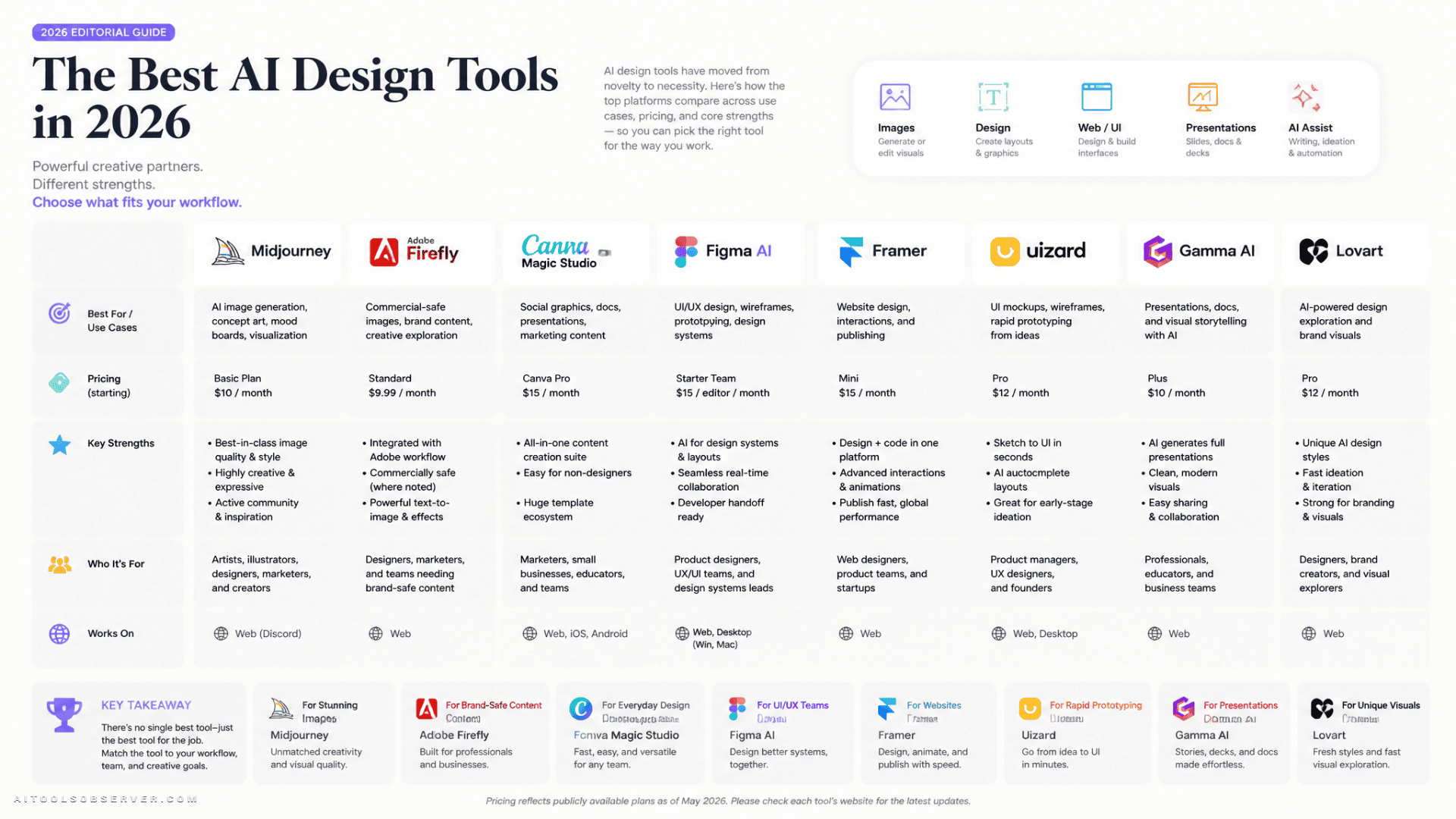
The AI design tool market has fragmented into at least three distinct categories: image generation, UI and web design, and all-in-one marketing platforms. A tool that excels at generating cinematic concept art may be entirely unsuitable for producing a brand-consistent social media campaign at scale. A platform built for product teams may offer nothing useful to a solo marketer.
We evaluated each platform across four dimensions: output quality, learning curve, commercial licensing, and workflow integration. These are the criteria that determine whether a tool survives contact with real work.
The Tools at a Glance
Before going deeper, here is a structured overview of the platforms covered in this comparison.
- Midjourney v7 — Best for high-fidelity artistic concepts. No free plan. From $10/month.
- Adobe Firefly — Best for commercial-safe image creation. Free plan available. From $9.99/month.
- Canva Magic Studio — Best all-in-one platform for marketing teams. Free plan available. From $18/month.
- Figma AI — Best for collaborative UI/UX design. Limited free plan. From $20/month (full seat).
- Framer — Best for zero-code AI website generation. Free plan available. From $15/month.
- Uizard — Best for sketch-to-screen prototyping. Free plan available. From $19/month.
- Gamma AI — Best for AI-generated presentations and documents. Free plan available. From $12/month.
- Lovart — Best for full-lifecycle brand consistency. Free plan available. From $19/month.
Image Generation: Where the Quality Gap Is Widest
Image generation remains the most competitive segment of the AI design market, and the performance gap between leading and average tools has widened considerably since 2024.
Midjourney v7: The Benchmark for Artistic Output
Midjourney continues to produce the highest-quality AI-generated imagery available. Version 7 delivers sharper detail, more coherent lighting, and greater consistency across multiple generations than any competing model tested. Its ability to interpret prompts describing mood, atmosphere, and cinematic composition is particularly strong—outputs frequently arrive with a visual character that feels art-directed rather than algorithmically assembled.
In a practical test using a luxury skincare campaign brief, Midjourney v7 produced outputs with lighting and compositional choices that would have required deliberate manual decision-making in a traditional workflow. For concept-stage work and mood board development, it consistently outperformed every other tool in this comparison.
What it does well: Detailed illustrations and concept art, premium marketing visuals, realistic product photography, cinematic lighting, creative exploration.
Where it falls short: No permanent free plan, limited native editing tools, requires prompt experimentation to achieve consistent results, and operates differently from conventional design software.
Pricing: Basic $10/month, Standard $30/month, Pro $60/month, Mega $120/month. Annual commitment carries a 20% discount.
Verdict: The strongest choice for creative professionals who need high-fidelity visuals and are comfortable working iteratively with prompts.
Adobe Firefly: The Commercially Safe Choice
Firefly’s core differentiator is not image quality—it is legal clarity. Adobe trains its models exclusively on licensed Adobe Stock content, public-domain material, and openly licensed datasets. For businesses producing client-facing work, advertising assets, or branded content, this removes the IP exposure that affects most other AI image generators. Enterprise customers additionally receive IP indemnification, meaning Adobe covers legal costs if a generated asset triggers a copyright claim.
The tool’s real strength emerges inside the Adobe Creative Cloud ecosystem. Generative Fill in Photoshop extends backgrounds and removes objects with clean, believable results. Text-to-vector in Illustrator converts descriptions into editable graphics without leaving the application. As a standalone image generator, Firefly is less creatively ambitious than Midjourney, but as an integrated editing accelerator within an existing Adobe workflow, it is the fastest path to a production-ready file.
What it does well: Commercial-safe generation, Generative Fill in Photoshop, vector recoloring, text effects, seamless Creative Cloud integration.
Where it falls short: Less artistically expressive than Midjourney, generation credits deplete quickly on lower-tier plans, and the full experience requires a Creative Cloud subscription.
Pricing: Individuals from $9.99/month (Standard) to $19.99/month (Pro). Business plans from $19.99 to $49.99/month per license. Student and teacher pricing mirrors individual tiers.
Verdict: The default choice for any team or agency that needs to use AI-generated assets commercially without legal ambiguity.
Canva Magic Studio: Volume, Consistency, and Speed
Canva has moved well beyond its origins as a drag-and-drop template tool. Magic Studio integrates AI image generation, writing assistance, background removal, smart resizing, and video editing inside a single web application. For marketing teams producing content across multiple channels simultaneously, this consolidation has measurable value.
The Brand Kit feature is the most operationally significant component. Once brand colors, fonts, and logos are uploaded, every AI-generated output conforms to those standards automatically. Magic Resize reformats a single design across every required platform dimension in seconds—a task that previously consumed significant production time.
In testing, we produced a complete social media campaign suite from a single product photo in a short session. The Brand Kit maintained visual consistency across every output, and the resize function eliminated the repetitive reformatting that typically occupies a disproportionate share of a marketing designer’s time.
What it does well: Social media graphics, marketing campaign assets, presentations, brand kit enforcement, one-click resizing, AI-assisted writing.
Where it falls short: AI image quality trails specialized generators, advanced editing controls are limited, vector tools are basic compared to Illustrator, and it is less suited to highly artistic or technically complex projects.
Pricing: Free tier available. Pro at $18/month. Teams at $25/month per person. Enterprise pricing on request.
Verdict: The strongest single tool for marketing teams that need to produce high volumes of brand-consistent content without a dedicated design resource.
UI/UX and Web Design: A Different Category Entirely
AI tools built for interface and web design solve a fundamentally different problem than image generators. The relevant outputs here are wireframes, layout scaffolds, component structures, and functional prototypes—not artwork.
Figma AI: Extending an Existing Professional Workflow
Figma AI does not attempt to replace the design process. It accelerates the parts of that process that are repetitive or structurally mechanical. The Make mode generates working prototype scaffolds from plain-language descriptions, with correct layout hierarchy that a team member can begin refining immediately. Layer renaming, duplicate component detection, and placeholder content generation handle the administrative overhead that accumulates across large design files.
Because AI suggestions land directly inside the shared Figma file, there is no context-switching between generation and refinement. For product teams already operating in Figma, the AI features extend a familiar workflow rather than introducing a new one.
In testing, landing page layouts generated from short prompts were structurally usable and saved meaningful setup time. Spacing, typography, and component hierarchy still required manual refinement before the designs reached production quality—but the starting point was significantly more advanced than a blank canvas.
What it does well: UI layout generation, editable wireframes, automated layer organization, developer handoff, real-time collaboration.
Where it falls short: AI features are scoped to UI/UX tasks and offer nothing for illustration, photo editing, or general graphic design. Manual refinement remains necessary.
Pricing: Starter free (limited). Professional full seat at $20/month, dev seat at $15/month, collab seat at $5/month. Organization and Enterprise tiers available at higher price points.
Verdict: The correct choice for product and UX teams already working in Figma who want to reduce setup time and automate repetitive tasks without changing their core toolchain.
Framer: Website Generation Without Code
Framer occupies a specific and well-defined position: it generates functional, publishable websites from text descriptions without code requiring any coding knowledge. For founders, marketers, and small teams that need a production-quality web presence quickly, it removes the technical barrier entirely while producing results that are visually competitive with hand-built sites.
The tool is less relevant for product teams building complex applications, but for landing pages, portfolio sites, and marketing microsites, it represents a meaningful compression of the time between brief and live URL.
Pricing: Free plan available. Paid plans from $15/month.
Verdict: The most practical option for non-technical users who need a functional, well-designed website without involving a developer.
The Copyright Question: Not Optional
Commercial licensing has become one of the most consequential differentiators in this market, and it deserves direct treatment rather than a footnote.
Most AI image generators train on large datasets that include copyrighted material scraped from the web without explicit permission. The legal status of outputs from these models remains contested in multiple jurisdictions. For individual creative projects, this risk may be acceptable. For client work, advertising, product packaging, or any commercial application where IP ownership can be challenged, it is a material business risk.
Adobe Firefly is currently the most defensible option for commercial use, with documented training data practices and enterprise-level indemnification. Midjourney has made progress toward licensed training data, which improves its position relative to many competitors, but it does not offer the same formal indemnification structure as Adobe.
Canva’s AI image generation terms vary by feature and plan tier and warrant careful review before use in high-stakes commercial contexts.
Any team using AI-generated assets in commercial work should review the specific licensing terms of their chosen platform before publishing, not after.
Specialized Tools Worth Noting
Two additional platforms address specific workflow gaps that the major tools do not fully cover.
Uizard focuses on sketch-to-screen prototyping, converting hand-drawn wireframes into digital mockups. For early-stage product teams that think visually before they think digitally, it removes a significant translation step. Free plan available, paid plans from $19/month.
Gamma AI generates structured presentations and marketing documents from prompts or outlines. For teams that produce frequent decks, reports, or proposals, it compresses a time-consuming production task into minutes. Free plan available, paid plans from $12/month.
Lovart positions itself as an AI design agent for full brand lifecycle management, maintaining consistency across assets rather than generating individual outputs in isolation. Free plan available, paid plans from $19/month.
Which Tool Is Right for Your Workflow
The honest answer is that no single platform covers every design need at the highest level of quality. The right choice depends on what you are actually building.
For creative professionals and agencies producing concept art, campaign visuals, or editorial imagery: Midjourney v7 delivers the strongest output quality and is worth the absence of a free tier.
For teams using Adobe Creative Cloud who need commercially safe AI generation: Firefly is the logical extension of an existing toolchain, not an addition to it.
For marketing teams producing high-volume, brand-consistent content across multiple channels: Canva Magic Studio offers the best combination of AI capability, ease of use, and operational efficiency at its price point.
For product and UX teams building digital interfaces: Figma AI extends the tool most of them already use daily, with no workflow disruption.
For non-technical founders or marketers who need a functional website quickly: Framer removes the technical barrier without compromising on visual quality.
The 91% weekly AI adoption figure from Figma’s report reflects a market that has moved past experimentation. The question in 2026 is not whether to use AI design tools—it is which combination of tools fits the specific shape of your work.









Comments (0) No comments yet
Want to join this discussion? Login or Register.
No comments yet. Be the first to share your thoughts!