



Understanding How Claude Actually Works

Before optimizing your workflow, you need to understand the mechanics underneath. Claude is not a single model — it is a family of three distinct models, each calibrated for different demands.
The Three Models: Haiku, Sonnet, and Opus

- Haiku — Fast, lightweight, and resource-efficient. Best for simple queries, quick summaries, and high-volume tasks where speed matters more than depth.
- Sonnet — The balanced workhorse. Handles most professional tasks with strong reasoning and acceptable resource consumption. The default for most Pro Plan users.
- Opus — The most capable model in the family. Reserved for complex reasoning, nuanced analysis, and tasks where output quality justifies higher token costs. Available on Max and Enterprise plans.
Choosing the right model is not a preference — it is a resource decision. Opus on a routine task wastes tokens; Haiku on a complex analytical brief produces shallow results.
Tokens: The Currency of Every Interaction
Every input and output in Claude is measured in tokens — roughly equivalent to word fragments. Complex tasks, longer documents, and multi-step instructions consume more tokens. Understanding this prevents two common mistakes: over-engineering simple prompts and under-resourcing complex ones.
Higher-tier plans allocate more tokens per session and per month, which is why model selection and plan alignment matter from day one.
Context Windows and Memory Limits
Claude maintains conversational coherence through context windows — essentially its working memory for a given session. These windows have defined size limits. As a conversation grows, older information gets compacted to make room for new inputs.
This has a practical implication: for long projects or multi-session workflows, you cannot rely on Claude to remember earlier context automatically. Use project workspaces and global instructions (covered below) to compensate.
The Hallucination Caveat
Like all large language models, Claude can generate plausible-sounding but factually incorrect information — commonly called hallucinations. This is not a flaw unique to Claude; it is an architectural characteristic of the technology. Always verify critical outputs, especially in legal, financial, or medical contexts.
How to Communicate with Claude: Prompt Engineering Essentials

The quality of Claude’s output is directly proportional to the quality of your input. Vague prompts produce vague results. Structured prompts produce structured, actionable responses.
Core Prompt Engineering Principles
Be explicit about role and context. Tell Claude who it is speaking as and what the broader task involves. “You are a senior financial analyst reviewing a Series A pitch deck” produces sharper output than “review this document.”
Specify the output format. If you need a bulleted list, a structured report, or a table — say so. Claude will adapt its formatting accordingly, saving you post-processing time.
Constrain the scope. Open-ended prompts invite sprawling responses. Define what Claude should and should not include. This is especially important when working with Haiku, where precision compensates for reduced reasoning depth.
Iterate in layers. Start with a broad prompt, evaluate the output, then refine with follow-up instructions. Claude handles multi-turn refinement well — treat it as a dialogue, not a one-shot query.
Multimodal Inputs: Beyond Plain Text

Claude accepts more than typed instructions. You can upload and analyze:
- Text documents and PDFs — ideal for contract review, research synthesis, or document summarization
- Images — useful for visual analysis, diagram interpretation, or UI feedback
- Spreadsheets — enabling data analysis, formula generation, and structured reporting
This multimodal capability transforms Claude from a text generator into a genuine document intelligence layer for your workflow.
Specialized Modes: When to Use Which

Claude offers three distinct operational modes beyond standard conversation. Knowing when to activate each one is what separates casual users from power users.
Extended Thinking
Activates deeper, multi-step reasoning before Claude produces a response. Use this for complex problem-solving, strategic planning, or scenarios where the reasoning process itself matters — not just the conclusion. Expect longer response times; the trade-off is substantially higher output quality on difficult tasks.
Deep Research
Designed for thorough investigative tasks. Claude structures its approach to a complex query more systematically, working through multiple angles before synthesizing a response. Particularly effective for competitive analysis, technical research, and due diligence workflows.
Web Search
Extends Claude’s knowledge beyond its training cut-off by pulling in live information. Essential for any task involving current events, recent product releases, regulatory updates, or market data. Without this mode enabled, Claude’s knowledge has a defined historical boundary.
Activate the mode that matches the task — do not default to standard conversation when a specialized mode would deliver meaningfully better results.
Artifacts: Customizable, Shareable Outputs

Claude can generate artifacts — structured outputs such as dashboards, applications, formatted documents, and data visualizations. These are not just text responses; they are functional deliverables that can be downloaded or shared directly.
This feature is particularly valuable for teams that need to move from AI-generated insight to a usable asset without manual reformatting.
Code Execution and File Generation

For technical users, Claude supports live code execution within the platform. You can write, test, and run scripts without leaving the interface. Additionally, Claude can generate files in formats including Word, Excel, and PowerPoint — bridging the gap between AI output and standard business tooling.
Writing Style Customization
Claude allows you to define a preferred writing style — formal or conversational, concise or detailed, first-person or third-person. This is not cosmetic. Consistent style customization reduces editing time and ensures outputs align with your brand voice or personal standards from the first draft.
Project Workspaces

Claude allows you to create dedicated workspaces for specific projects, each with its own tailored instructions. This means Claude enters each session with the relevant context already loaded — no need to re-explain the project background every time.
For ongoing client work, product development cycles, or research projects spanning weeks, this feature is essential for maintaining coherence and reducing setup friction.
Global Instructions and Memory
Beyond project-specific settings, you can configure global instructions that apply across all interactions. These act as persistent behavioral guidelines — defining how Claude should respond, what it should prioritize, and what it should avoid.
Combined with automatic chat saving and search functionality, these tools make Claude a genuinely persistent work environment rather than a stateless query tool.
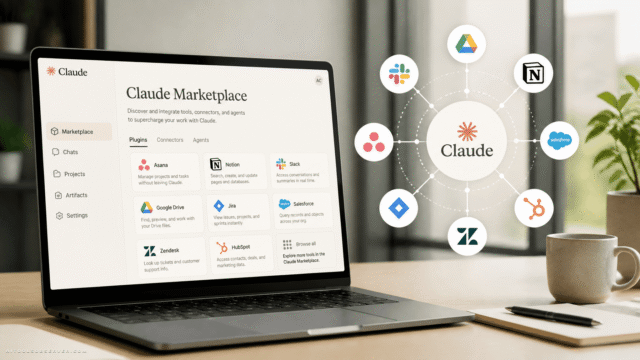
Native Connectors

Claude integrates directly with a core set of productivity platforms:
- Gmail — Draft, summarize, and respond to emails without switching context
- Google Drive — Access and analyze documents stored in your Drive directly within Claude
- Slack — Surface Claude’s capabilities within team communication channels
- Notion — Connect knowledge bases and project documentation for contextually aware responses
These integrations are activated through Claude’s connector system and are particularly powerful when combined with the Model Context Protocol (MCP).
Model Context Protocol (MCP)

MCP is the technical backbone that allows Claude to connect with multiple external applications simultaneously, creating a unified productivity ecosystem. Rather than switching between tools, you can orchestrate actions across platforms from within a single Claude session.
For teams building AI-augmented workflows, MCP is the integration layer that makes Claude genuinely interoperable — not just a standalone assistant.
Additional Productivity Shortcuts
- Browser extensions — Access Claude directly from any webpage without opening a separate tab
- Excel and PowerPoint integrations — Analyze data and build presentations without manual copy-paste workflows
- Claude Co-work — A collaborative mode for task delegation and shared file management within teams
- Automation tools — Schedule recurring tasks and set up trigger-based workflows, reducing manual intervention on routine processes
Skills
Skills are predefined instruction sets for repetitive tasks. Instead of re-prompting Claude with the same detailed instructions each time, you define a Skill once and invoke it on demand. This is particularly effective for standardized processes — weekly reports, content templates, data formatting routines.
Plugins
Plugins bundle Skills and connectors into a single functional package. They extend Claude’s native capabilities and can be configured to address specific use cases — from customer support workflows to technical documentation pipelines.
Sub-Agents

Sub-Agents allow Claude to handle multiple objectives in parallel. Rather than processing tasks sequentially, Sub-Agents distribute workload across concurrent processes — significantly reducing time-to-completion for complex, multi-part projects.
For team leads and operations managers, Sub-Agents represent a meaningful shift from AI as a single-threaded assistant to AI as a coordinated task management layer.
Pricing Plans: Choosing the Right Tier

Claude’s pricing structure is tiered to match different usage intensities. Here is a clear breakdown:
| Plan | Price | Best For |
|---|---|---|
| Free | $0/month | Casual exploration, basic queries |
| Pro | $20/month | Most individual professionals — optimal cost-to-capability ratio |
| Max | $100–$200/month | Power users requiring higher token limits and Opus access |
| Team | $25/user/month | Collaborative teams on shared projects |
| Enterprise | Custom pricing | Large organizations with compliance, security, and scale requirements |
Which Plan Makes Sense?
For the majority of founders, marketers, and knowledge workers, the Pro Plan at $20/month delivers the right balance. It provides access to Sonnet, sufficient token allocation for daily professional use, and the core integration features.
The Max Plan becomes relevant when your workflows regularly require Opus-level reasoning or when token limits on Pro become a genuine bottleneck — not a theoretical one.
Team and Enterprise plans add collaborative infrastructure, administrative controls, and in the Enterprise case, custom security and compliance configurations. These are not upsells for most individual users; they are genuinely different product tiers for different organizational contexts.
Building an Efficient Claude Workflow: A Practical Summary

Putting this all together, an efficient Claude workflow in 2026 looks like this:
- Match the model to the task. Use Haiku for speed, Sonnet for daily work, Opus for high-stakes complexity.
- Engineer your prompts deliberately. Define role, context, format, and scope before submitting. Iterate in layers.
- Activate the right mode. Extended Thinking for deep reasoning, Deep Research for investigation, Web Search for current information.
- Use project workspaces. Set up dedicated environments with tailored instructions for ongoing work. Stop re-explaining context.
- Connect your tools. Integrate Gmail, Drive, Slack, and Notion through connectors. Use MCP for multi-application orchestration.
- Automate the repeatable. Define Skills for recurring tasks, build Plugins for bundled workflows, deploy Sub-Agents for parallel processing.
- Verify critical outputs. Treat Claude as a highly capable collaborator — not an infallible authority. Cross-check facts that carry real-world consequences.
Final Observation
Claude AI is not a tool you master in a single session — it is a platform that rewards deliberate configuration. The users who extract the most value are not necessarily the ones with the most technical background; they are the ones who take the time to understand the mechanics, align their plan to their actual usage, and build structured workflows rather than ad hoc queries.
The cheat sheet above gives you the foundation. What you build on it depends on how precisely you observe the tools available — and how intentionally you choose to use them.










Comments (0) No comments yet
Want to join this discussion? Login or Register.
No comments yet. Be the first to share your thoughts!