


What It Actually Does
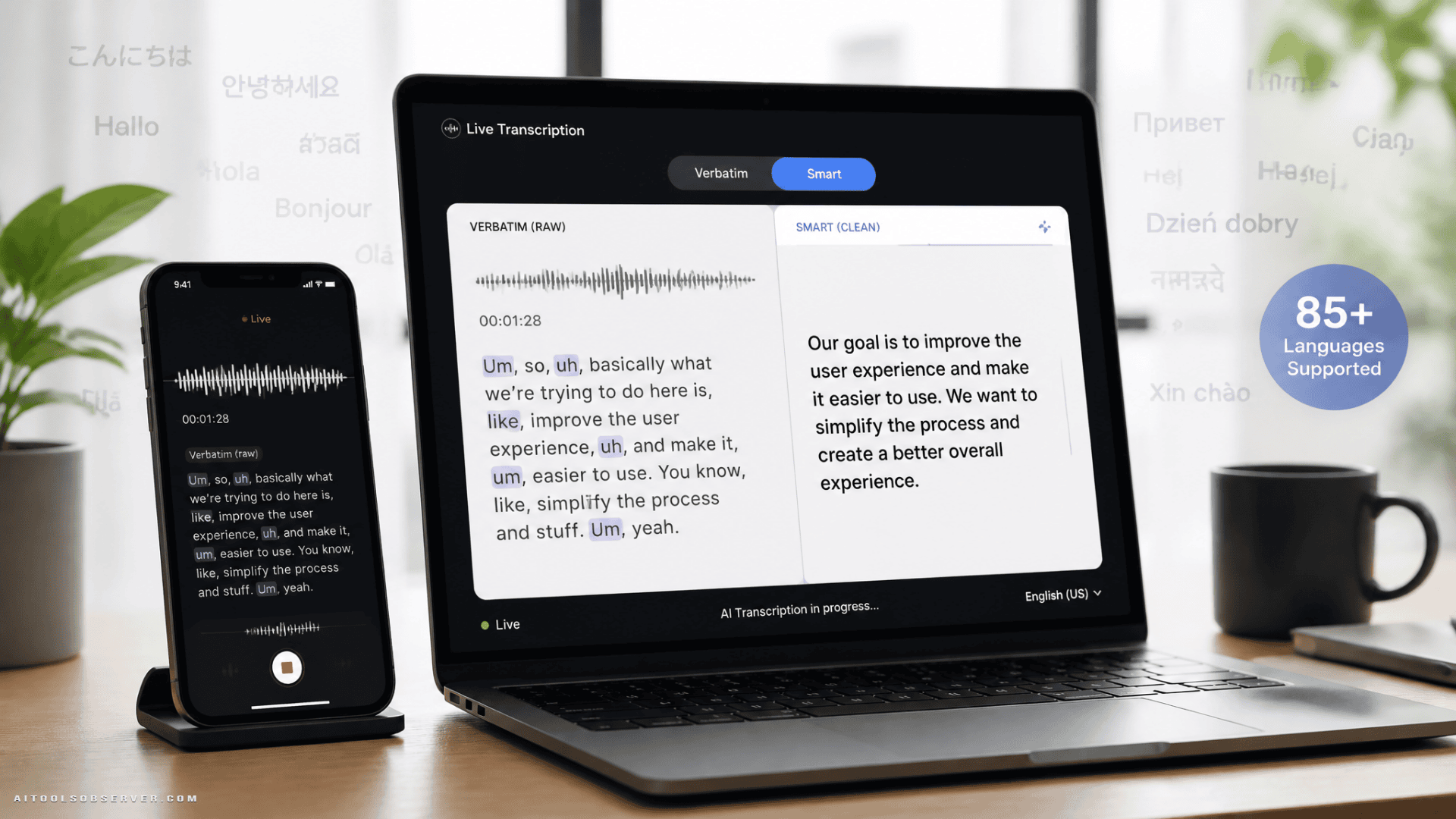
Google’s new speech recognition model ships with two distinct modes, which is a smart design choice.
- Smart Transcription removes filler words, auto-formats text, and lets you edit on the fly using your voice. It also supports custom vocabulary for specialized jargon.
- Verbatim Mode captures everything exactly as spoken—hesitations included—which is useful for interviews, legal contexts, or measuring how often you say “basically” in meetings.
The model supports 85 languages and can handle up to three speakers in pre-recorded audio. That’s a meaningful range for teams working across regions.
How It Stacks Up
Based on the word error rate data Google shared, Gemini 3.5 Transcribe Live posts a 5.50% error rate in streaming recognition—lower than OpenAI’s GPT Live Transcribe (15.77%), ElevenLabs Scribe v2 Realtime (9.70%), and Deepgram Nova-3 (8.97%). Google Cloud Chirp 3 sits at 7.32%.
Those are Google’s own benchmarks, so take them with appropriate skepticism. But the directional signal is clear: this model is positioned to compete seriously at the accuracy layer, not just the feature layer.
Where It’s Available Right Now
Rollout is staged, which means not everyone gets it today.
- Gboard’s Rambler feature — live now, but currently limited to Pixel 11 devices
- Gemini app on macOS — voice input now routes through Gemini 3.5 Transcribe
- AI Studio — developers can build and vibe-code with AI-optimized voice input
- Gemini API — direct model access for developers
- Chrome browser — coming “soon,” enabling voice input into any web field
The Honest Tradeoff
Smart Transcription is genuinely useful for drafting emails, prompting AI tools by voice, or turning rambling thoughts into clean text. But it does technically reword what you said. For anything where exact phrasing matters—legal notes, journalism, verbatim quotes—you’ll want to flip to Verbatim Mode or verify the output carefully.
The AI is making editorial decisions on your behalf. That’s the feature. It’s also the risk.
Who Should Pay Attention
Developers building voice-first apps now have a competitive transcription option directly in the Gemini API, with screen context and chat history access available through Antigravity. Power users on Pixel 11 or macOS can start testing today. Everyone else is waiting on Chrome support, which should open this up to the broadest possible audience without requiring a specific device or app.
The practical takeaway: if you’re building anything with voice input in 2025, Gemini 3.5 Transcribe belongs on your evaluation list. And if you’re a heavy voice-to-text user, the two-mode design alone makes it worth watching when it lands in Chrome.








Comments (0) No comments yet
Want to join this discussion? Login or Register.
No comments yet. Be the first to share your thoughts!