



The Core Difference: Tool Depth
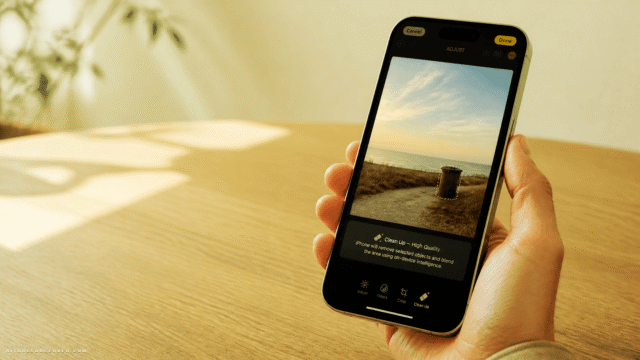
Apple’s built-in AI photo editing currently centers on a single tool: Clean Up. It identifies and removes unwanted objects, and it works reasonably well when the subject is clearly defined. But that’s largely where Apple’s native AI editing ends.
Google’s Pixel stack, by contrast, includes generative removal, AI-powered image enhancement, text-prompt-based editing, and reflection cleanup. The breadth alone gives the Pixel a structural advantage before you even evaluate quality.
Object Removal: Functional vs. Seamless
Both phones offer generative removal—the ability to erase photobombers and replace them with plausible background fill. In practice, the results diverge noticeably.
In a concert scenario with hands partially obscuring the frame, the iPhone’s removal left a visible distortion where the fill didn’t blend cleanly. The Pixel’s result wasn’t flawless under close inspection, but it was clean enough to post without further editing. That’s a meaningful difference in real-world usability.
When the objects being removed are clearly defined against a simple background, Apple performs better. The Pixel, however, handles ambiguous edges and complex backgrounds more reliably—which is precisely the condition that matters most when you’re trying to rescue an otherwise good shot. For readers comparing dedicated object-removal workflows, Magic Eraser is one example of a tool focused on this task.
Reflection Removal: The Pixel’s Standout Moment
Removing reflections from glass is one of the harder tasks in photo editing, even for experienced human editors. It requires understanding what’s behind the glass, what light is doing, and how to reconstruct occluded detail convincingly.
The Pixel handled a window-reflection test—sunlit glass obscuring a shop display—with a result that appeared to genuinely reconstruct the scene behind the glass rather than simply cropping or blurring. The reflections were muted, the interior darkened appropriately, and the window display became legible.
The iPhone offered no comparable tool for this task. It’s not that Apple’s version underperformed—the feature simply doesn’t exist on the device.
AI Enhancement and Generative Editing
The Pixel includes an AI Enhance feature that adjusts texture, saturation, and tonal contrast based on the image content. Applied to a nature shot, it brought out algae texture and deepened water tones in a way that changed the character of the image noticeably. Whether that’s desirable depends on the user, but the capability exists.
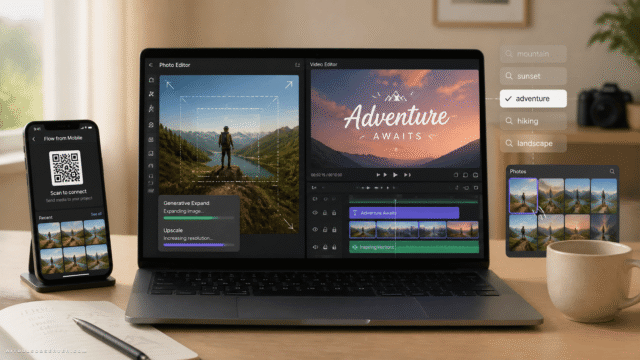
Apple has no equivalent native feature. Users who want that kind of enhancement on an iPhone need to export to a third-party app. Tools such as AI Image Editor exist for broader AI photo editing workflows.
The Pixel also supports text-prompt editing—asking the AI to make specific changes using natural language. It doesn’t always interpret instructions correctly; in one test, a request to add a hat to one person in a photo resulted in the hat appearing on the wrong subject. The feature is genuinely useful when it works, but it introduces a layer of unpredictability that requires patience. For readers interested in instruction-based image editing more broadly, Emu Edit is relevant context.
Camera Quality vs. Editing Software: A Useful Distinction
It’s worth separating two things that often get conflated: camera hardware quality and AI editing capability. A higher-resolution sensor gives the AI more data to work with, which can improve outcomes. But editing software is a separate layer.
In testing, an iPhone-captured image exported to the Pixel and edited there produced better results than the same image edited natively on the iPhone. The editing tools, not the source image quality, were the limiting factor on Apple’s side.
This matters for anyone choosing a phone primarily for photography. The best camera hardware doesn’t compensate for a limited editing toolkit.
Why Google Has the Edge Here
Google’s advantage in AI photo editing isn’t accidental. The company has invested in machine learning research for considerably longer than most consumer tech competitors, and that depth shows in how its models handle edge cases—complex backgrounds, ambiguous boundaries, difficult lighting conditions.
Apple’s approach to AI has been more measured and deliberate. That restraint may serve the company strategically over time, but it currently translates to fewer tools and less capable generative outputs in the photo editing context specifically. The broader conversation around generative photo editing helps frame why these differences matter.
Who Should Care About This
- Casual photographers who want to clean up shots without leaving the native Photos app will find the Pixel significantly more capable.
- iPhone users who need more than basic object removal will still need to rely on third-party apps like Snapseed, Lightroom, or dedicated AI editing tools such as AI Photo Object Eraser or Nano Image AI.
- Anyone choosing between these two devices primarily for AI-assisted photography should weight the editing software heavily—not just the camera specs.









Comments (0) No comments yet
Want to join this discussion? Login or Register.
No comments yet. Be the first to share your thoughts!