
What Is ReWords AI?
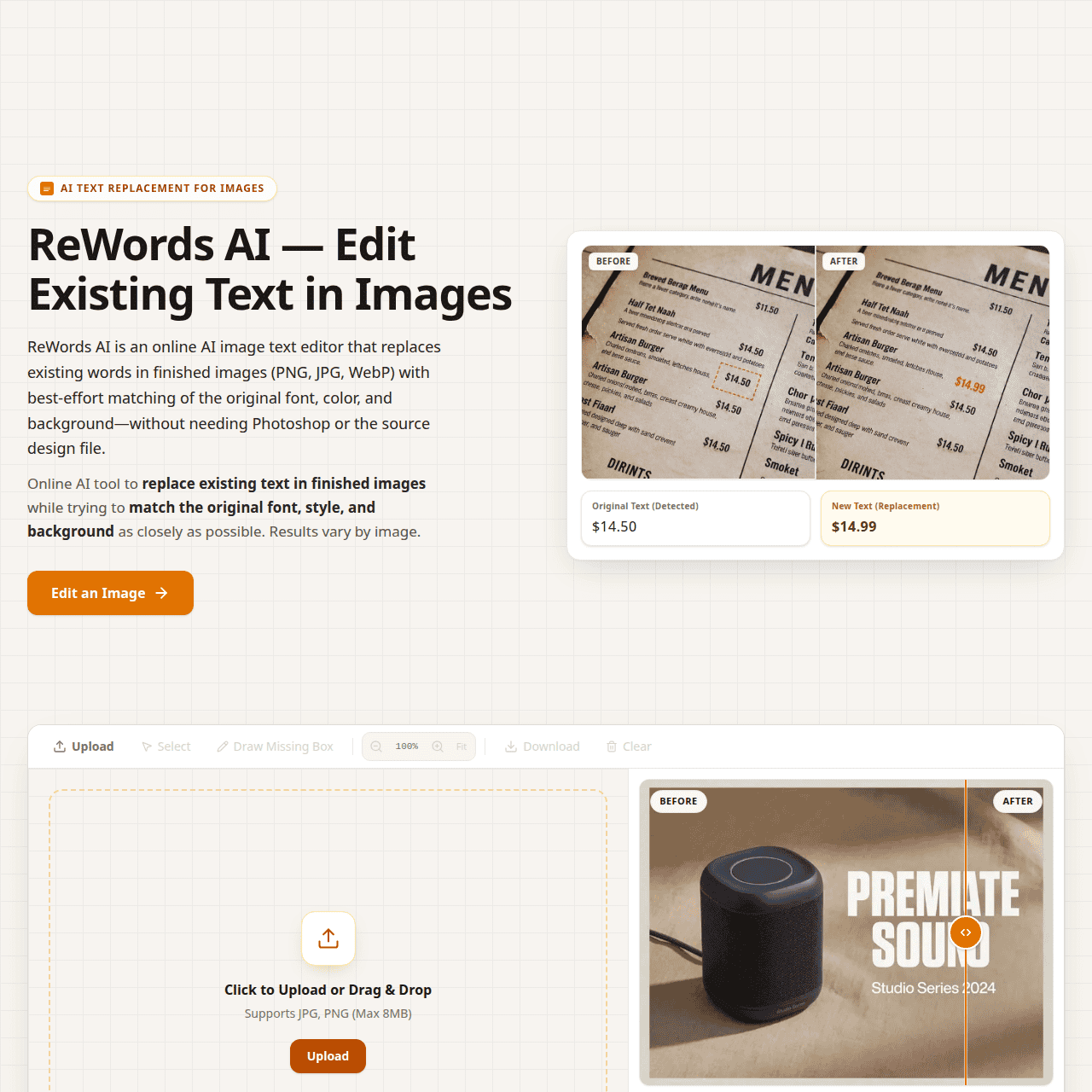
ReWords AI is an online AI image text editor built specifically for changing text in existing images like screenshots, designs, and product photos. You upload a PNG, JPG, or WebP file, select the text area, type your new wording, and generate a revised image that keeps the original design intact.
The AI analyzes the surrounding font, color, and background so replacements blend naturally into posters, ads, social media graphics, and AI-generated visuals. It supports multiple text regions per image and can export at standard, HD 2K, or Ultra HD 4K resolutions depending on your plan.
ReWords AI is ideal for marketers, designers, e-commerce sellers, and content creators who need precise text fixes without the overhead of full graphic design tools.
Quick Snapshot
ReWords AI lets you update text in existing images without reopening design files or using complex software. It automatically matches fonts, styles, and backgrounds so your edits blend seamlessly and look professional.
- Works on
-
- Web
- Pricing Model
- Credit-Based
Starting at $5.00/month — ReWords AI uses a credit-based model where 10 credits equal one standard 1K image. Users can purchase one-time packs starting at $5.99 for 100 credits or choose subscriptions from $5.00/month for 200 credits, with higher tiers enabling HD 2K and Ultra HD 4K resolutions. - Fits on
- Affiliate Program
- We could not identify an affiliate program.
- API Availability
- We could not identify whether an API is available.
- Key Features
-
- Update image text without original design files
- AI-matched fonts, colors, and backgrounds
- Credit-based, browser-ready image text editing
- Audience
-
- marketers
- content creators
- e-commerce sellers
- designers
- social media managers
- product teams
Screenshot

Key Features of ReWords AI
AI text replacement
Replace existing text in images by selecting a region and entering new wording, with the AI handling the visual reconstruction.
Font and style matching
Automatically analyzes and matches the original font, color, and styling so new text blends seamlessly into the design.
Background blending
Recreates and aligns the background behind edited text to avoid visible artifacts or rough edges around replacements.
Multiple text regions
Supports editing several text areas within a single image, allowing comprehensive updates in one workflow.
High-resolution exports
Offers standard, HD 2K, and Ultra HD 4K image outputs depending on the selected credit plan.
Browser-based tool
Runs entirely online in the browser, so there is no need to install heavy graphic design software.
Use Cases for ReWords AI
Marketing creatives
Quickly update headlines, CTAs, or promotional details in existing ad images without reopening design files, keeping campaigns fresh with minimal design effort.
E-commerce product images
Adjust labels, pricing, or feature text on product photos while preserving brand styling, so catalogs stay accurate across channels.
Social media graphics
Refresh copy in social posts, banners, and story images while maintaining consistent fonts and backgrounds for a cohesive feed.
App and UI screenshots
Edit text in product or app screenshots for different languages, features, or versions without recreating the interface visuals.
AI-generated visuals
Fix or refine imperfect text in AI-generated images so the final output looks polished and on-brand.
Frequently Asked Questions
What is ReWords AI used for?
ReWords AI is used to replace text in finished images—such as screenshots, ads, and product photos—while matching the original font, style, and background.
Which image formats does ReWords AI support?
ReWords AI supports common image formats including PNG, JPG, and WebP.
Can I edit multiple text areas in one image with ReWords AI?
Yes, ReWords AI allows you to define and edit multiple text regions within a single image.
Does ReWords AI require design skills to use?
No, ReWords AI is designed for non-designers and professionals alike, handling font and background matching automatically to create polished results.
How does ReWords AI pricing work?
ReWords AI uses a credit-based model where 10 credits equal one standard 1K image, with one-time credit packs and monthly subscriptions starting at $5.00/month.
Is there an API available for ReWords AI?
No, ReWords AI does not currently offer an API.
Can ReWords AI export images in high resolution?
Yes, higher-tier plans unlock HD 2K and Ultra HD 4K resolution options for edited images.
Do I need to download any software to use ReWords AI?
No, ReWords AI is a browser-based tool that works online without any software installation.
ReWords AI · Our Verdict
ReWords AI tackles a very specific but common problem: updating text in finished images without rebuilding the whole design. Its focus on font and background matching makes it especially useful for marketers and product teams who iterate frequently on copy. For many everyday edits, it can meaningfully reduce reliance on heavy design software.
ReWords AI ·
-
 Free
Free ONEIMG
All-in-one free AI photo editor online
AI Photo Editors - Freemium
Photodot AI
AI photo editing for polished visuals at scale
AI Photo Editors - Credit-Based
WePhoto FaceSwap AI
AI face swaps in your browser, instantly
AI Photo Editors - Freemium
Adobe Express
Create standout content fast with AI
Image & Design AI - Credit-Based Premium
ImageTranslate.AI
Translate any image, keep the design intact
Image & Design AI - Your Ad Here
-
AI Avatar
Turn one selfie into hundreds of avatars
AI Photo Editors - Freemium
Magic Studio AI Image Generator
Create stunning AI images from text
AI Image Generation