What Is WriteMyPRD?
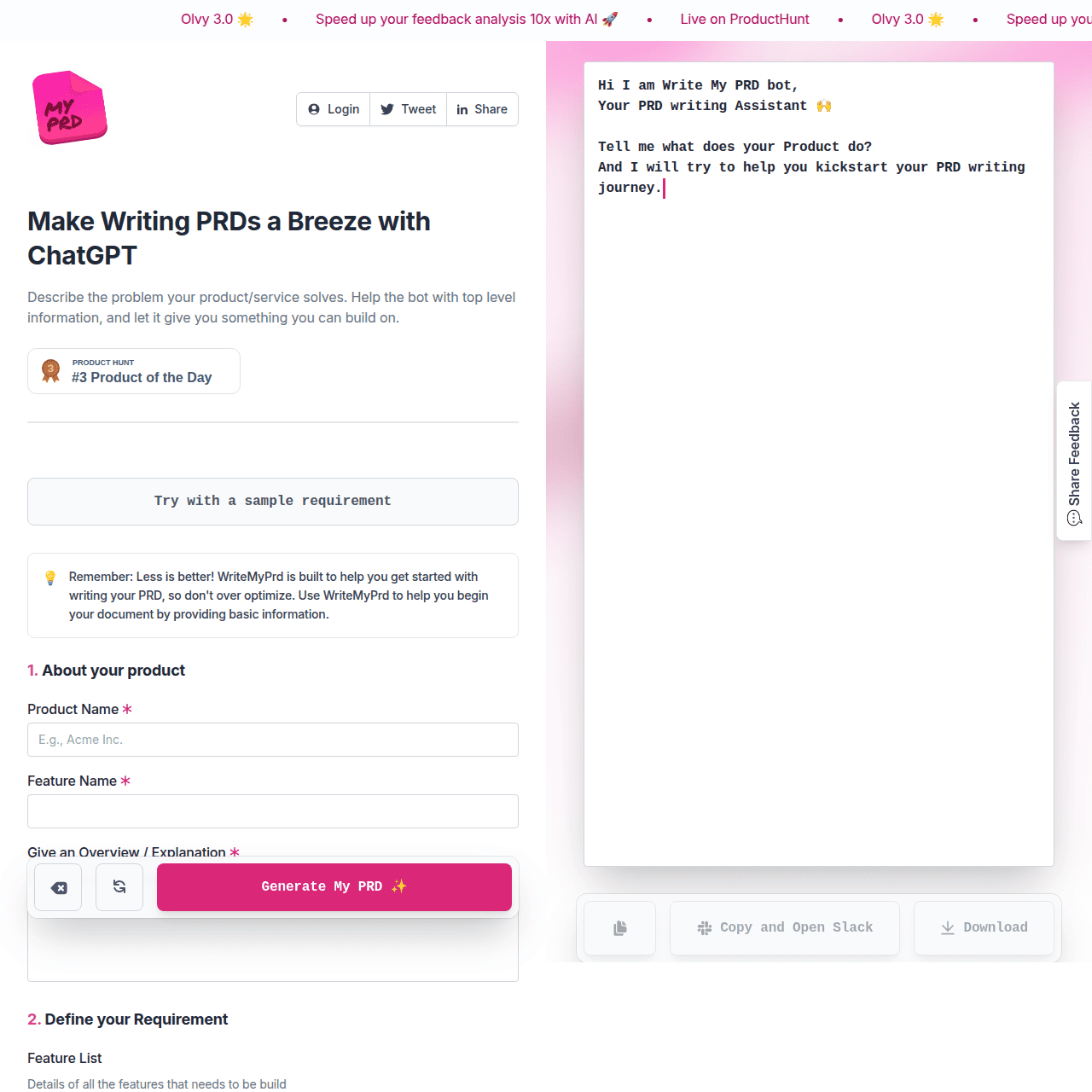
WriteMyPRD is a web-based tool that helps product teams draft Product Requirements Documents using AI. Instead of starting from scratch, users fill in guided fields such as product name, feature overview, feature list, and qualitative feedback. The tool then generates a structured PRD narrative on the right-hand side that can be refined, copied, downloaded, or shared to tools like Slack.
This workflow streamlines the early drafting phase, reduces writer’s block, and speeds up turning ideas and user feedback into a tangible requirements document. It is particularly useful for product managers, startup founders, and SaaS teams who need to quickly align stakeholders around new features or products.
Quick Snapshot
WriteMyPRD converts a short product brief into a structured, AI-generated product requirements document, giving teams a fast, reliable starting point. It cuts blank-page anxiety so product managers and founders can focus on refining scope and aligning stakeholders.
- Works on
-
- Web
- Pricing Model
- Cannot determine the price.
- Fits on
- Affiliate Program
- We could not identify an affiliate program.
- API Availability
- We could not identify whether an API is available.
- Key Features
-
- Turn product briefs into PRDs in minutes
- Guided workflow to capture core product details
- Export and share AI-generated PRD drafts
- Audience
-
- product managers
- startup founders
- product teams
- SaaS companies
- UX designers
- product designers
Screenshot

Key Features of WriteMyPRD
AI PRD generation
Transforms core product details, feature descriptions, and qualitative feedback into a structured product requirements document draft using AI.
Guided input fields
Offers a simple interface with sections for product name, feature overview, feature list, and user feedback to ensure important context is captured.
Live PRD preview
Generates a narrative PRD on the right-hand side of the interface as users fill in the form, making it easy to see how inputs shape the document.
Export and sharing
Allows users to refine, copy, download, or send the generated PRD to collaboration tools like Slack for team review.
Use Cases for WriteMyPRD
New feature PRDs
Quickly turn a short description of a new feature and user feedback into a structured PRD draft that can be circulated for review and alignment.
Startup product planning
Help early-stage founders organize ideas, priorities, and qualitative feedback into clear PRDs that support roadmapping and investor or team communication.
SaaS release documentation
Standardize documentation for upcoming SaaS releases by using guided fields and AI-generated PRDs instead of ad-hoc documents.
UX and design handoffs
Provide designers with structured context on product goals, features, and user insights, improving clarity in handoffs and reducing back-and-forth.
Frequently Asked Questions
What is WriteMyPRD used for?
WriteMyPRD is used to quickly generate Product Requirements Document drafts from brief product inputs, helping product teams avoid starting from a blank page.
Who should use WriteMyPRD?
WriteMyPRD is ideal for product managers, startup founders, SaaS product teams, and UX or product designers who need structured PRDs to align stakeholders.
Does WriteMyPRD offer a free plan?
Based on the available information, WriteMyPRD does not list a free version, and specific pricing details are not disclosed.
Can I export or share PRDs created with WriteMyPRD?
Yes. You can refine the generated PRD and then copy, download, or send it to tools like Slack for further collaboration.
Does WriteMyPRD provide templates for PRDs?
WriteMyPRD effectively acts as a dynamic PRD template, guiding you through key sections and using AI to generate a structured document based on your inputs.
Does WriteMyPRD have an API?
No. The available information indicates that WriteMyPRD does not currently offer an API.
WriteMyPRD · Our Verdict
WriteMyPRD focuses on a single high-friction task in product management and executes it cleanly: getting from scattered notes to a structured PRD draft. The guided input fields combined with AI generation make it especially helpful for teams that need to move quickly but still maintain clear documentation and alignment.
WriteMyPRD ·
-
 Subscription
Rewriter AI
AI-powered rewriting, grammar, and summaries in one
Document Drafting & Editing - Subscription
TextFlip.ai
AI rewriter for fast, human-sounding content
AI Copywriting Tools -
Tenorshare AI Bypass
Turn AI drafts into natural human text
Text & Writing AI - Subscription
AutoResume
AI-powered resumes tailored to every job
Resume & Career Writing -
Content Assistant
Your AI co-pilot for everything you write.
Text & Writing AI - Your Ad Here
- One-Time
StoryCV
The only resume writer that truly tells your story.
Resume & Career Writing - Freemium Premium
Trupeer AI
Turn real workflows into product videos and guides
Knowledge Management