


What changed in Acrobat
Adobe has introduced a wider set of AI tools inside Acrobat for organizations working with large volumes of documents.
Based on the available context, the update includes:
- search across selected document collections
- cited answers to questions from internal files
- structured data extraction from unstructured documents
- visual summaries and interactive reporting
- styling tools for plain business documents
- audio formats such as summaries, read-aloud, and personal podcast-style outputs
The bigger shift is not just “Acrobat gets AI.” It is Acrobat moving further from being a PDF reader and editor into a document intelligence layer for business workflows.
The most useful addition: search across document collections
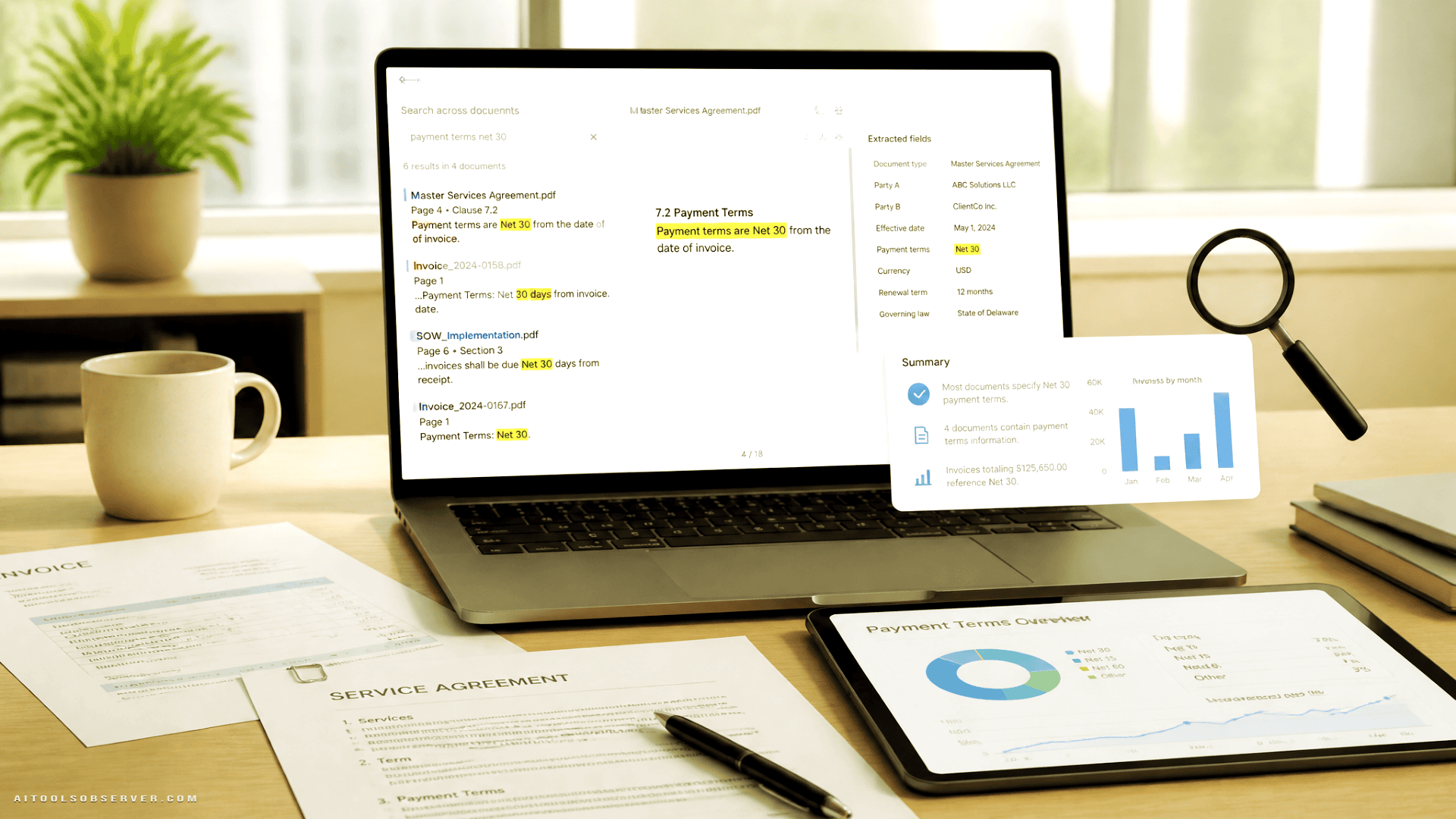
One of the more practical features is Knowledge Base, which lets teams ask questions across selected sets of documents and get cited answers back.
That matters because most enterprise document work is not about opening one file. It is about comparing information spread across many files. A finance team may need to check payment terms across invoice batches. A legal team may want to trace language across contract versions. An operations team may need to pull findings from multiple reports without reading each one end to end.
Clickable citations are an important detail here. They give users a way to verify where an answer came from instead of treating the output like a black box.
Data extraction is where real workflow value shows up
The Analyser tool appears positioned to extract structured data from messy, unstructured files at scale.
This is likely the feature that will matter most for teams with repetitive document-heavy work. Invoices, contracts, and reports often contain consistent data points, but not in a format that is easy to analyze quickly. Pulling those fields manually is slow, and using separate extraction software adds process overhead.
If Acrobat can reliably help teams pull data from files they already store as PDFs, it could reduce one of the most common bottlenecks in document operations.
Where this could be useful
- extracting payment terms from invoices
- pulling dates, clauses, or parties from contracts
- collecting figures from internal reports
- organizing research findings across large PDF sets
The practical appeal is obvious: fewer hours spent reading for fields that should be queryable.
Summaries and visual reporting target decision speed
Adobe is also adding ways to convert document content into interactive reports, charts, key takeaways, and summary slides.
That reflects a very real shift in workplace behavior. Many teams do not want to read every page in sequence when they are under deadline. They want the core findings, the patterns, and the parts that need action.
For leaders, analysts, and cross-functional teams, visual outputs can make dense document collections easier to share internally. A long report may still exist as the source of record, but a chart or summary slide often becomes the format people actually discuss.
The tradeoff is familiar: speed goes up, but users still need to check whether the summary or visualization accurately reflects the underlying material. That is why source traceability matters.
Stylize is less flashy, but still practical
Another new feature, Stylize, applies design templates to plain documents while preserving the original wording.
This is not the headline AI feature, but it could save time for teams that regularly turn basic documents into client-ready outputs. Proposals, resumes, reports, and invoices often need cleaner formatting before they are shared. If users can improve presentation without rebuilding the document from scratch, that removes another low-value task from the workflow.
It also shows Adobe’s angle clearly: not just helping users understand documents, but helping them repurpose documents for communication.
Audio features suggest Acrobat wants more “consume anywhere” use cases
The release also includes audio options such as personal podcasts, audio summaries, and read-aloud for individual documents or groups of documents.
That may sound secondary, but it fits how professionals actually work. Long reports and internal materials are often reviewed between meetings, while commuting, or away from a desk. Audio can turn passive time into review time.
For some users, this will be a convenience feature. For others, especially teams handling large reading loads, it may become a useful shortcut for first-pass understanding before diving into the full file.
Why this matters for enterprise document workflows
Adobe is targeting a common business pain point: large stores of unstructured information inside documents that are hard to search, compare, and transform into usable outputs.
That is why this update matters beyond Acrobat itself. It points to a broader trend in AI tools for work:
- less focus on generating new content from scratch
- more focus on extracting value from existing internal content
- more pressure on legacy document tools to become search, analysis, and workflow tools
For organizations already deep in PDF-based processes, this kind of update could be more practical than adopting a completely separate AI document platform. The appeal is not novelty. It is staying closer to the systems employees already use.
Adobe’s trust message is clearly aimed at larger organizations
Adobe is also emphasizing security and provenance in the rollout.
Two details stand out:
- answers include citations tied to source documents
- Adobe says it does not train its models on customer document data
That messaging is especially relevant for businesses handling legal, financial, HR, or operational records. AI features are easier to adopt when there is a clearer path to verification and a stronger privacy position around sensitive files.
In enterprise buying, trust claims often matter as much as feature depth. A tool that can summarize a contract is useful. A tool that can summarize a contract with source traceability and stronger data handling assurances is much easier to put in front of real teams.
Where Adobe is pushing competitively
This update also pushes Acrobat into more direct competition with vendors focused on document intelligence, workplace search, and AI knowledge tools.
Adobe’s advantage is obvious: Acrobat already sits close to where a huge amount of business documentation lives and gets shared. Instead of asking teams to export files into another system, Adobe appears to be embedding more intelligence directly into the document layer.
That does not automatically make it the right choice for every company. Some teams will still prefer specialized extraction, contract analysis, or enterprise search tools. But Adobe is making a strong case for consolidation: search, extract, summarize, visualize, and format in one familiar product.
What teams should watch before adopting it
The feature set sounds useful, but practical rollout questions still matter.
Teams evaluating this kind of update should pay attention to:
- how well answers hold up across messy real-world document sets
- how accurate extraction is on varied formats and templates
- whether summaries preserve nuance in legal or financial material
- how easy it is to control which document collections are queried
- whether visual outputs save time or create more review work
In other words, the value will depend less on whether Acrobat can produce an answer and more on whether teams can trust that answer inside live workflows.
The bottom line
Adobe is turning Acrobat into more than a place to open and edit PDFs. It is positioning the product as a way to query, extract, summarize, and repackage information locked inside business documents.
For companies drowning in contracts, invoices, reports, and internal PDFs, that is the part to watch. The smartest use case is not “AI for documents” in the abstract. It is using AI to make existing document collections faster to search, easier to analyze, and simpler to turn into decisions.












Comments (0) No comments yet
Want to join this discussion? Login or Register.
No comments yet. Be the first to share your thoughts!